4.3.15 Reffering Adjustment Parameter 221
4.3 Working with MUTOH Service Assistance Software VJ628XE-M-00
4.3.15 Reffering Adjustment Parameter
Before this procedure, make sure to prepare the following:
• Set up the printer, computer and MSA.
"4.3.3Required Environment
• Start the printer on Board manager mode.
"(6)Starting the printer
• Change to Technician mode on MSA.
"(12)Switching to Technician Mode
(1) Acquiring Adjustment Parameter from Backup parameter (*prm) to
reference
When inappropriate file (such as file extension is different from *.prn) is selected clicked to
open, error message appears and return to the main window.
• The serial number of Printer, model name and FilePath are displayed.
• At the time of acquisition date and various F/W version are not displayed.
• Adjustment parameter file shown on the window shall be saved whether tab is
switched over to others. When another parameter file is acquired or saved
parameter file is open, the detail shall be renewed.
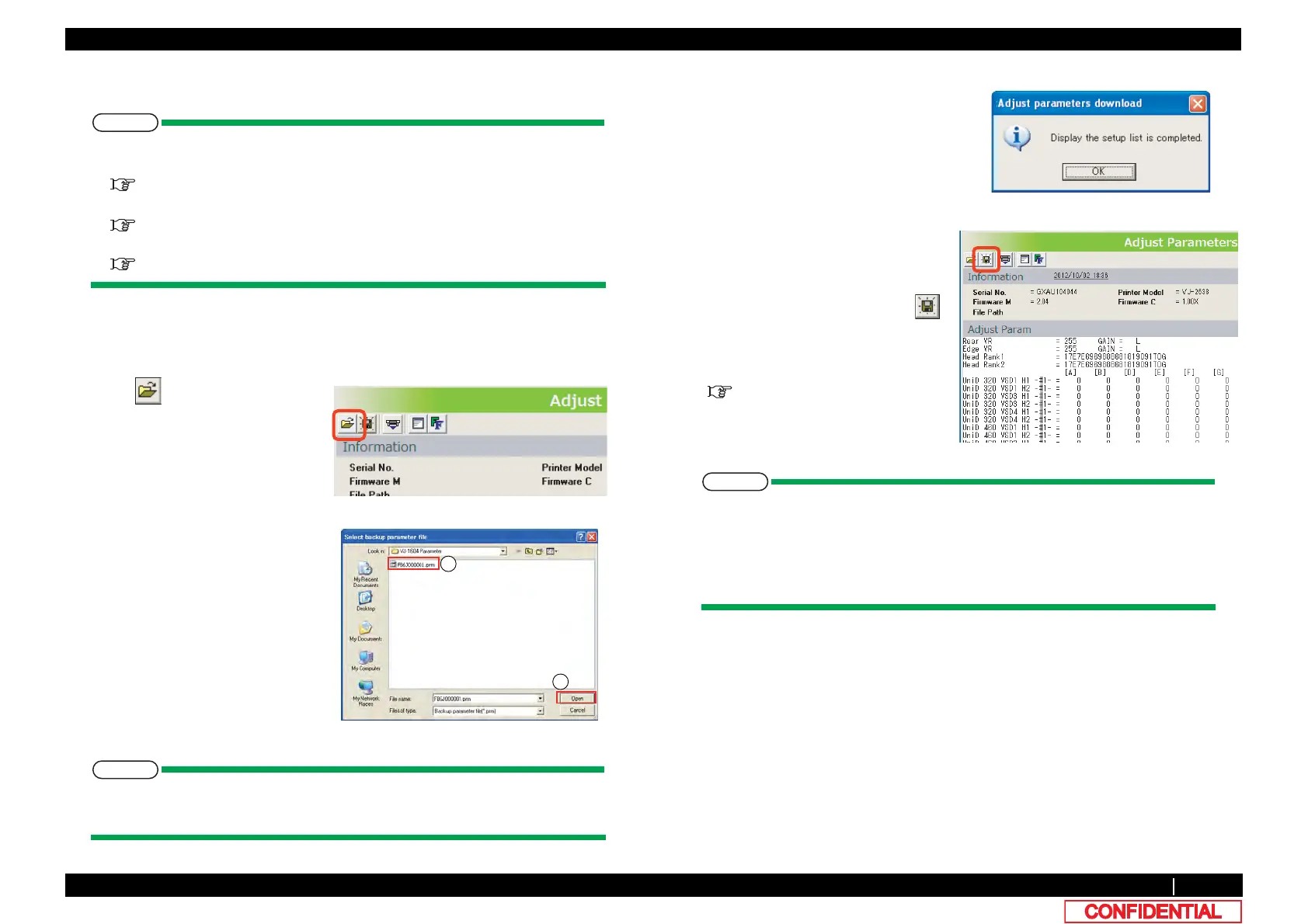
1 Click on [Adjust Parameters].
2 Click to select backup parameter file
on [Select backup parameter file]
window ① , then click [Open] ② .
*Click [Cancel] to return to the main
window.
3 Adjustment parameter is displayed
under a Adjust parameter tab page after
the completion of acquisition of
Adjustment parameter from a Backup
parameter. Since a "Adjustment
parameter download" window is
displayed after that, click [OK] and it
checks the listed setup information.
4 Acquired adjustment parameter shall
be indicated under the tab named
[Adjust parameter].
To save the file as plain text, click .
*Set up information is same detail with
the one acquired in [Print setup
parameters].
"5.8Sample printing Menu















 To Next Page