5.2.2 Starting Up 243
5.2 Preparation VJ628XE-M-00
5.2.2 Starting Up
When using the self-diagnostic function of VJ-628X, there are the following two
methods.
• Using Panel Window in MSA
(1) Usage of Maintenance Panel (MSA)
• Using Jig Panel Assy
(2) Connecting Jig Panel Assy
(1) Usage of Maintenance Panel (MSA)
(1-a)Usage of Maintenance Panel Window
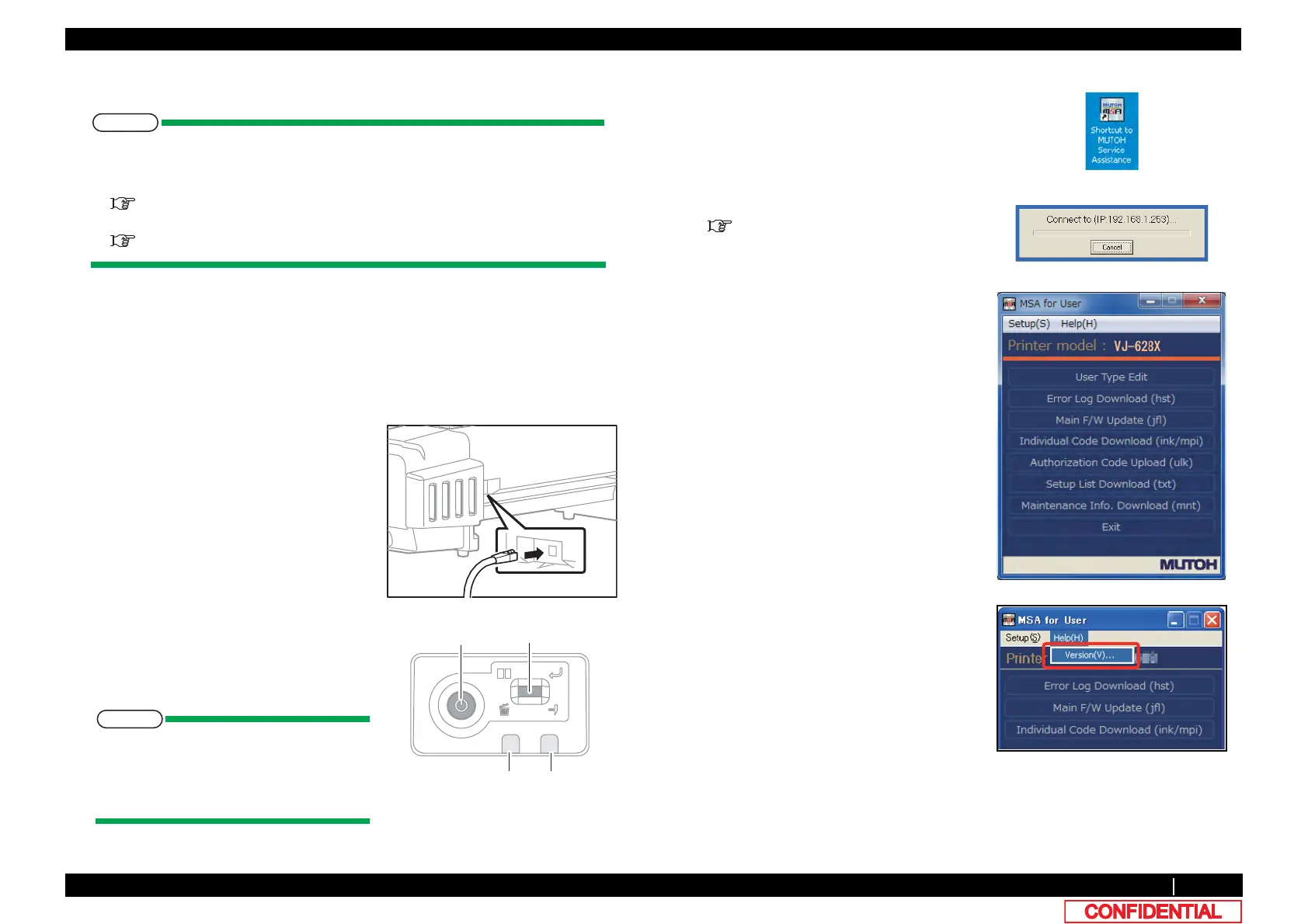
1 Turn OFF the printer.
2 Insert Connector of Network interface cable
into Network interface connector located in
the back of the printer.
3 Press Power key to ON.
4 If data LED and error LED light up, pressing
the multi-key is continued.
If Data LED and Error LED repeat
lighting and putting out lights by turns, it
means having started in board manager
mode.
ErrorLED
Powerkey
DataLED
Multikey
5 Double-click the [Shortcut to MUTOH
Service Assistance.exe], and check that the
application starts correctly.
At the first startup, it shall be started in
English mode.
6 Automatic printer model selection is started.
(9) Confirming Startup of the "MUTOH
Service Assistance"
7 After having chosen printer model, main
window appears.
8 On User mode main window, click [Help] -
[Version].
[Version information] window appears.















 To Next Page