5.2.2 Starting Up 244
5.2 Preparation VJ628XE-M-00
(1-b)How to start the Maintenance Panel
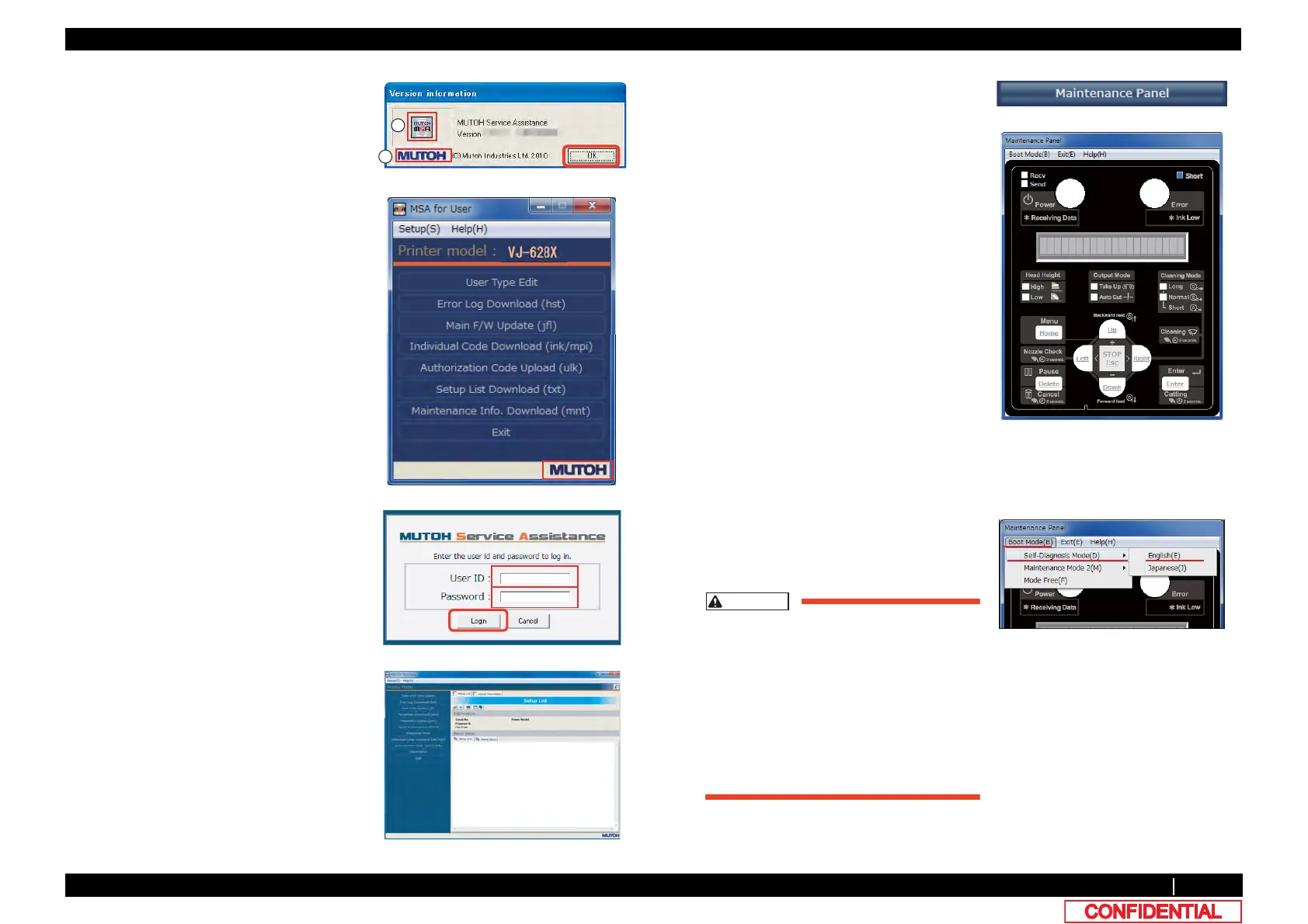
9 Double-click the MUTOH logo (1) and then
the MSA icon (2).
Then click [OK].
10 Double click [MUTOH].
Login window will be displayed.
11 Enter User ID and Password.
Then click [Login].
12 The main screen of Technician mode will be
displayed.
13 Click [Maintenance Panel].
14 [Maintenance Panel] window will be
displayed.
1 Click [Boot Mode] and choose either [Self-
Diagnosis Mode] or [Maintenance Mode 2].
Then, choose language.
• The Maintenance Panel is not
available until the PC is properly
connected to the printer after the
mode selection.
• The selected language is reflected in
the Maintenance Panel until the
printer is powered off.
The initial language setting is
reflected in the printer.















 To Next Page