2.3 Troubleshooting Without Error Messages VJ628XE-M-00
2.3.5 Online Function Problems 54
2.3.5 Online Function Problems
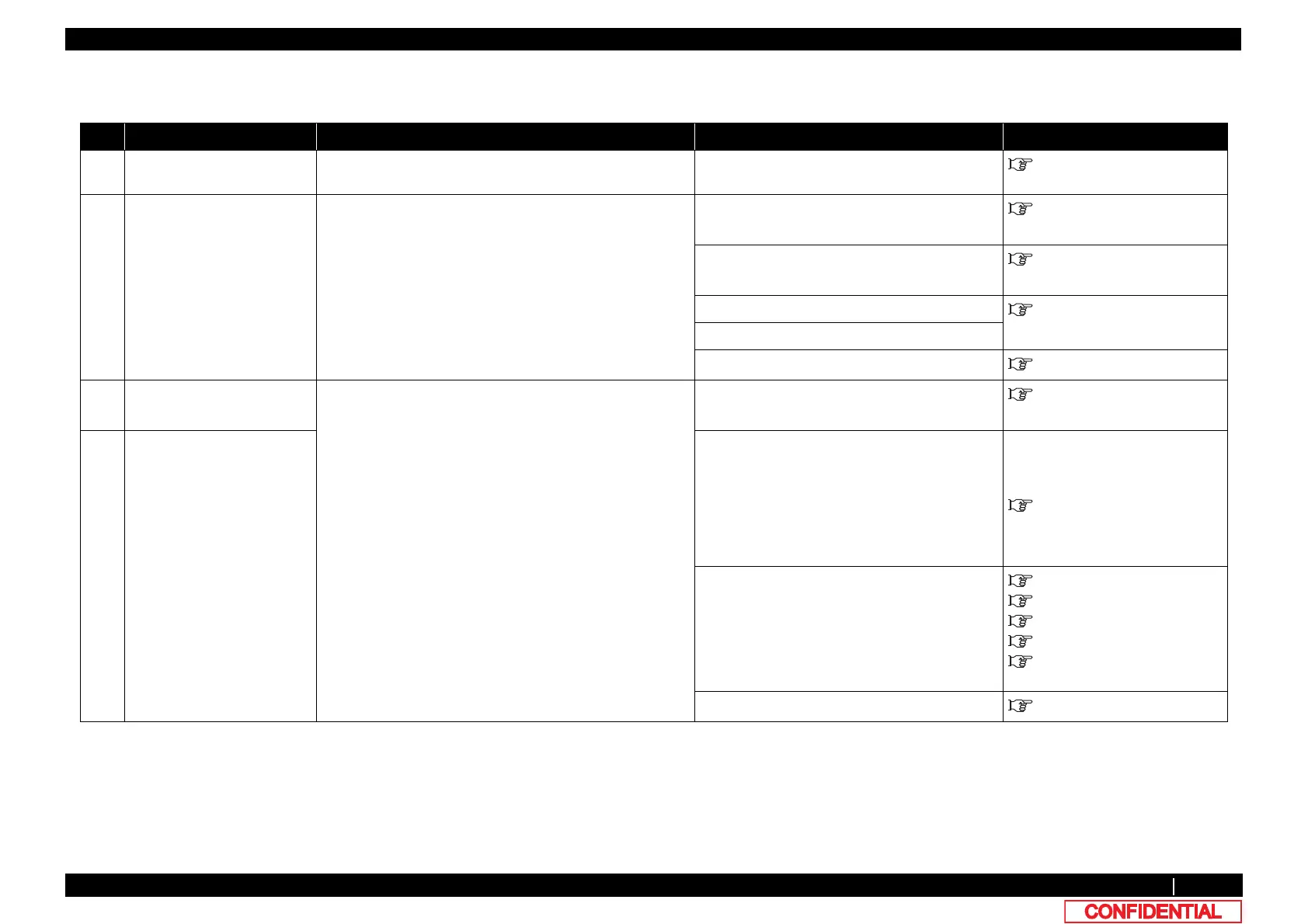
Table 2-10 Symptoms, Check Items, And Actions for Online Function Problems
No. Symptom Check item Action Reference
1 Other functions do not work
correctly
1. MAIN board may be damaged. Replace MAIN board.
"3.5.10Replacing MAIN Board
2 Printing position is incorrect 1. Is there a problem with CW adjustment? Perform adjustment.
"5.6.5Uni-D/ Bi-D Adjustment
Menu
2. Is there a problem with P EDGE Sensor adjustment? Perform adjustment.
"5.6.1Rear/ Edge Sensor
Adjustment
3. Is P EDGE Sensor correctly connected? Connect it securely.
3.8.6 Replacing P_EDGE
Sensor
4. P EDGE Sensor may be damaged. Replace P_Edge sensor.
5. MAIN board may be damaged. Replace MAIN board.
"3.5.10Replacing MAIN Board
3 Data or printing is garbled 1. Firmware on the Main side may be faulty. Upgrade Firmware on the Main side.
4.3 Working with MUTOH
Service Assistance Software
4 Part of the data is not printed
(missing)
2. Check if T fence is dirty or twisted. • When there is grease or dust on it: Wipe it
with a dry cloth.
• When there is ink on it: Damp a cloth with
mild detergent and lightly wipe off the ink.
• When it is too dirty and the adhered
substance cannot be removed: Replace T
fence.
"3.6.8Replacing T Fence
3. Check “Encoder: CR” in “Check: Test” – “Test: Encoder”
in the self-diagnosis function.
• If NG, check the connection of the
connector of CR board
• Replace T fence
• Replace CR_FFC
• Replace CR motor
• Replace CR board
"3.5.10Replacing MAIN Board
"3.6.8Replacing T Fence
"3.9.4Replacing Ink Tube
"3.8.4Replacing CR Board
3.9.3 Replacing CR FFC
4. Main board may be malfunctioned. Replace MAIN board.
"3.5.10Replacing MAIN Board















 To Next Page