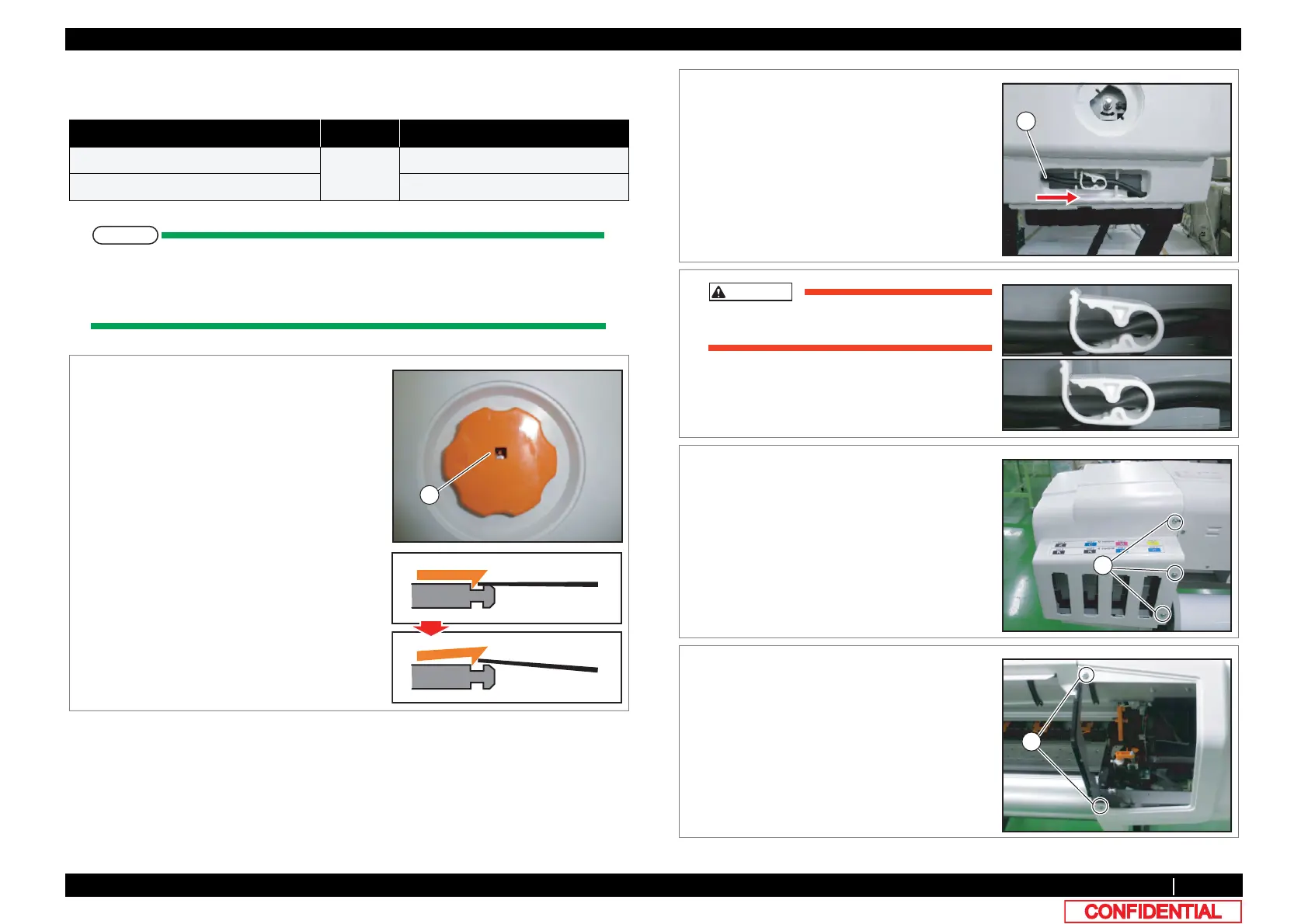
3.2.2 Removing Side Cover 65
3.2 Removing Covers VJ628XE-M-00
3.2.2 Removing Side Cover
● Tools & Jigs
When removing R Side Cover, the work of Procedure 1~2 are required.
Other work is the same at R Side Cover and L Side Cover.
In this section, the photograph of R Side Cover is used.
Name No. Remarks
Phillips screwdriver No.2
Generic
products
-
slotted screwdriver(precision)
-
1 Remoe Pressure Handle.
Insert slotted screwdriver to the hole of
Pressure Handle, then release the hook.
A : hole
A
2 Remove the tip of Waste Fluid Tube from the
main body.
A : Waste Fluid Tube
If the clamp is loosened, Ink may leak.
3 Remove the screws (3 pieces).
A : Tapping screw M4x10 S Tight cup
4 Remove the screws (2 pieces).
A : Tapping screw M4x8 S tight bind
Poor
Good
A















 To Next Page