5.6.1 Rear/ Edge Sensor Adjustment 271
5.6 Adjustment Menu VJ628XE-M-00
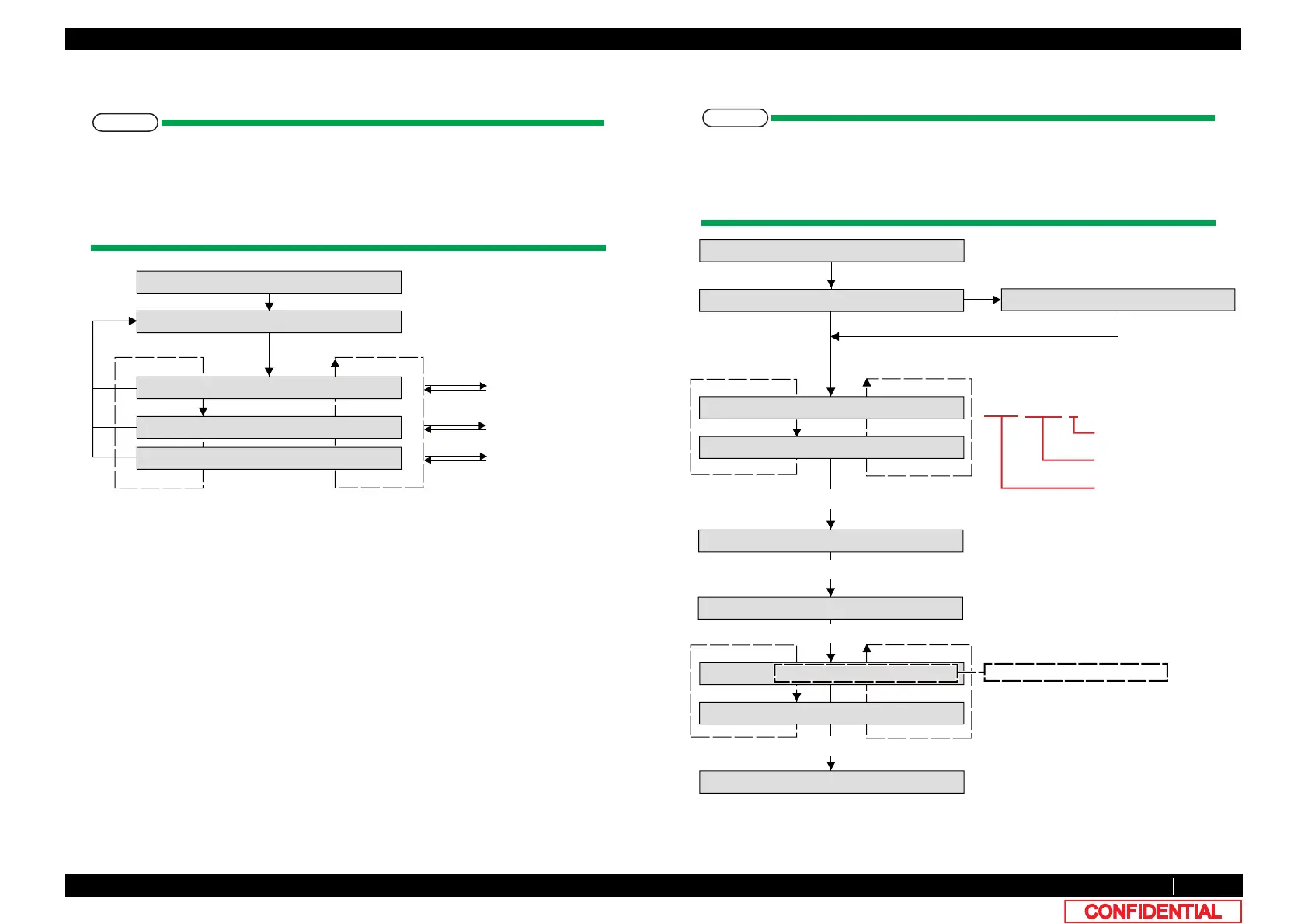
5.6.1 Rear/ Edge Sensor Adjustment
• Automatically Adjusting AD values of P_REAR sensor and P_EDGE sensor to
proper values.
• After adjusting, measuring AD values when paper is not set.
Confirming threshold that is used to judge whether paper is set.
• Measuring AD values of Edge sensor at four positions of Platen.
(1) Calibration
• After adjusting AD values of P_REAR sensor and P_EDGE sensor to proper
values, panel displays results.
• When abnormal termination, panel displays the VR values that is final state of
adjusting process.
>!@
>@
[Enter]
[Cancel]
[Cancel]
[Enter]
[Enter]
㸿㹢㹨㸬ࠉ㸯㸸㹐㹣㹟㹰㸭㹃㹢㹥㹣
㹁㹦㹣㹡㹩ࠉ㸱㸸㸿㹢㹨㹳㹱㹲㹫㹣㹬㹲
㹐㹣㹟㹰㸭㹃㹢㹥㹣㸸㹁㹟㹪㹧㹠㹰㹟㹲㹣
Input menu
Calibration menu
㹐㹣㹟㹰㸭㹃㹢㹥㹣㸸㹑㹣㹬㹱㹧㹬㹥
Sensing platen menu
㹐㹣㹟㹰㸭㹃㹢㹥㹣㸸㹇㹬㹮㹳㹲
㹐㹣㹟㹰ࠉ㹔㹐ࠉ㸰㸳㸳㸭㸿㹂ࠉ㸯㸷㸮㸭㹊
㹃㹢㹥㹣ࠉ㹔㹐ࠉ㸰㸳㸳㸭㸿㹂ࠉ㸯㸷㸮㸭㹊
㹁㹟㹪㹧㹠㹰㹟㹲㹧㹬㹥
[Cancel]
>!@NH\
>@NH\
㹑㹣㹲ࠉ㹋㹣㹢㹧㹟
㹁㹟㹪㹧㹠㹰㹟㹲㹧㹭㹬ࠉ㹃㹰㹰㹭㹰
Abnormal termination
[Enter]
AD㸸Sensor reflecting
value (0 to 255)
Push [Enter] or [Cancel] during [Edge VR] display
㹐㹣㹫㹭㹴㹣ࠉ㹋㹣㹢㹧㹟
After removing a media, push [Enter] key
㹋㹣㹟㹱㹳㹰㹧㹬㹥
After measuring
㹐㹣㹟㹰ࠉࠉ㸳㸶ࠉ㸭ࠉࠉࠉ㸳ࠉ㸭ࠉࠉ㸯㸮
>@NH\
㹃㹢㹥㹣ࠉࠉ㸶㸰ࠉ㸭ࠉࠉࠉ㸳ࠉ㸭ࠉࠉ㸯㸮
㸿㹂㹈ࠉ㸯㸸㹐㹣㹟㹰㸭㹃㹢㹥㹣㹑㹣㹬㸬
Push [Enter] or [Cancel] during [EdgeXXX㸭XXX㸭XXX] display
>!@NH\
THRࠉ㸭ࠉOFFࠉ㸭ࠉP_NOT
THRࠉ 㸸threshold value to
judge a media setting or not
ࠉOFFࠉ 㸸sensor reflecting value
when sensor LED is OFF
ࠉP_NOT㸸sensor reflecting value
when removing a paper
After setting paper, push [Enter] key
VR xxx / AD xxx / x
GAIN㸸Sensor gaining
setting (0 to 255)
VR㸸Sensor setting
value (0 to 255)















 To Next Page