STP
515
Managed Switches
The settings for VLAN ID 1002 display in the fields in the table heading.
c. In the Priority field, enter 0.
d. Click Apply.
Web Interface: Configure PVSTP on Switch 2
1. Ensure that ports 1/0/1 and 1/0/2 are in VLAN 1002 in tagged mode because BPDU
packets for PVSTP are transmitted in tagged packets.
2. Enable PVSTP.
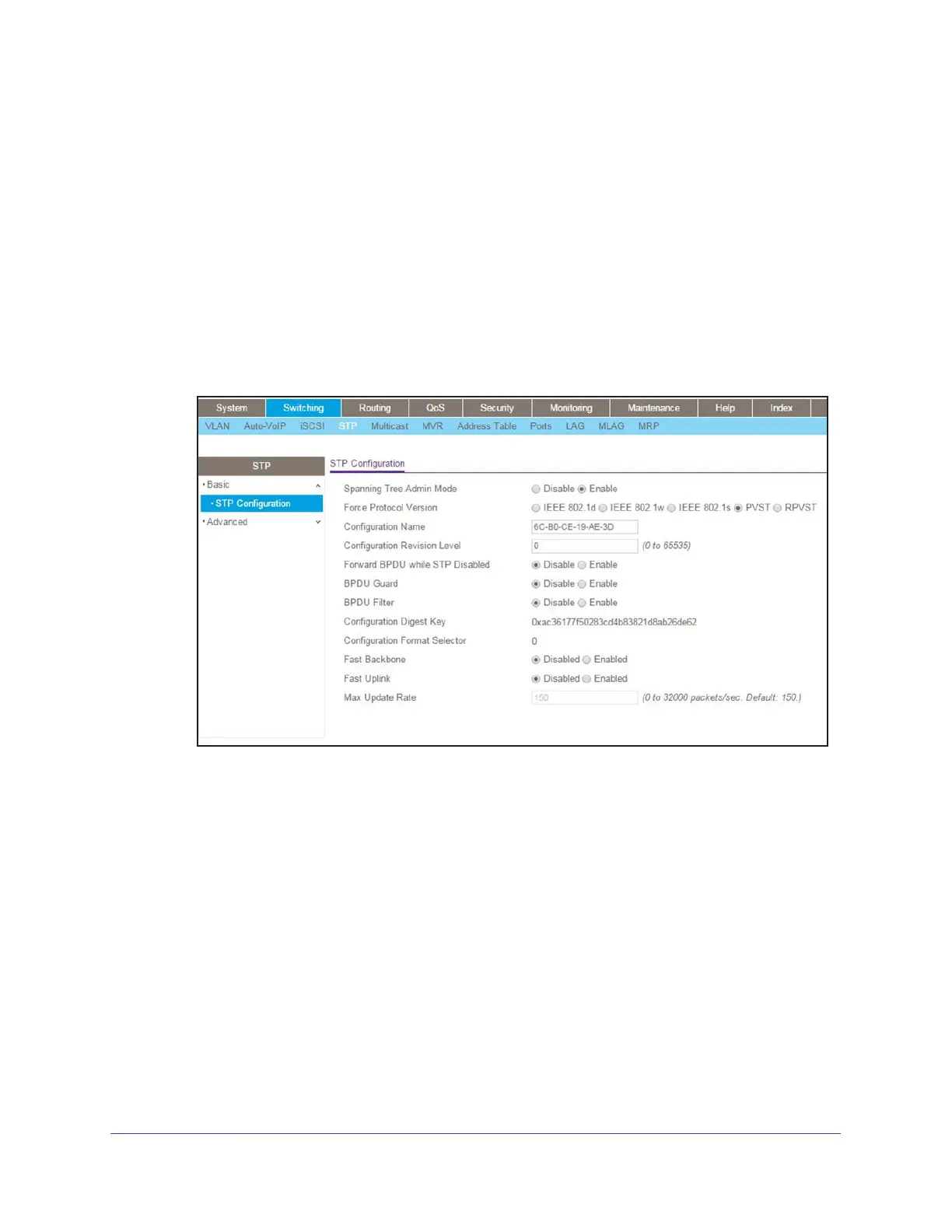
a. Select Switching > STP > Basic > STP Configuration.
A screen similar to the following displays.
b. Configure the following settings:
• For Spanning Tree Admin Mode, select the Enable radio button.
• For Force Protocol Version, select the PVST radio button.
c. Click Apply.
Note: After you enable PVST globally, PVST is applied to VLANs automatically.
3. Display the PVST status for ports 1/0/1 and 1/0/2 in VLAN 1002.
a. Select Switching > STP > Advanced > PVST Interface.
A screen similar to the following displays.









 To Next Page