Chapter 12—Library Troubleshooting Restoring the Library Configuration
August 2017 User Guide—Spectra T50e Library
371
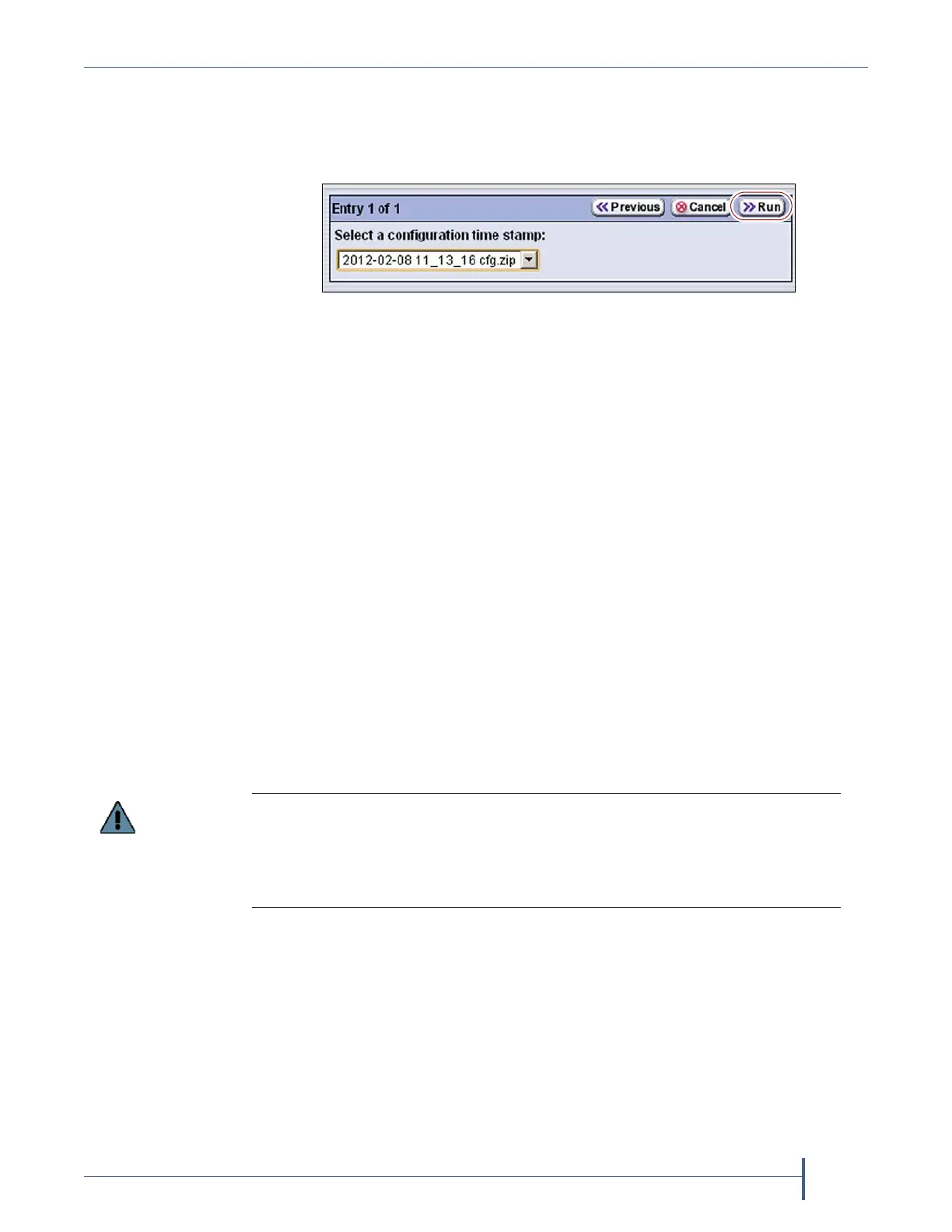
8. ClickNext.UsetheSelect a configuration time stampdrop‐downlistto
selecttheconfigurationbackupfileyouwanttouse.Theautomatically
generatedconfigurationbackupfilesarenamed<date-time>cfg.zip,
where<date-time>isthetimestampforwhenthefilewascreated.
Notes: Ifavailable,thezippedconfigurationbackupfilestoredon
theLCMmemorycardcontainsthemostrecentlysaved
libraryconfigurationinformation,aswellastheMLMand
DLMdatabases.Checkthetimestampinthefilenameofthe
zippedAutoConfigurationSavefiletodeterminewhether
anymanuallygeneratedbackupfileyouhaveismorerecent.
UnlessyoureplacetheLCMoritsmemorycard,thefirstfile
listedisthezippedconfigurationbackupfilestoredonthe
LCMmemorycard.
IfyouconnectedaUSBdevicetotheLCM,theconfiguration
backupfilesarelistedafterthefileontheLCM.
9. ClickRun.
Afterabriefdelay,theUtilityResultsscreenappears,showingthatthe
configurationwasrestored.Thelibrarythenperformsapower‐cycle
reset.
10. Oncethelibrarybeginsitspower‐onsequence,removetheUSBdevice
ifnecessary.
Restore Other Configuration Changes
Thelibrarydoesnotimmediatelygenerateaconfigurationbackupfile
whenyoumakechangestoanyofthelibraryconfigurationsettingsother
thanthoseforpartitions.Ifyoumadeanychangestothelibrary
configurationaftertheautomaticallygeneratedconfiguratio nbackupfile
youusedtorestorethelibrarywasgenerated,youneedtorepeatthose
changesaftercompletingtherestore.
Figure 255 Select the configuration file you want to use,
then click Run.
If you do not remove the USB device, the library power-on sequence fails.
If the library fails to boot, power off the library as described in Power Off the Library
on page 136. Once the library is powered off, remove the USB device and power on
the library as described in Power On the Library on page 135.



 To Next Page