Appendix A—Best Practices Using Cartridges
August 2017 User Guide—Spectra T50e Library
481
USING CARTRIDGES
Note: SeeMLMBestPracticesonpage473foradditionalguidance
whenusingSpectraCertifiedMediawithMLMsupport.
Thefollowingsectionsdescribebestpracticesforusingcartridgesandfor
managingyourmediainventory.Alllibraryusergroupshaveprivileges
thatallowthemtousethelibrary’suserinterfacetoperformthecartridge
handlingandmediamanagementoperationsdescribedinthissection.
Becausehandlingcartridgesrequiresphysicalinteractionwiththelibrary,
muchoftheinformationinthissectionisnotapplicablewhenyouare
accessingthelibraryusingtheBlueScalewebinterface.
Use Spectra Certified Media
Toensurethebestpossibleperformance,useSpectraCertifiedMedia(both
dataandcleaningcartridges)inthelibrary.SeeSpectraCertifiedMediaon
page485formoreinformationaboutSpectraCertifiedMedia.
IfyoudonotuseSpectraCertifiedMedia,useonlycartridgesfrom
vendorsapprovedbySpectraLogic.ChecktheCompatibilityMatrices
pageontheSpectraLogicwebsiteforalistofapprovedvendors.
Labeling Cartridges
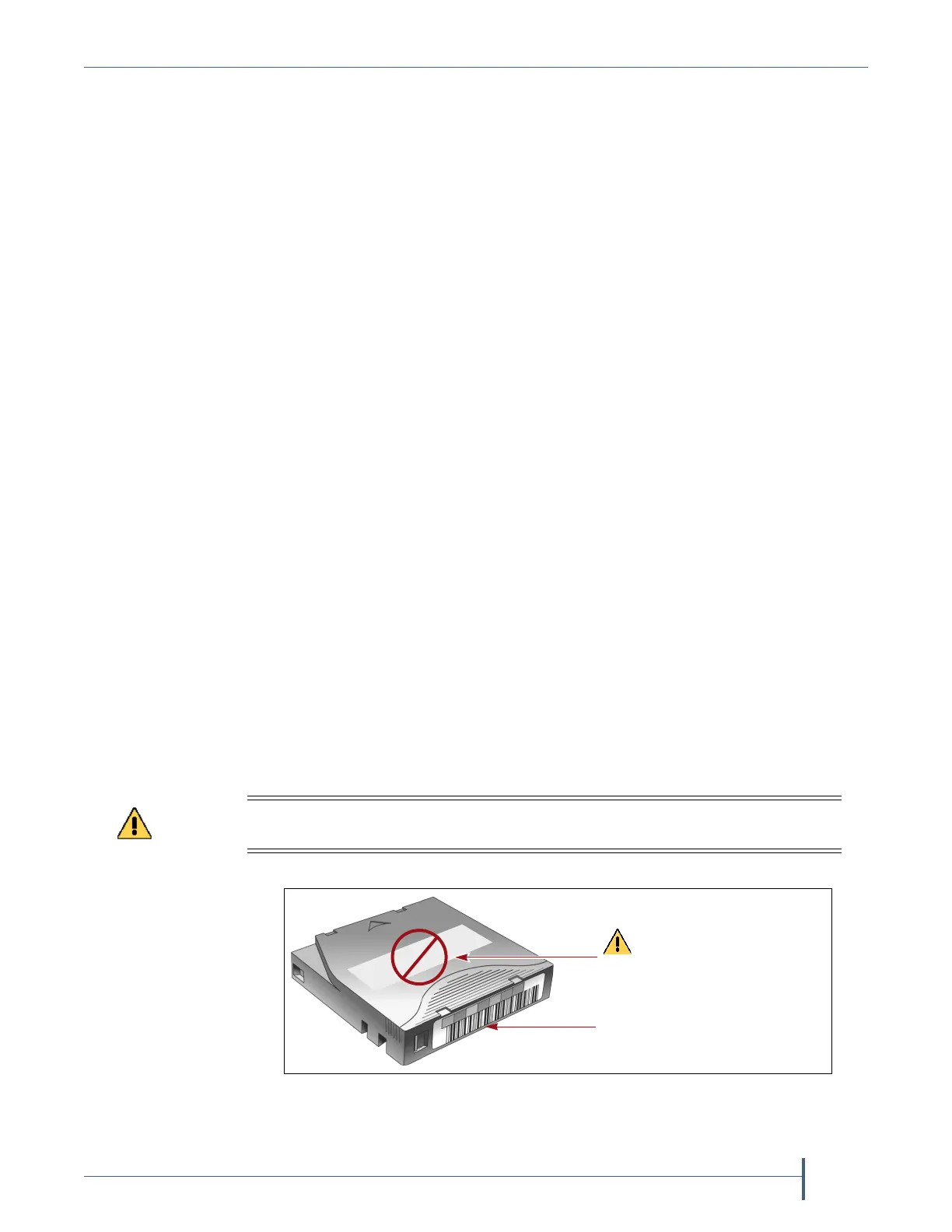
Ifyouarenotusingpre‐labeledSpectraCertifiedMedia(bothdataand
cleaningcartridges),besuretolabelallcartridgeswiththeappropriate
barcodelabels.Positioneachlabelintheindentedareaonthecartridge,as
illustratedinFigure325.SeeBarcodeLabelSpecificationsforHalf‐Inch
Mediaonpage505fordetailedinformationaboutpreparingandusing
barcodelabels.
Do not place labels on any surface of the cartridge except the area shown in
Figure 325. A loose label can become dislodged and damage the drive.
Figure 325 Properly barcode label all cartridges.
Barcode label
CAUTION: Do not place
labels on any surface of the
cartridge except the front!



 To Next Page