CDM-570 Satellite Modem with Optional IP Module Revision 12
Base Modem Web Server Interface MN/CDM570L.IOM
7–8
7.3.2 Admin Pages
The Admin pages are available only if you have logged in using the
Administrator Name and Password.
The Administrator may use these pages to set up user names, passwords, the e-mail server, and
the host IP Addresses as required to establish communication with the CDM-570/570L Base
Modem HTTP Interface.
Click the Access or Remote hyperlink to continue.
7.3.2.1 Admin | Access
This page is available only if you have logged in using the Administrator Name
and Password.
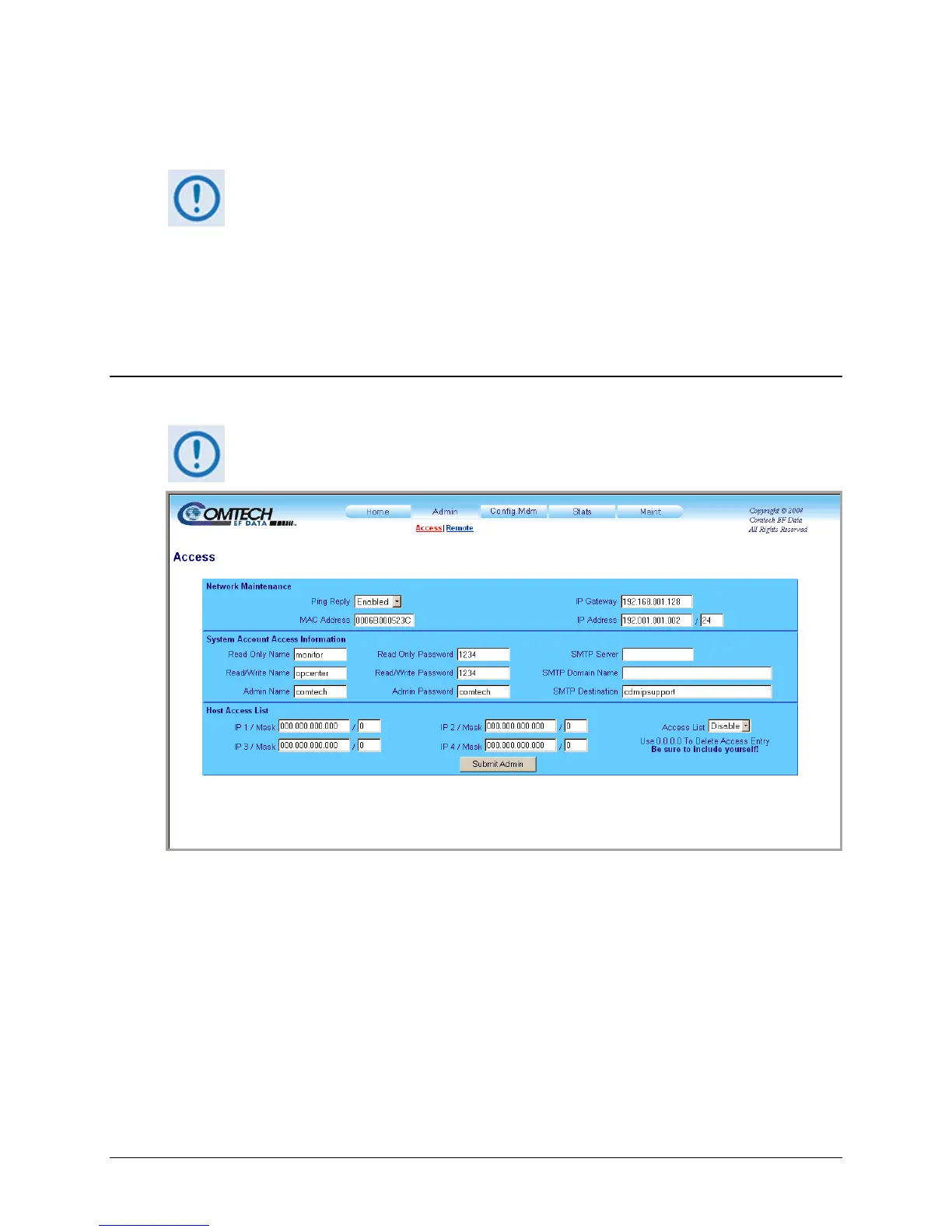
Figure 7-6. Admin | Access page
Network Maintenance
• Ping reply – Use the drop-down menu to set ping reply as Enabled or Disabled.
• MAC address – This is read-only and cannot be edited.
• IP Gateway / IP Address – Enter a Gateway IP Address, and an Ethernet Traffic IP address
and subnet mask, for the modem in use.



 To Next Page