CDM-570/570L Satellite Modem with Optional IP Module Revision 12
Appendix L MN/CDM570L.IOM
L–16
L.5.2 ODU Configuration Pages
When properly configured to operate with a BUC or LNB, the ‘Modem | BUC’ and ‘Modem |
LNB’ pages allow configuration of the operating parameters specific to the active unit.
Click the ‘Modem’ tab, and then click the ‘BUC’ or ‘LNB’ hyperlink to continue.
L.5.2.1 Modem | BUC (Block Up Converter)
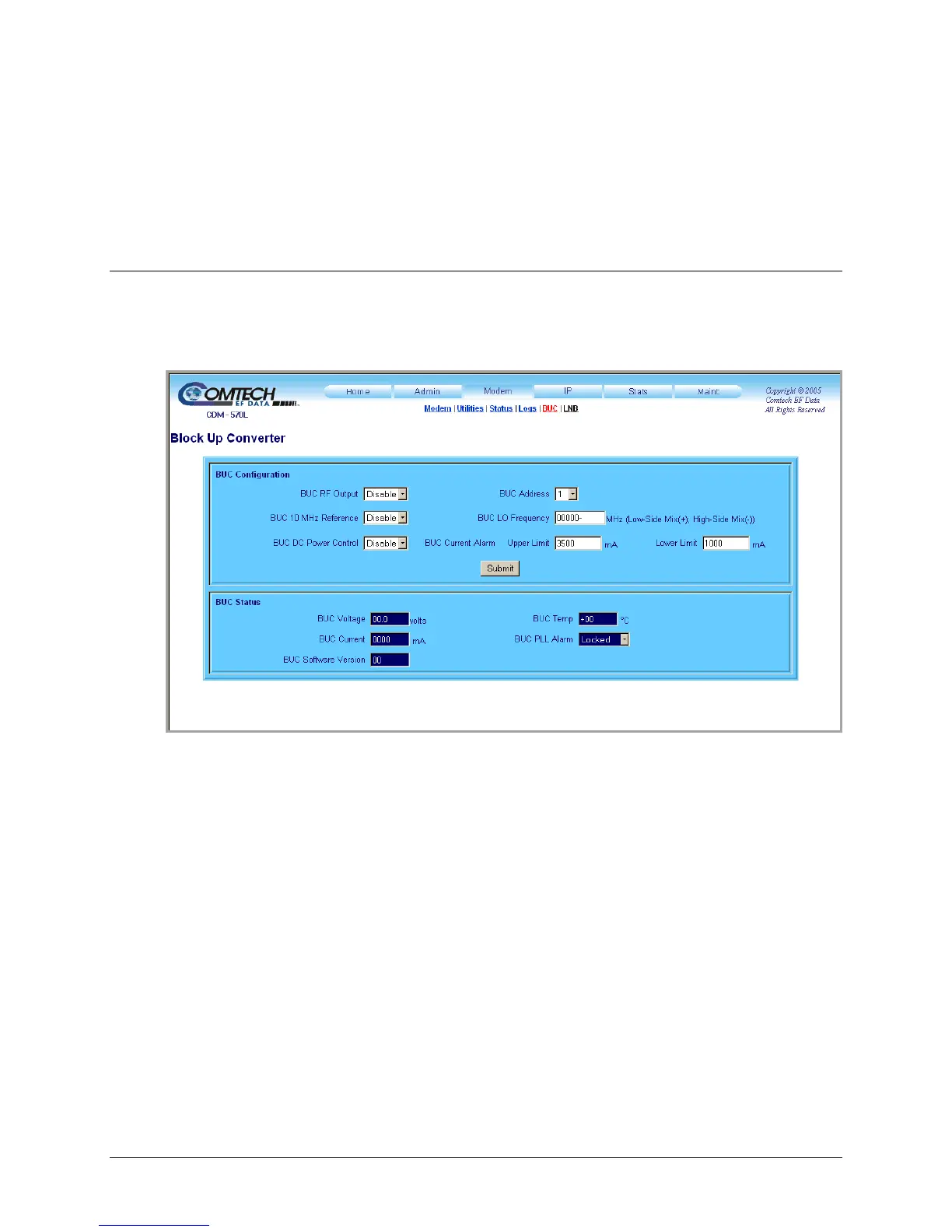
Use this page to configure Block Up Converter parameters, and display the BUC status for L-Band
operation.
Figure L-5. Modem | BUC page
BUC Configuration
• Use the drop-down menus to set BUC RF Output, 10 MHz Reference, or DC Power
Control operations to Enable or Disable.
• Use the drop-down menu to select a BUC Address of 1 to 15.
• Assign the LO (Lockout) Frequency and designate the value as a HIGH (+) or LOW (–)
limit.
• Assign BUC Current Alarm Upper and Lower Limit values ranging from 0 to 4000 mA.



 To Next Page