CDM-570/570L Satellite Modem with Optional IP Module Revision 12
Ethernet IP Module - CLI and Telnet Operation MN/CDM570L.IOM
14–27
14.2.5 Route Table Configuration Page
The Ethernet IP Modules featuring HDLC Encapsulation (IP Module V1
Firmware Ver. 1.6.# and earlier / IP Module V2 Firmware Ver. 2.1.# and
earlier) are not
compatible with the IP Modules featuring Streamline
Encapsulation (IP Module V1 Firmware Ver. 1.7.# and later / IP Module V2
Firmware Ver. 2.2.# and later).
Satellite HDLC addressing only applies to IP Module V1 Firmware Ver. 1.6.#
and earlier / IP Module V2 Firmware Ver. 2.1.# and earlier.
IP Module V1 Firmware Ver. 1.7.# / IP Module V2 Firmware Ver. 2.2.# feature
Streamline Encapsulation, and HDLC addresses are not used. The Satellite
Interface menu is read-only and for IP Module V1 Firmware Ver. 1.7.# and
later / IP Module V2 Firmware Ver. 2.2.# and later there is no selection for
Receive HDLC Channel Addresses.
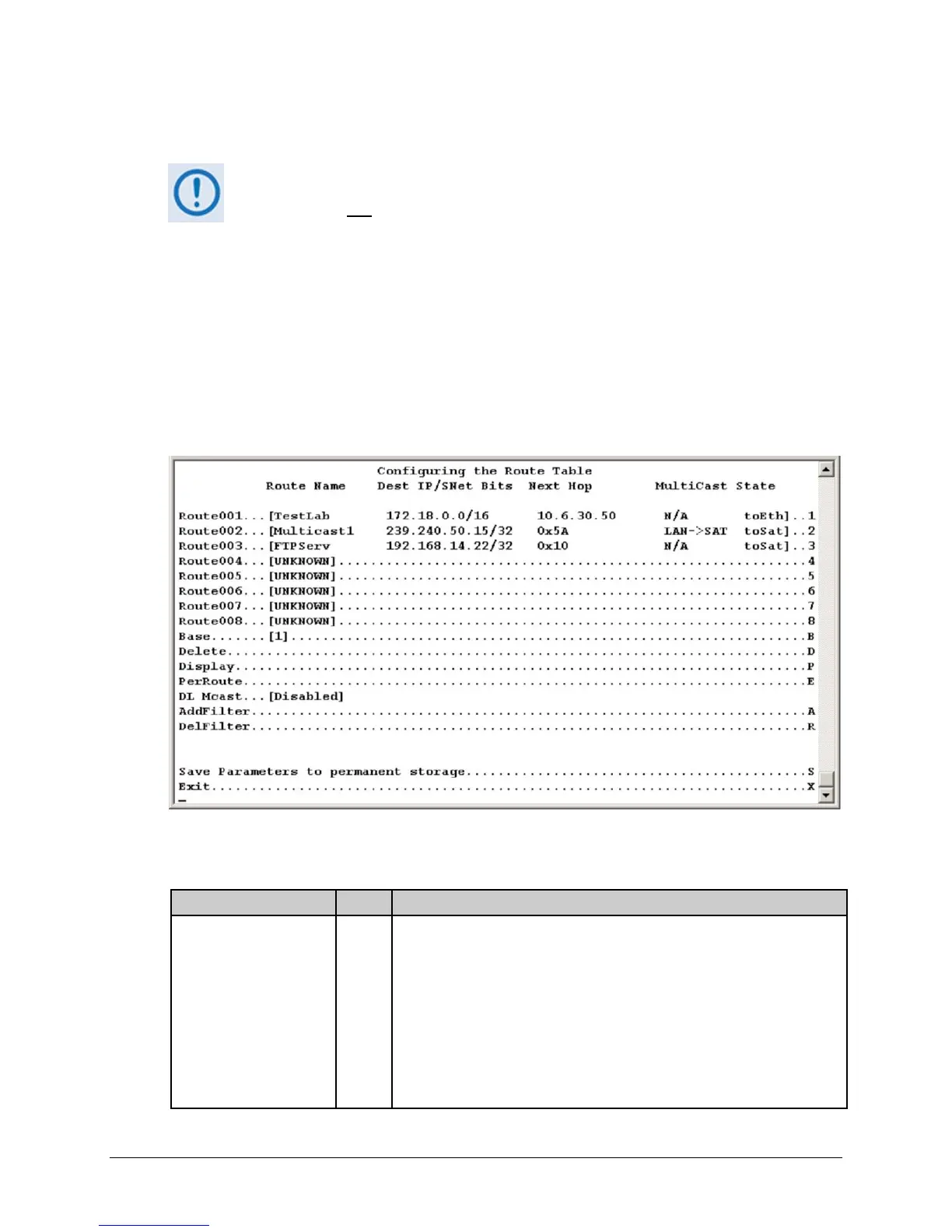
Activate the Configuring the Route Table page from the Main Menu page.
Figure 14-18. Route Table Configuration page
The Configuring the Route Table page contains the following options/fields:
Selection Entry Description
Route001-Route008 (256)
(The 8 currently displayed
routes, up to 256 can be
defined)
1 – 8 Defines how packets the IP Module receives are routed. Defining an entry in
this table is similar to using the 'route add' command of machines that
support that command.
For each route, define the following:
1. Assign a name to reference the route. The assigned name cannot
contain any whitespace and must be unique.
2. The destination address of an IP packet of interest.
The number of network addresses that are governed by the selected
destination entry, i.e., subnet mask.



 To Next Page