CDM-570/570L Satellite Modem with Optional IP Module Revision 12
Appendix L MN/CDM570L.IOM
L–2
L.3 ODU Operations via the CDM-570L Front Panel
L.3.1 CDM-570L Front Panel Operation Overview
For in-depth explanations of the function and operation of the front panel
features, see Chapter 5. FRONT PANEL OPERATION.
Use the CDM-570L front panel keypad and display to configure, monitor and control BUC/LNB
operation. Nested menus display all available options and prompt the user to carry out any
required action(s).
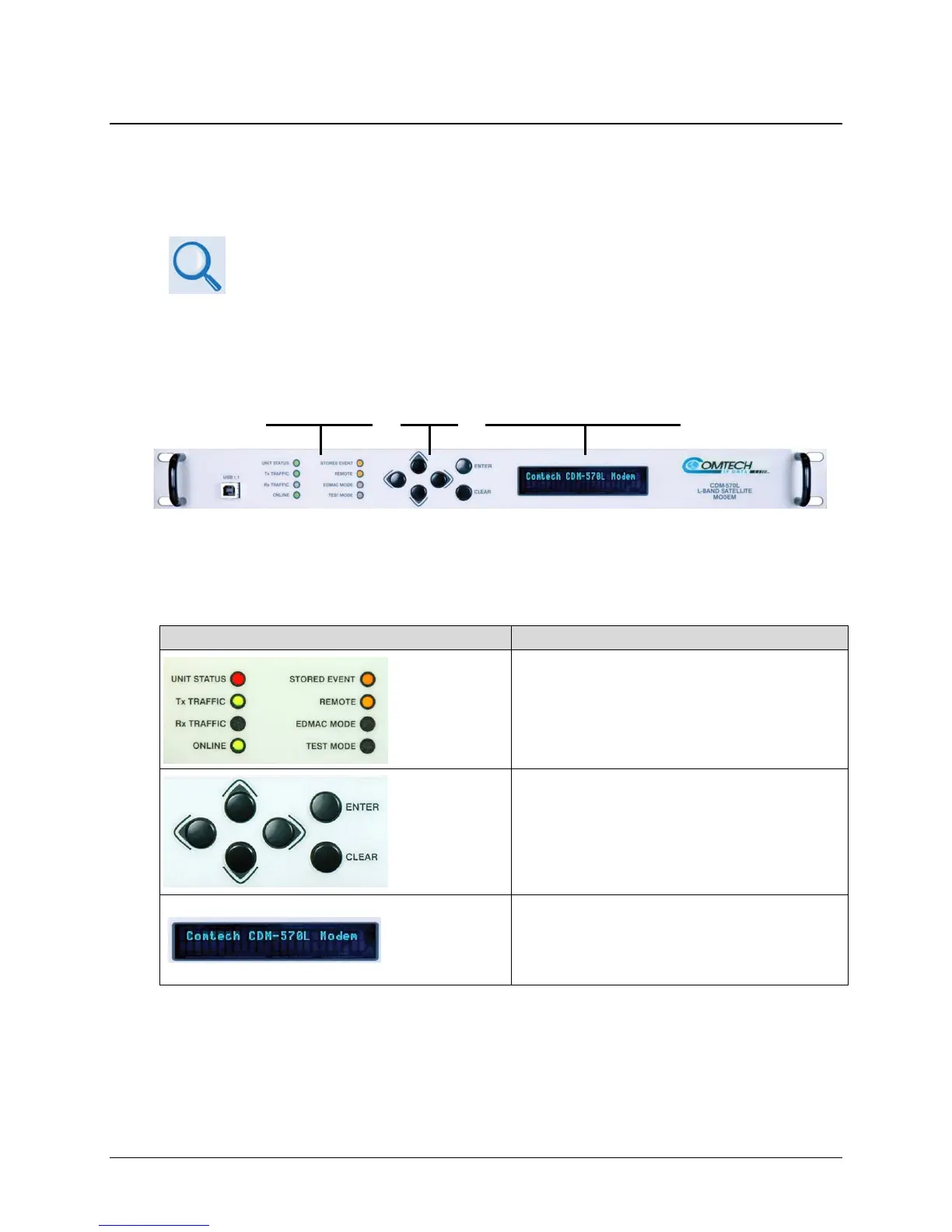
Figure L-1. CDM-570L Front Panel View
Figure L-1 identifies the key
features of the CDM-570L front panel; their purpose is summarized
as follows:
Feature Description
LED Indicators
This array of eight LEDs indicates the operational status
of the CDM-570L.
Keypad
Use the keypad to select and navigate the available
CDM-570L
monitor and control menu functions as
displayed on the Vacuum Fluorescent Display (VFD).
Vacuum
Fluorescent
Display (VFD)
The VFD features two rows of text with a width of 24
characters per row. It displays all available options and
prompts for required actions via the keypad and nested
menus.
LED
Indicators
Keypad
Vacuum Fluorescent
Display (VFD)



 To Next Page