CDM-570/570L Satellite Modem with Optional IP Module Revision 12
Appendix F MN/CDM570L.IOM
F–4
F.3 Managed Switch Point-to-Point System Configuration
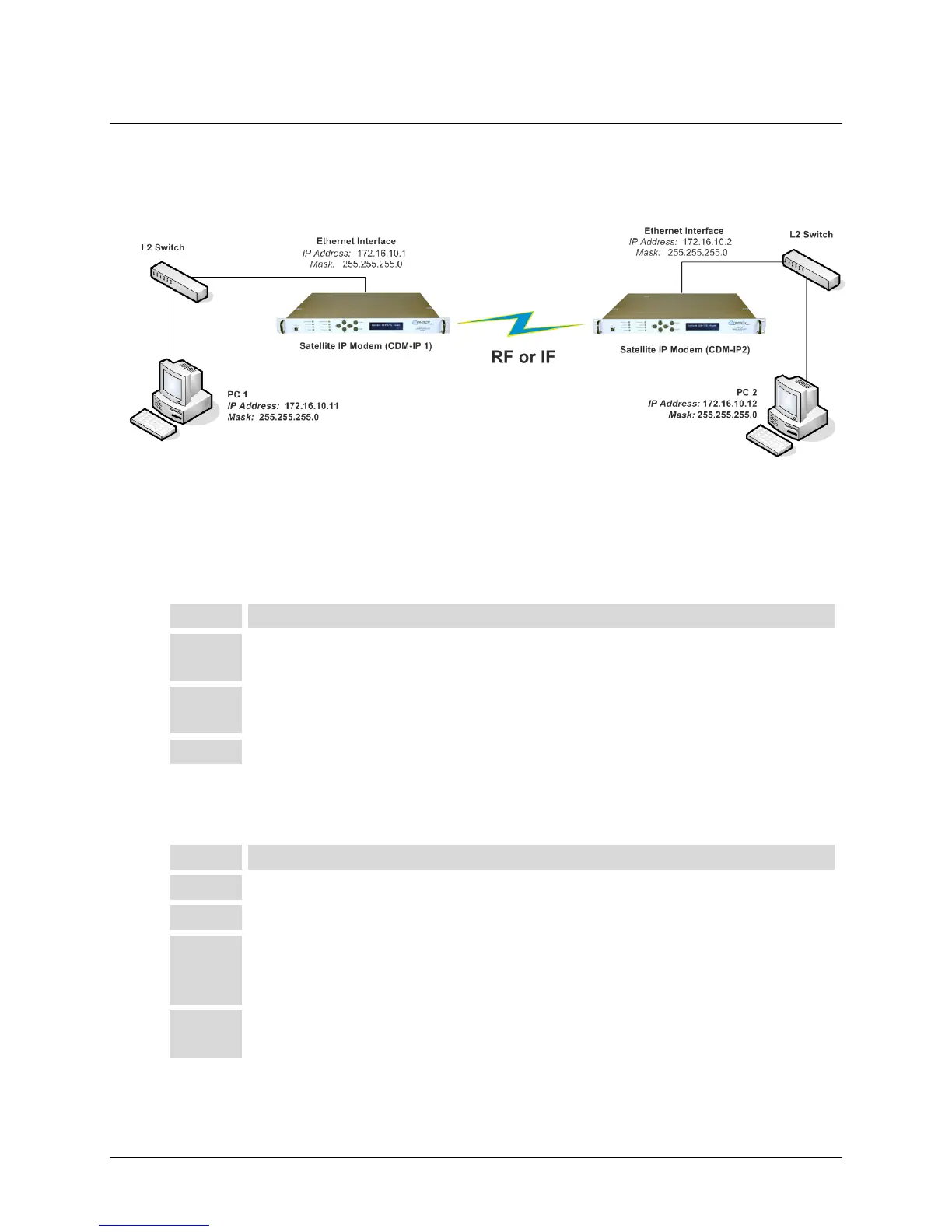
The procedures outlined in this section will lead to the configuration illustrated in Figure F-2.
Figure F-2. Managed Switch Point-to-Point System Configuration
F.3.1 PC Configuration
Step Task
1 PC 1: Set the IP address to 172.16.10.11;
Set mask to 255.255.255.0.
2 PC 2: Set the IP address to 172.16.10.12;
Set mask to 255.255.255.0.
3 Reboot the PCs (if required).
F.3.2 CDM-IP Configuration – Setting IP Address(es)
Step Task
1 From the Main Menu select Network Interface Configuration submenu [I].
2 From the Interface Configuration Menu select Ethernet Interface (fei0) submenu [E].
3 Set Ethernet IP Address [I]:
Set CDM-IP 1 to 172.16.10.1
Set CDM-IP 2 to 172.16.10.2
4 Set Subnet Prefix Length [M] to 24
The other parameters can be left to their factory default settings.



 To Next Page