CDM-570/570L Satellite Modem with Optional IP Module Revision 12
Ethernet IP Module - CLI and Telnet Operation MN/CDM570L.IOM
14–53
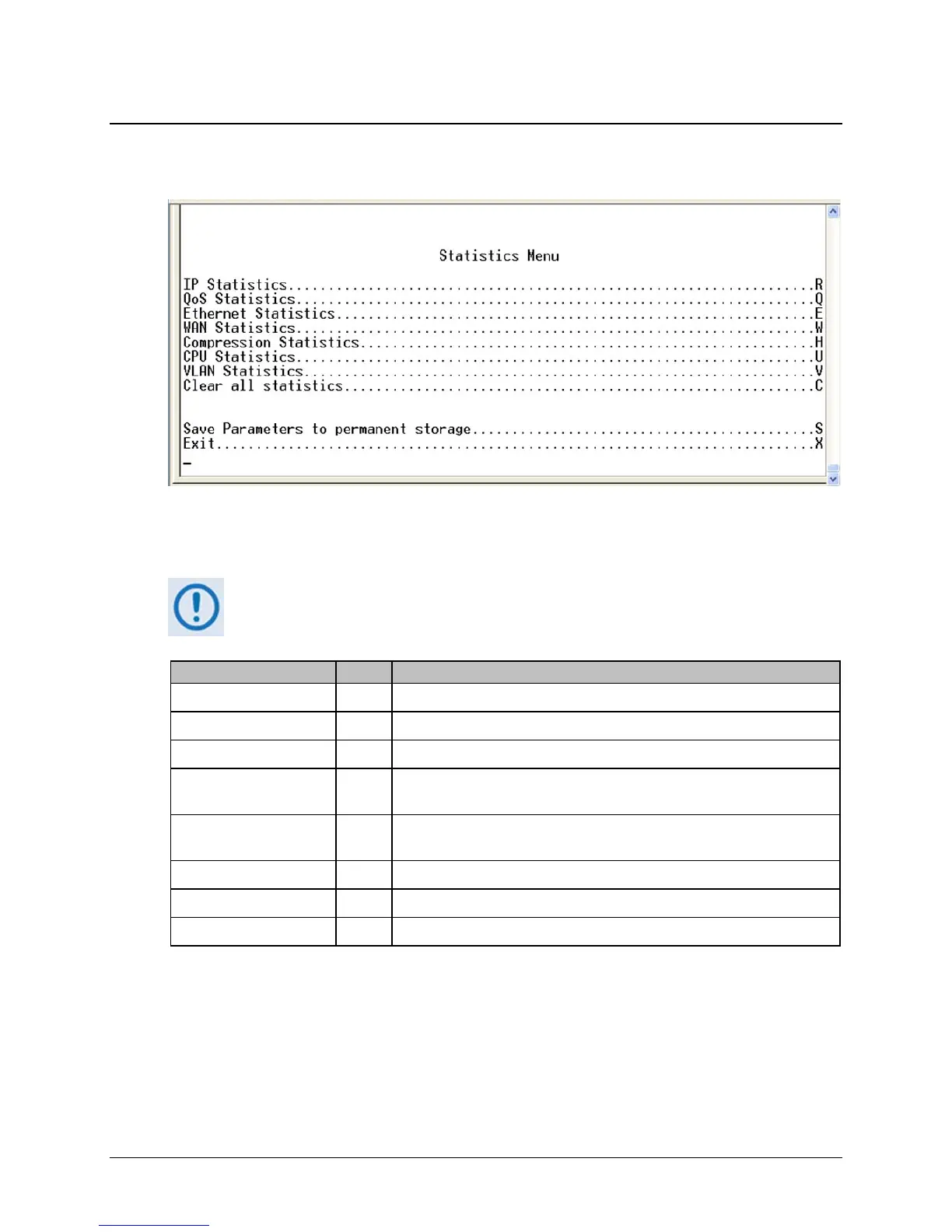
14.2.11.2 Statistics Page
Activate the Statistics Menu page from the Operations and Maintenance page.
Figure 14-37. Statistics Menu
The Statistics Menu page contains the following options/fields:
All updates for Statistics information will occur once every 6 seconds.
Selection Entry Description
IP Statistics R Displays the statistics for IP Routing and allows counters to be reset.
QoS Statistics Q Displays the statistics for QoS and allows counters to be reset.
Ethernet Statistics E Displays the statistics for the Ethernet Port and allows counters to be reset.
WAN Statistics W Displays the statistics for the WAN (HDLC) Port and allows counters to be
reset.
Compression Statistics H Displays the statistics for Header & Payload Compression and allows
counters to be reset.
CPU Statistics U Displays CPU Usage % (percentage)
VLAN Statistics V Displays the statistics for the VLAN entries and allows counters to be reset.
Clear all statistics C Globally resets all statistics counters.



 To Next Page