CDM-570/570L Satellite Modem with Optional IP Module Revision 12
Ethernet IP Module Interface MN/CDM570L.IOM
13–37
13.6.2.4 IP Pages
Click the Interface, Routes, Multicast, QoS Mode, QoS, ARP, VLAN, IGMP, or
Redundancy hyperlink to continue.
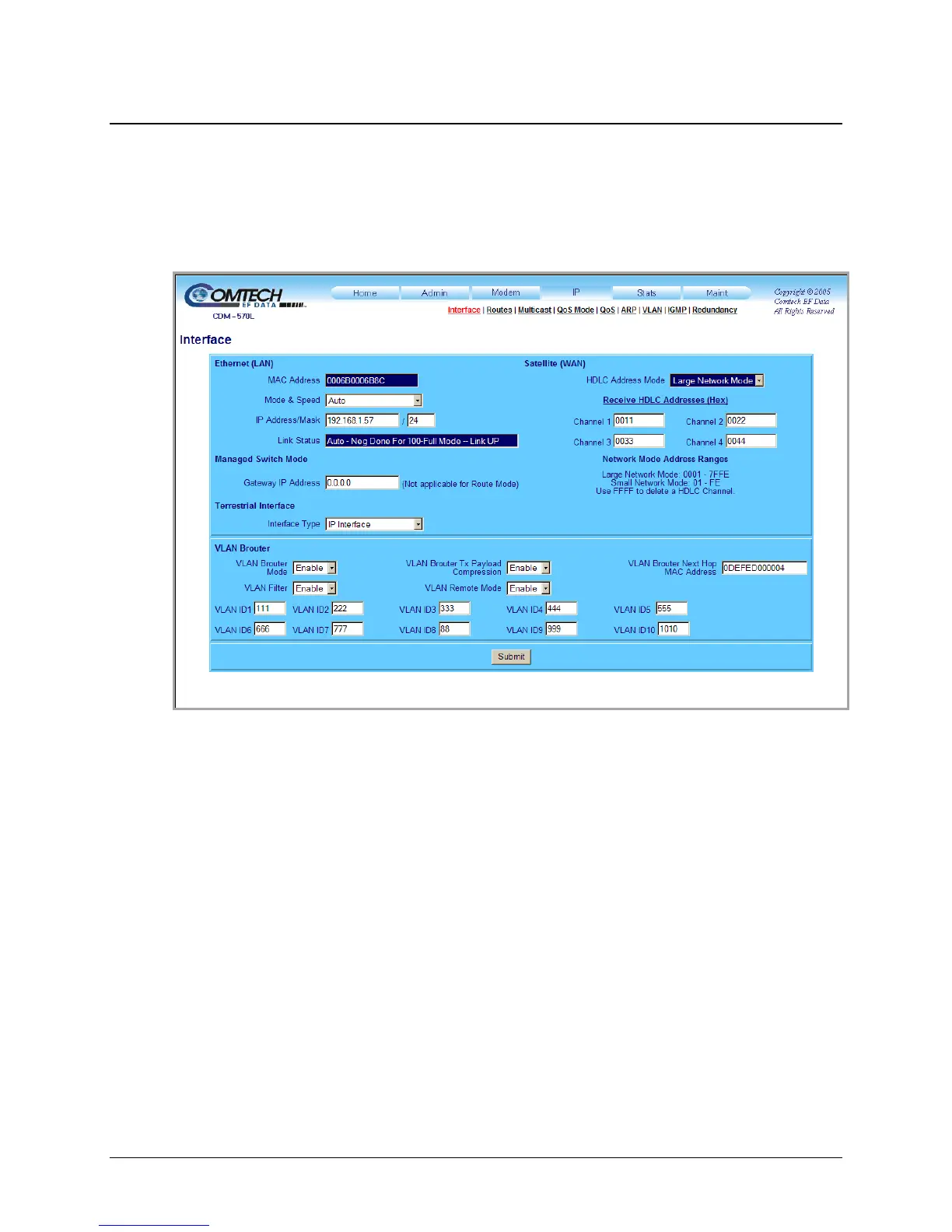
13.6.2.4.1 IP | Interface
Figure 13-17. IP | Interface page
Use this page to view the MAC address, set the IP address and mask of the IP Module, and define
parameters for Brouter (Bridge + Router Traffic) Working Mode operation.
Ethernet (LAN)
• MAC Address (read-only) – This is set at the factory to a guaranteed unique address that
cannot be modified.
• Mode & Speed – Use the drop-down menu to select Auto, 10 Mbps Half Duplex, 100
Mbps Half Duplex, 10 Mbps Full Duplex, or 100 Mbps Full Duplex.
• IP Address/Mask – Enter the IP Address/Mask for the IP Module Ethernet Interface.
• Link Status (read-only) – This is the actual negotiated Link Status of the Ethernet Port; this
includes whether the link is UP or DOWN.
Managed Switch Mode
The Gateway IP Address may be entered when Managed Switch Mode is active.



 To Next Page