CDM-570/570L Satellite Modem with Optional IP Module Revision 12
Ethernet IP Module Interface MN/CDM570L.IOM
13–45
13.6.2.4.5 IP | QoS (Quality of Service) Page
This section depicts the CDM-570/570L IP Module HTTP Interface with Quality of
Service (QoS) installed on the CDM-570/570L. QoS is a FAST Feature option
which must be purchased from Comtech EF Data.
Use this page to select the QoS operating rule that drives the appearance of the ‘IP | QoS’ page.
To access this QoS page, this optional feature must first be installed by entering the appropriate
FAST Access Code from the CDM-570/570L front panel; use the ‘Admin | Features’ page to
then enable QoS functionality.
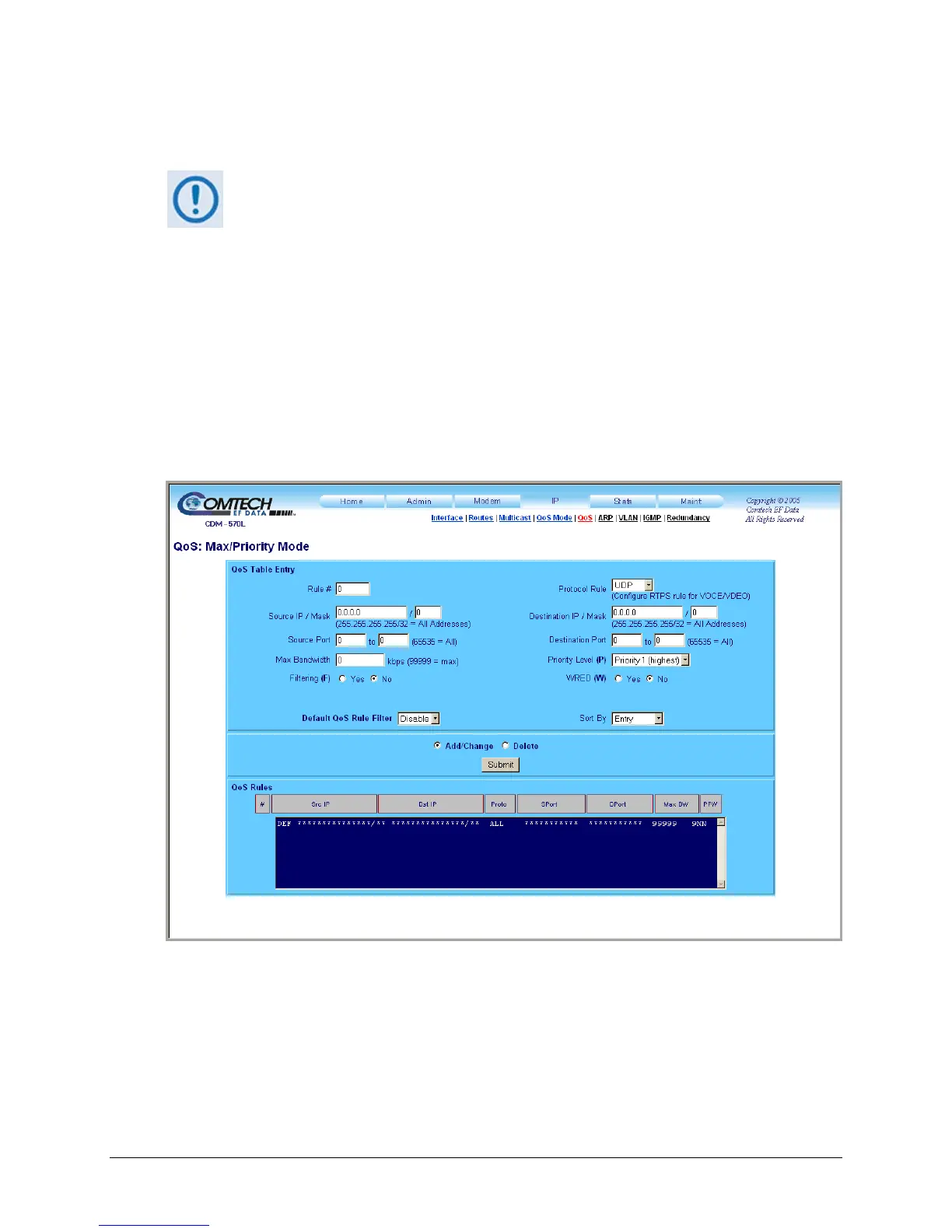
13.6.2.4.5.1 IP | QoS (Maximum Bandwidth/Priority Mode)
Use the ‘IP | QoS’ page, as it appears when Maximum Bandwidth/Priority Mode is active
(Figure 13-21), to establi
sh up to 32 different types of flows. See Sect. 13.4.5.1 for full
information on this page’s functionality.
Figure 13-21. IP | QoS page (Max/Priority Mode)



 To Next Page