CDM-570/570L Satellite Modem with Optional IP Module Revision 12
Appendix K MN/CDM570L.IOM
K–29
K.4.1.2.3 ODU | Utilities Pages
The appearance of the ‘ODU | Utilities’ page changes depending on which type of
ODU had been configured for operation with the CDM-570. Use this page to
configure various ODU utility functions.
K.4.1.2.3.1 ODU | Utilities (CSAT-5060)
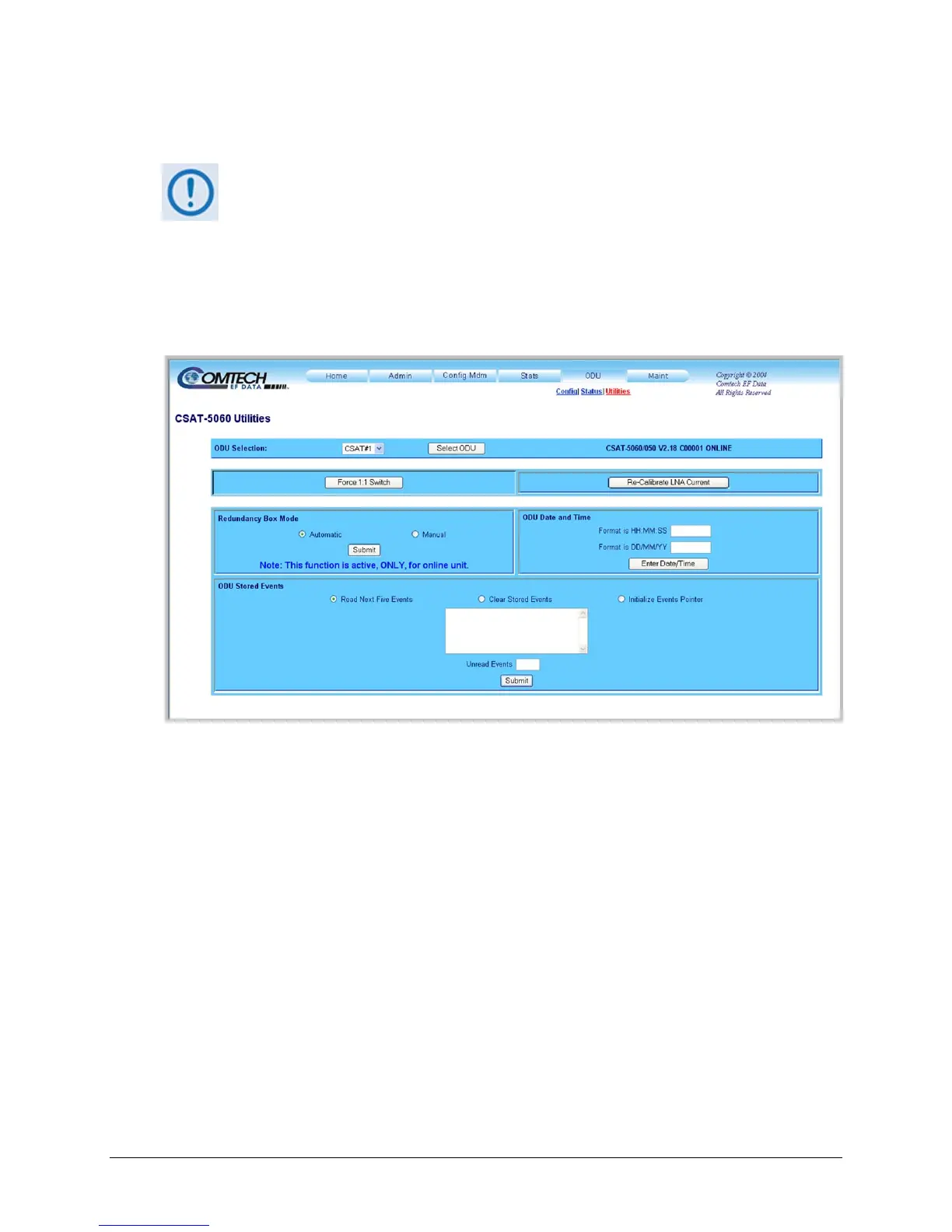
Figure K-9 shows the ‘ODU | Utilities’ page as it appears with the CSAT-5060 configured as the
ODU.
Figure K-9. ODU | Utilities page (CSAT-5060)
ODU Selection
If redundant ODUs are used, the CSAT-5060 ‘ODU | Status’ page can toggle between the Online
and Offline units. Select CSAT #1 or CSAT #2 from the ODU Selection: drop-down menu, and
then click [Select ODU]. A message identifies the currently active unit as ‘ONLINE’ in the
right-hand side of the box.
Force 1:1 Switch
If redundant ODUs are used and the selected unit is currently the ‘ONLINE’ unit, click [Force
1:1 Switch] to force the switchover of the ‘ONLINE’ unit into ‘STANDBY’ mode. This
command is only valid for the ‘ONLINE’ unit in a 1:1 pair.
Re-Calibrate LNA Current
Click to recalibrate the LNA Current.



 To Next Page