CDM-570/570L Satellite Modem with Optional IP Module Revision 12
Ethernet IP Module - CLI and Telnet Operation MN/CDM570L.IOM
14–5
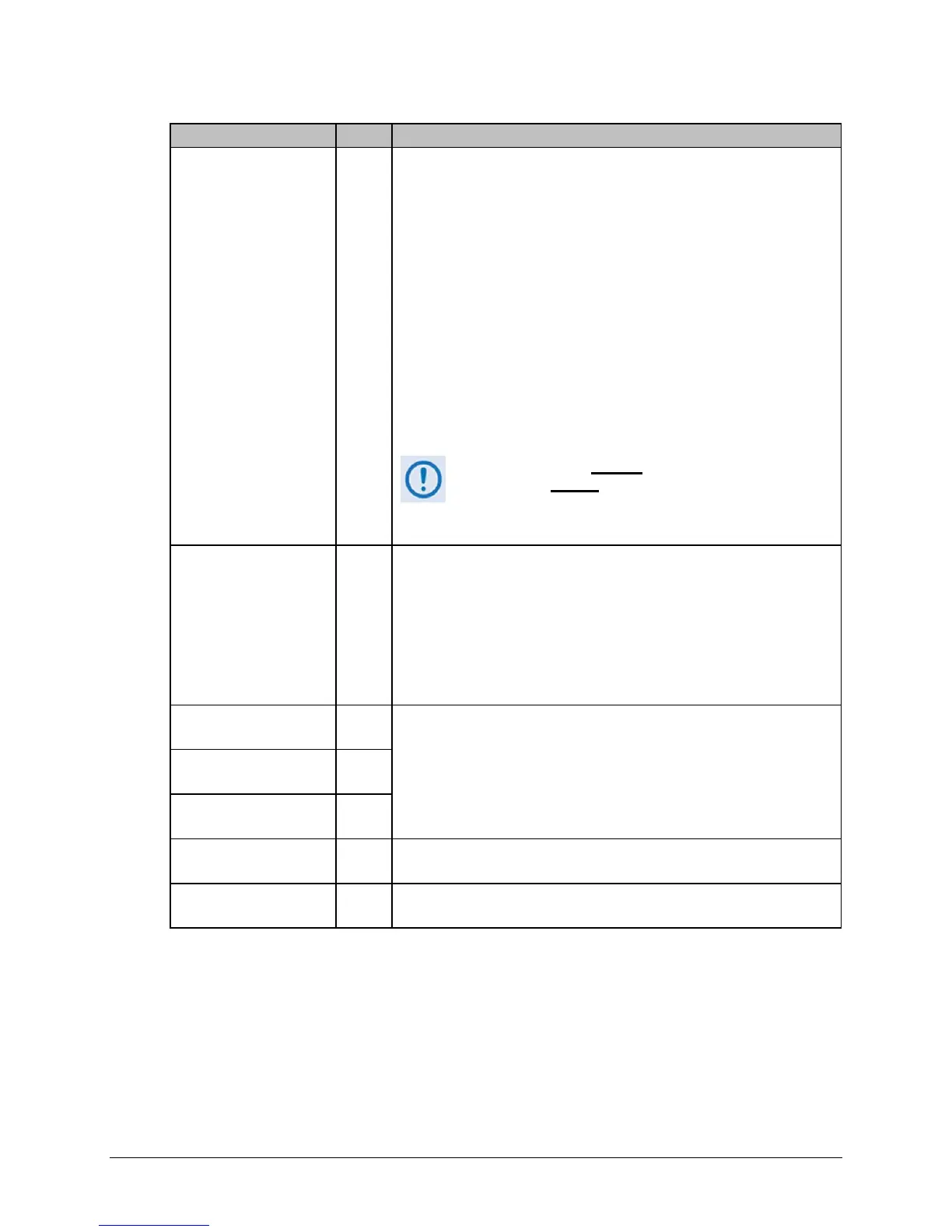
Selection Entry Description
Working Mode W*
-or-
C**
Sets the Working Mode.
*For IP Module V1 Firmware Ver. 1.7.# and later / IP Module V2
Firmware Ver. 2.2.# and later:
• Managed Switch
• Router – Hub
• Router – Remote
• Router – Point to Point
** For IP Module Firmware Ver. 1.6.# and earlier / IP Module V2
Firmware Ver. 2.1.# and earlier:
• Router – Small Network
• Router – Large Network
• Router – Point to Point
• Managed Switch
See Chapter 13 for additional information.
Working Mode is disabled
when Brouter Mode VLAN
Filtering is enabled
. If selection is attempted while
configured as such, the following error message displays:
“Can’t change Modem Working Mode when
Brouter VLAN Filter is Enabled”
Managed Switch
Multicast Option
(For Modem Firmware
Ver. 1.5.4 and later; was
“easyConnect Multicast
Option” for Modem
Firmware Ver. 1.5.3.6 and
earlier)
E
If both units have this feature enabled, when unit is running in Managed
Switch mode, Multicast is only forwarded across link.
Header comp refresh rate
(in pkts) for UDP/RTP1
H
Allows for the adjustment of how often to send a full header of this type of
traffic when Header Compression is enabled.
Header comp refresh rate
(in pkts) for UDP
U
Header comp refresh rate
(in pkts) for all others
O
Payload comp refresh
rate (in pkts)
Q
Allows for the adjustment of how often to send a full payload when Payload
Compression is enabled.
Telnet Timeout T
Determines how many minutes (1-60) of Telnet inactivity before the Telnet
session is automatically terminated.



 To Next Page