ESAB Cutting Systems
CROSSBOW Page 61
4 Operation
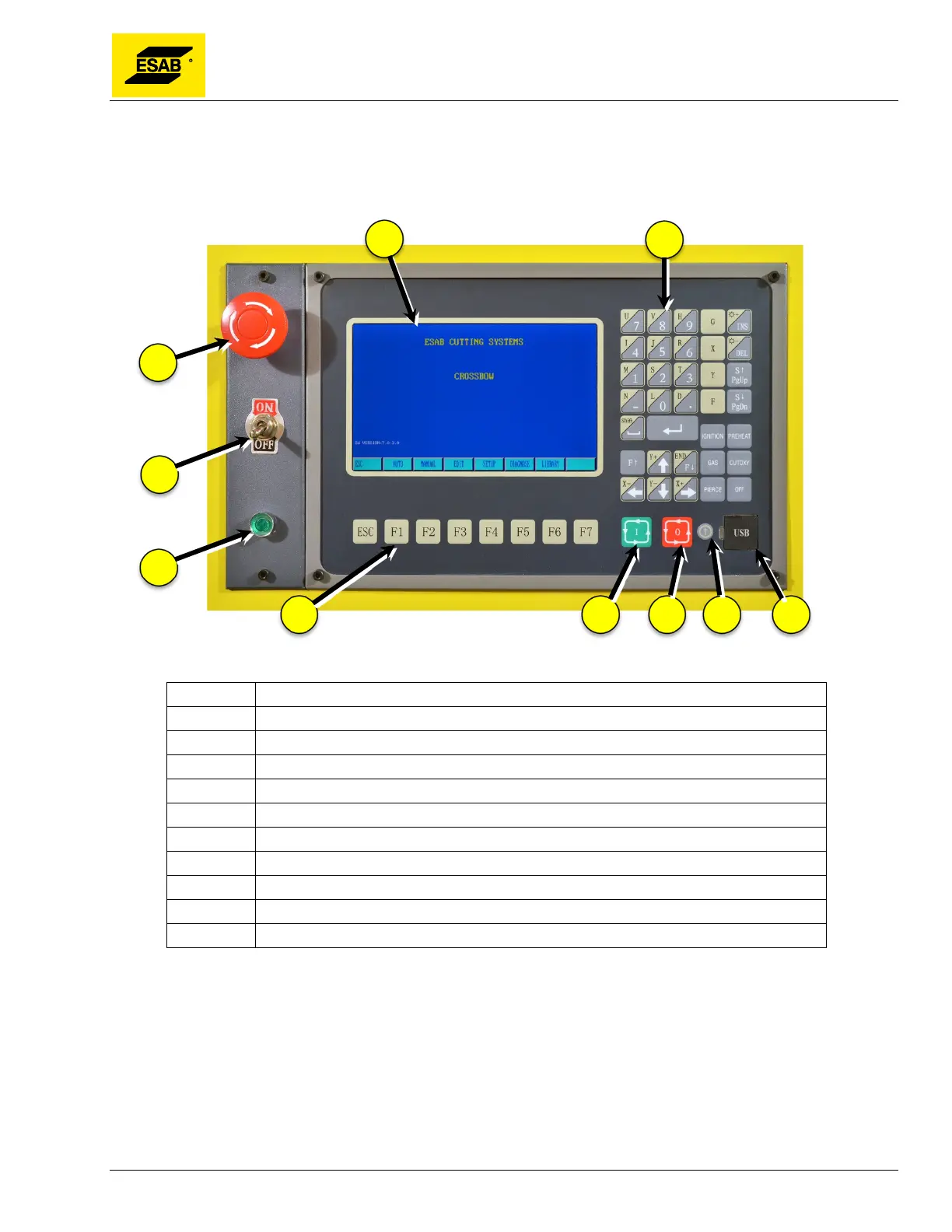
4.1 Control Panel and Function
Figure 38: Central Unit Control Panel
Number Description
1 E
Stop Button
2 Display
3 Input keys
4 Drive Engage/Disengage Switch
5 Drive Power Indicator
6 Menu/Function keys
7 Start Button
8 Stop Button
9 Software Update Button
10 USB Port
E-STOP (Emergency stop): Press to cut off all power to drives, torch lifter, and output relays. To
restore power, turn the button clockwise until it pops out. E-Stop button must be released before power
is switched on or else the CNC may not function properly.
Drive Engage/Disengage: In the OFF position, power is removed from the drives so the machine can
be manually positioned in either axis. In the ON position the drives are powered for normal operation.
Drive Power Indicator: Light is on when the drives have power, meaning the Drive Engage switch is
ON, and the E-Stop button is not pressed.



 To Next Page