ESAB Cutting Systems
CROSSBOW Page 72
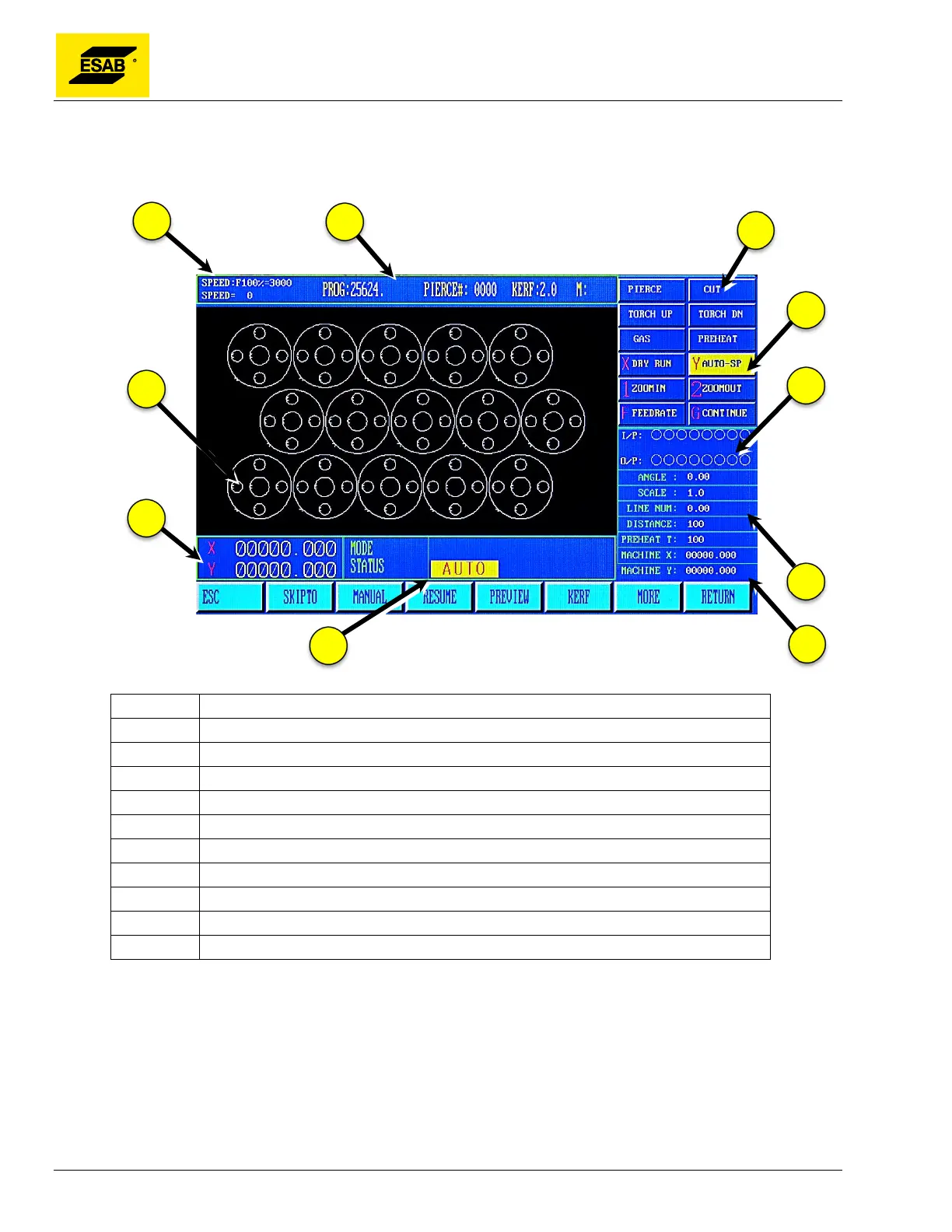
4.10 Auto Mode Screen
From the Main Menu, press 【F1】to select AUTO:
Figure 42: Auto Mode Screen
Number Description
1 Feed Rate Override Percentage and actual Cutting Speed
2 Program, Pierce, and Kerf
3 Cutting Process Status Indicators
4 Additional Function Key Indicators
5 Input/Output Status Indicators
6 Operating Parameters
7 Machine Coordinates
8 Mode/Status Indicator / Prompts
9 Program Coordinates
10 Program Graphics Display Area
4.10.1 SPEED
In Automatic Mode, at the top left corner of the screen, it shows the Feed Rate Override Percentage
and the resulting cut speed. The cut speed is the result of the Max Cutting Speed (see Setup Menu)
multiplied by the Feed Rate Override Percentage.
In Manual Mode, at the top left corner of the screen, it shows the Feed Rate Override Percentage and
the resulting jog speed. The jog speed is the result of the Max Jog Speed (see Setup Menu) multiplied
by the Feed Rate Override Percentage.



 To Next Page