ESAB Cutting Systems
CROSSBOW Page 110
4.25.5 【F5】Control Parameters
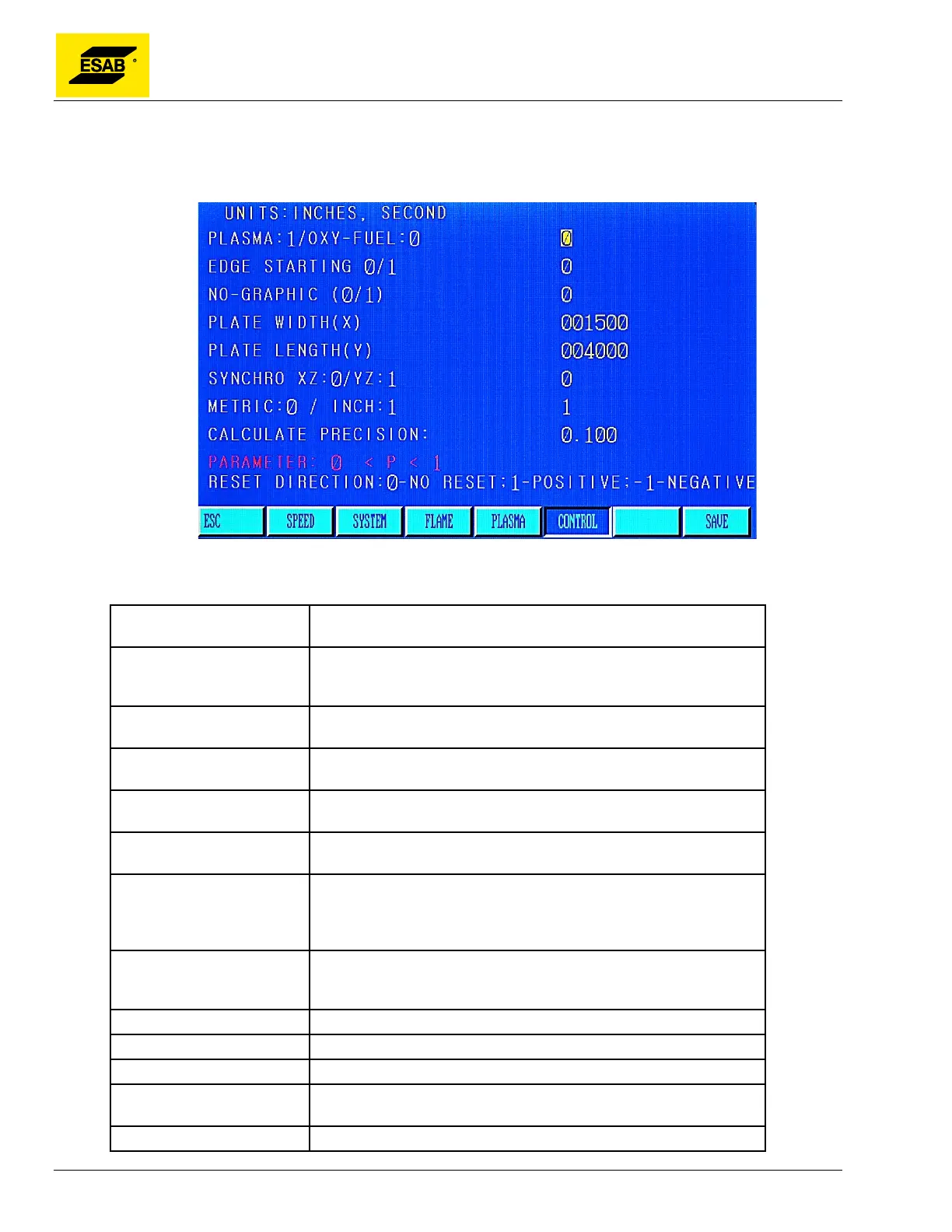
In the SETUP menu, press the【F5】key to enter the CONTROL parameter page:
Figure 89: CONTROL Parameters
CONTROL Parameters
PLASMA / OXY-FUEL
Selection to pick which process to use. Activates the appropriate
process controls in Auto and Manual modes.
EDGE STARTING
This parameter activates edge starting for cutting thicker materials.
When enabled, the operator is prompted to move the torch to the
plate edge prior to each pierce.
NO-GRAPHIC
Do not draw graphic of program in Auto Mode. This option can
save time if cutting a large program.
PLATE WIDTH (X)
Actual width of steel plate in X axis. Only used when running very
large programs.
PLATE LENGTH (Y)
Actual length of steel plate in Y axis. Only used when running very
large programs.
SYNCHRO XZ / YZ
For dual-side drive gantries, selects whether Z-axis is synchronized
with X-axis or Y-axis. Not used on Crossbow.
METRIC / INCH
Enter 0 for Metric, 1 for Inch. The CNC will show length and speed
values in the appropriate system. Regardless of which setting is
used, the system can still run part program with mm dimensions by
using the G21 code, or Inch dimensions by using the G20 code.
CALCULATE PRECISION
Default value is 0.1mm. Changing this value can eliminate some
positioning calculation errors caused by rounding in the nesting
software.
EXTERNAL CTRL Not used on Crossbow.
WIRED/WIRELESS CTRL Not used on Crossbow.
KERF CHECK ON/OFF Check for kerf errors, yes or no.
RESET COORDINATES
Automatically sets Program Coordinates to zero when a program is
started.
AIR CYLINDER AHC Not used on Crossbow.



 To Next Page