8 Stored Programming
206
Stored Programming
8
Deleting Stored Programming
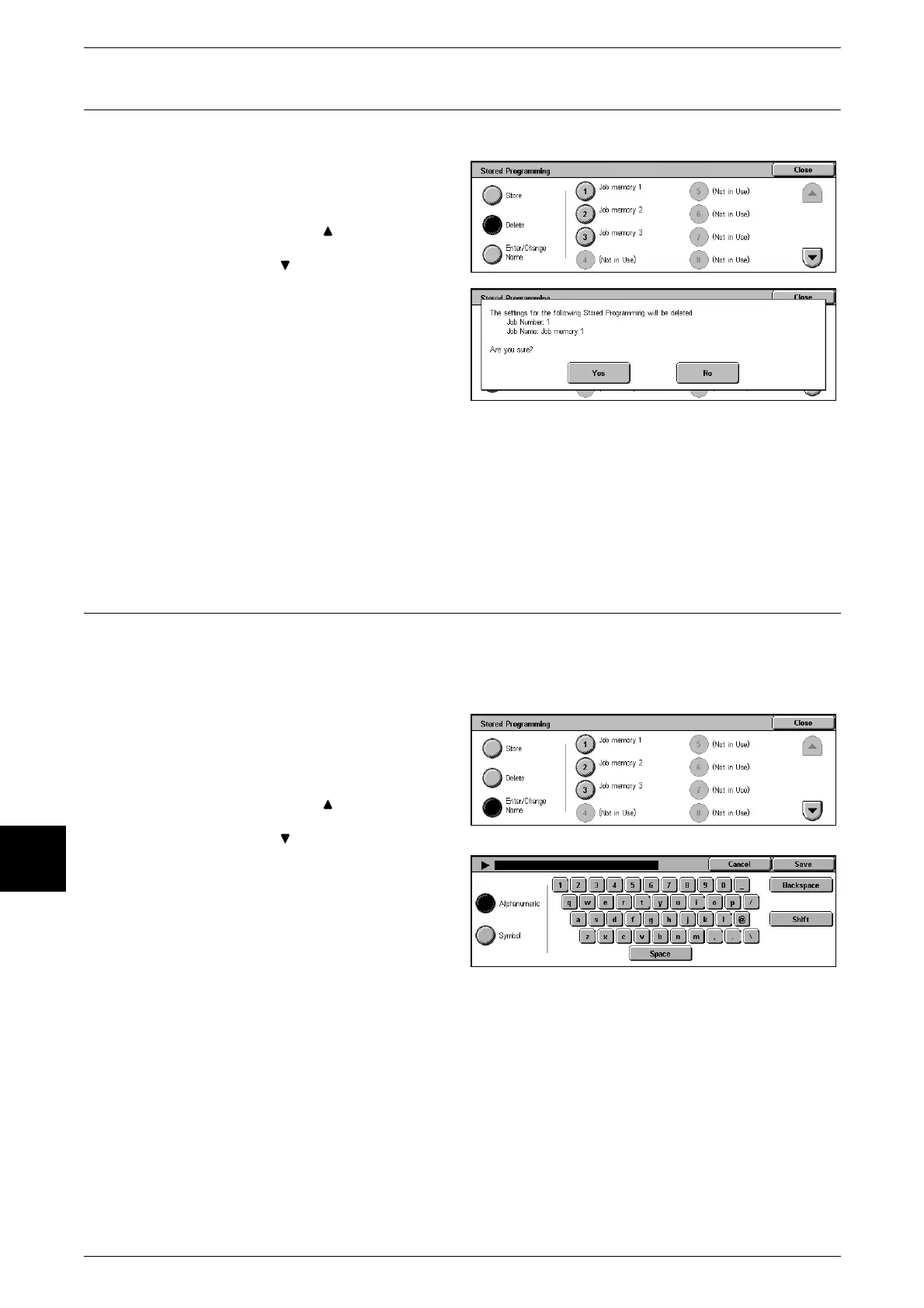
Below describes the procedure for deleting Stored Programming.
1 Select [Delete].
2 Select the number to delete.
Note • Select [ ] to display the
previous screen and select
[ ] to display the next screen.
3 Select [Yes].
Yes
Deletes Stored Programming.
Note • Deleted Stored Programming cannot be restored.
No
The Stored Programming delete operation is cancelled.
Naming/Renaming Stored Programming
Below describes the procedure for naming and renaming Stored Programming.
Up to 18 characters are allowed in Stored Programming name.
For information about how to enter characters, refer to "Entering Text" (P.252).
1 Select [Enter/Change Name].
2 Select the number to add or
change a name.
Note • Select [ ] to display the
previous screen and select
[ ] to display the next screen.
3 Enter the name, and select [Save].


 To Next Page