Paper Jams
479
Problem Solving
16
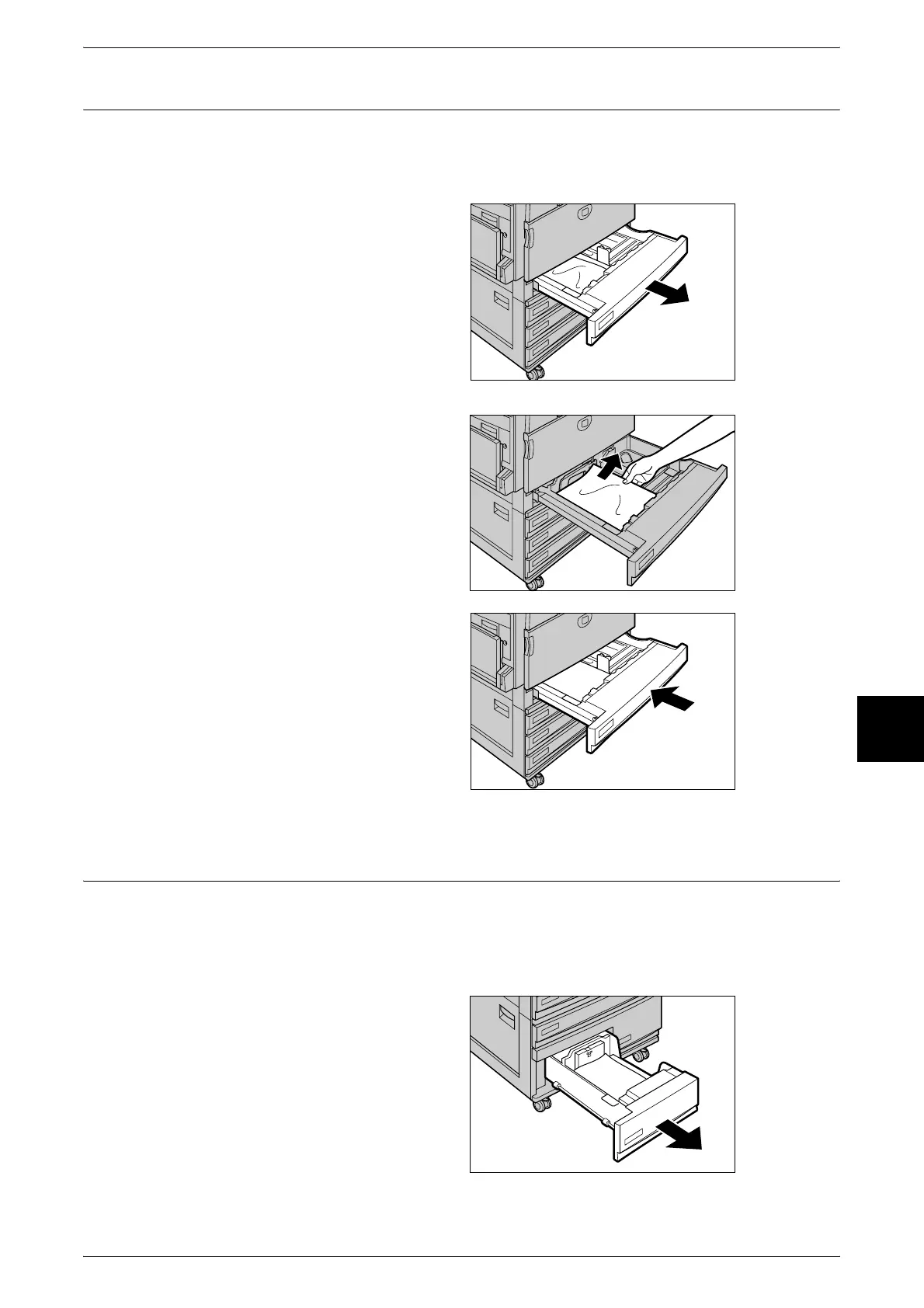
Paper Jams in Trays 1 to 4
The following describes how to clear paper jams that occur on trays 1 to 4.
When using the Document Centre C450 Tandem Tray model, refer to "Paper Jams in High Capacity
Tray" (P.479) for dealing with Paper Tray 3, 4 paper jams.
1 Pull out the tray where the paper
jam occurred.
Important • Paper is sometimes torn and
remains inside the machine if
you draw out a tray without
checking the paper jam
position. This may cause
machine malfunction. Check
where the paper jam occurred
before remedying the
problem.
2 Remove the jammed paper.
Note • If paper is torn, check for any
torn pieces of paper inside the
machine.
3 Push the tray in gently until it
comes to a stop.
Paper Jams in High Capacity Tray
This describes how to clear paper jams in the high capacity tray when using the
Document Centre C450 Tandem Tray model.
Paper Jams in Tray 3 (High Capacity)
1 Pull out Tray 3 (high capacity).
Important • Paper is sometimes torn and
remains inside the machine if
you draw out a tray without
checking the paper jam
position. This may cause
machine malfunction. Check
where the paper jam occurred
before remedying the
problem.












 To Next Page