14 Authentication and Auditron Administration
396
Authentication and Auditron Administration
14
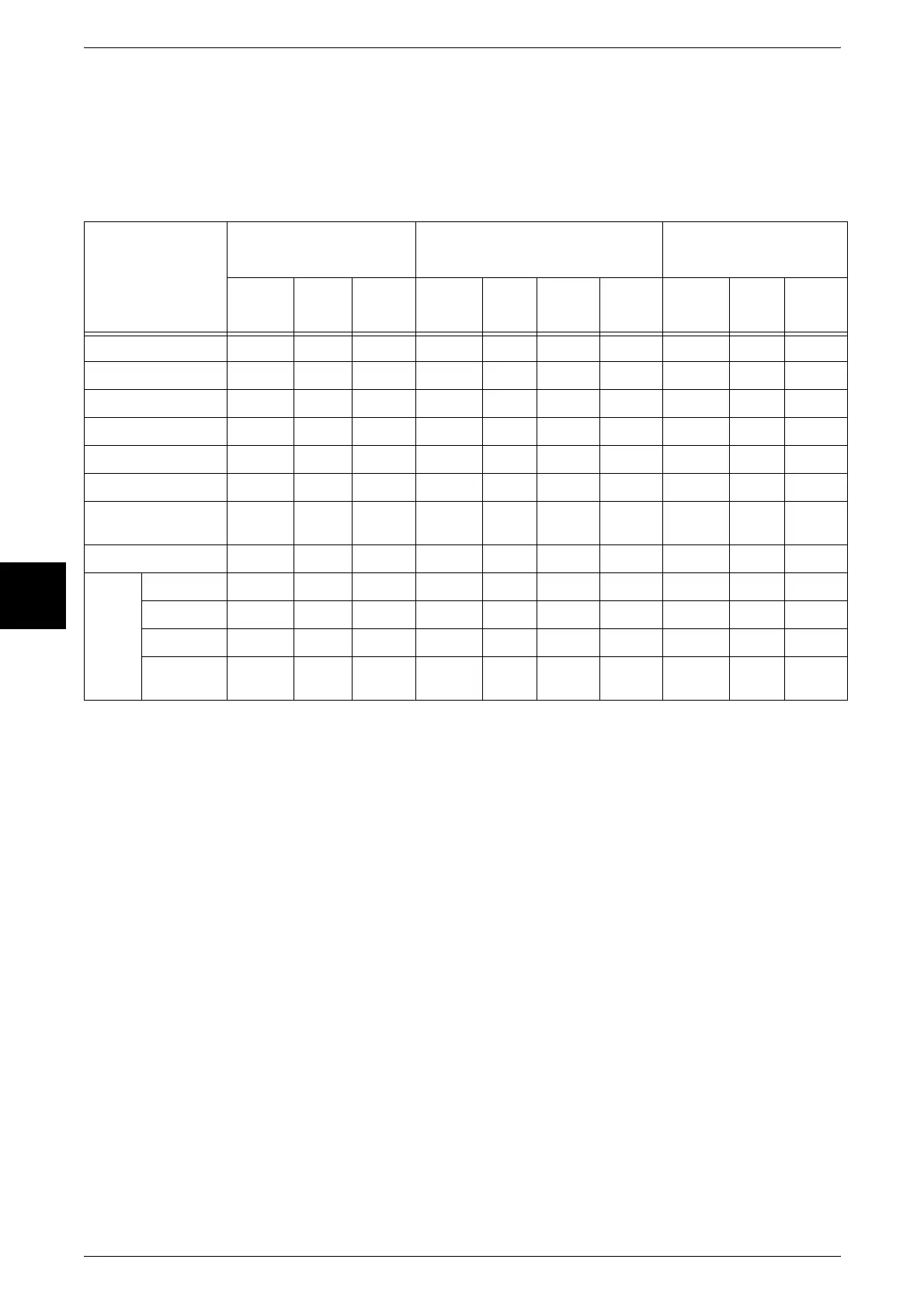
When the Authentication Feature is Enabled
When the Authentication feature is enabled, the relation between the users and the use
of mailbox is as follows.
When [Local Machine Access] or [Network] > [Check User Details] > [On] is
selected, or for authenticated users other than guests for [Remote Access]
* 1 The following operations of document registration in a mailbox or document retrieval, are not the subject of
authentication.
• Fax mailbox receiving
• iFax mailbox receiving
• Document retrieval using a scan driver or mailbox viewer
* 2 This can only be used when the Authentication feature settings in System Administration mode permit mailbox
operation.
* 3 A job flow sheet associated with the mailbox permits display, auto start, and manual start operations.
Important • If a job flow sheet is associated with a mailbox in which it can no longer be used as a result
of a change in the authentication status, then changing/copying is no longer possible, but it
can still be used. However, once the association is released, the job flow sheet is no longer
displayed, and cannot be used.
Mailbox
operation
Unauthenticated user
(general user)
Authenticated user
System
administrator
Generally
shared
Admin-
istrator
shared
Personal Generally
shared
Admin-
istrator
shared
Personal
(owner)
Personal
(non-
owner)
Generally
shared
Admin-
istrator
shared
Personal
Creation/registration
–
No
–––
Yes
––
Yes
–
Display
–
Yes
*2
––
Yes Yes
–
Yes Yes Yes
Deletion
–
No
–––
Yes
–
Yes Yes Yes
Changing settings
–
No
–––
Yes
–
Yes Yes Yes
Document display
–
Yes
*2
––
Yes Yes
–
Yes Yes Yes
Document deletion
–
Yes
*2
––
Yes Yes
–
Yes Yes Yes
Document
registration
*1
–
Yes
*2
––
Yes Yes
–
Yes Yes Yes
Document output
*1
–
Yes
*2
––
Yes Yes
–
Yes Yes Yes
Job
flow
sheet
Display
–
–
*3
––
Yes Yes
–
Yes Yes Yes
Association
–
No
–––
Yes
–
Yes Yes Yes
Auto start
–
–
*3
––
Yes Yes
–
Yes Yes Yes
Manual
start
–
–
*3
––
Yes Yes
–
Yes Yes Yes



 To Next Page