Changing Paper Settings
237
Paper and Other Media
10
Changing Paper Settings
The following describes how to change the paper size on Trays 1 to 4 and how to set
image quality processing by individual paper type.
Image quality best suited to the paper type can be obtained by setting the desired
image processing to particular paper types.
Note • For custom paper 1 to 5, the user assigns any name to plain paper, bond paper, and
recycled paper.
For information about how to set names to custom paper 1 to 5, refer to "Custom Paper Name" (P.260).
For information about image quality processing for different paper types, refer to "Image Quality"
(P.262).
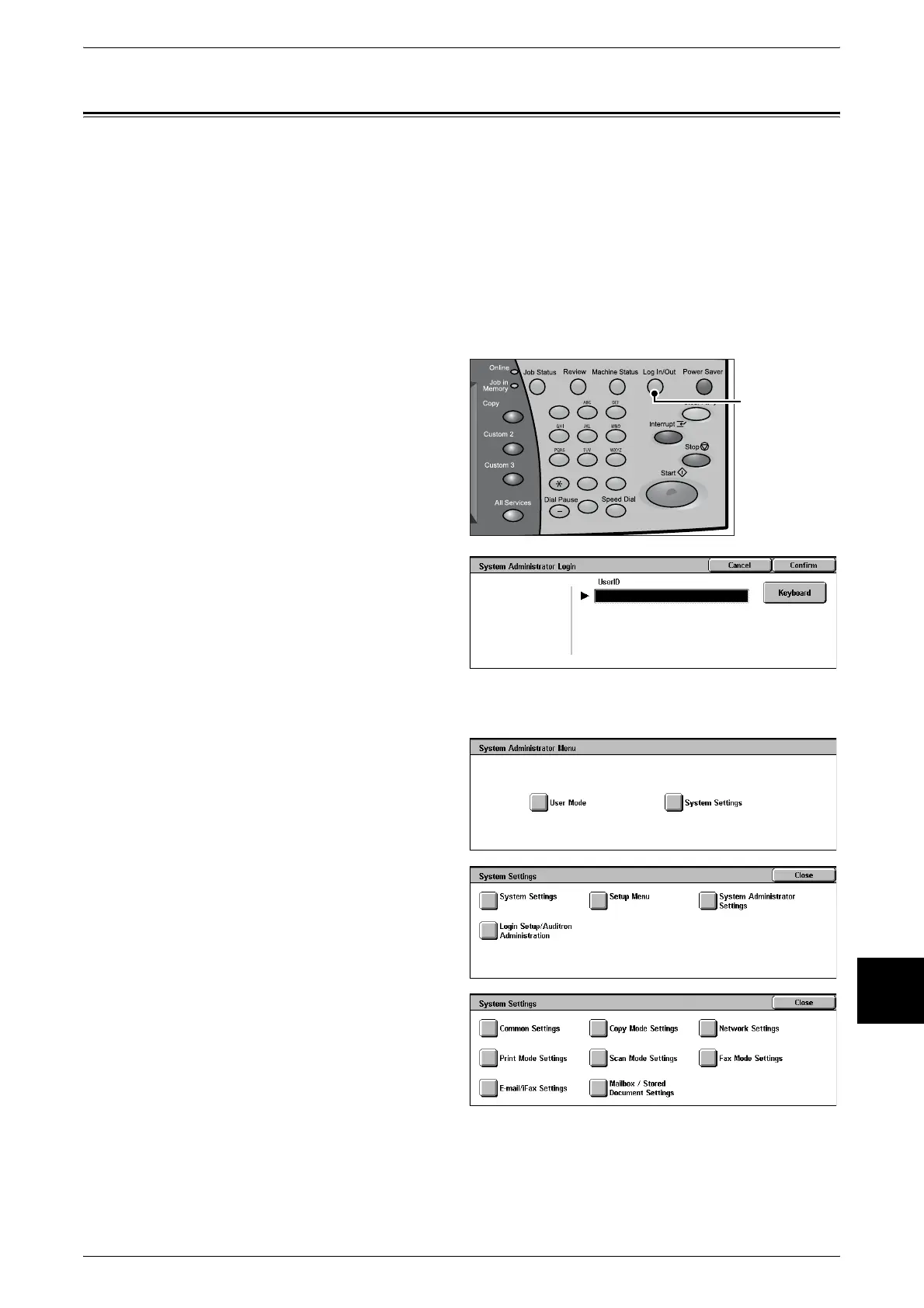
1 Press the <Log In/Out> button.
2 Enter the User ID with the numeric
keypad, and select [Confirm]
Note • The default UserID value is
"11111". When using the
Authentication feature, a
password is required. The
default password value is "x-
admin".
3 Select [System Settings].
4 Select [System Settings].
5 Select [Common Settings].
123
456
789
0 #
C
<Log In/Out>
button












 To Next Page