10 Paper and Other Media
236
Paper and Other Media
10
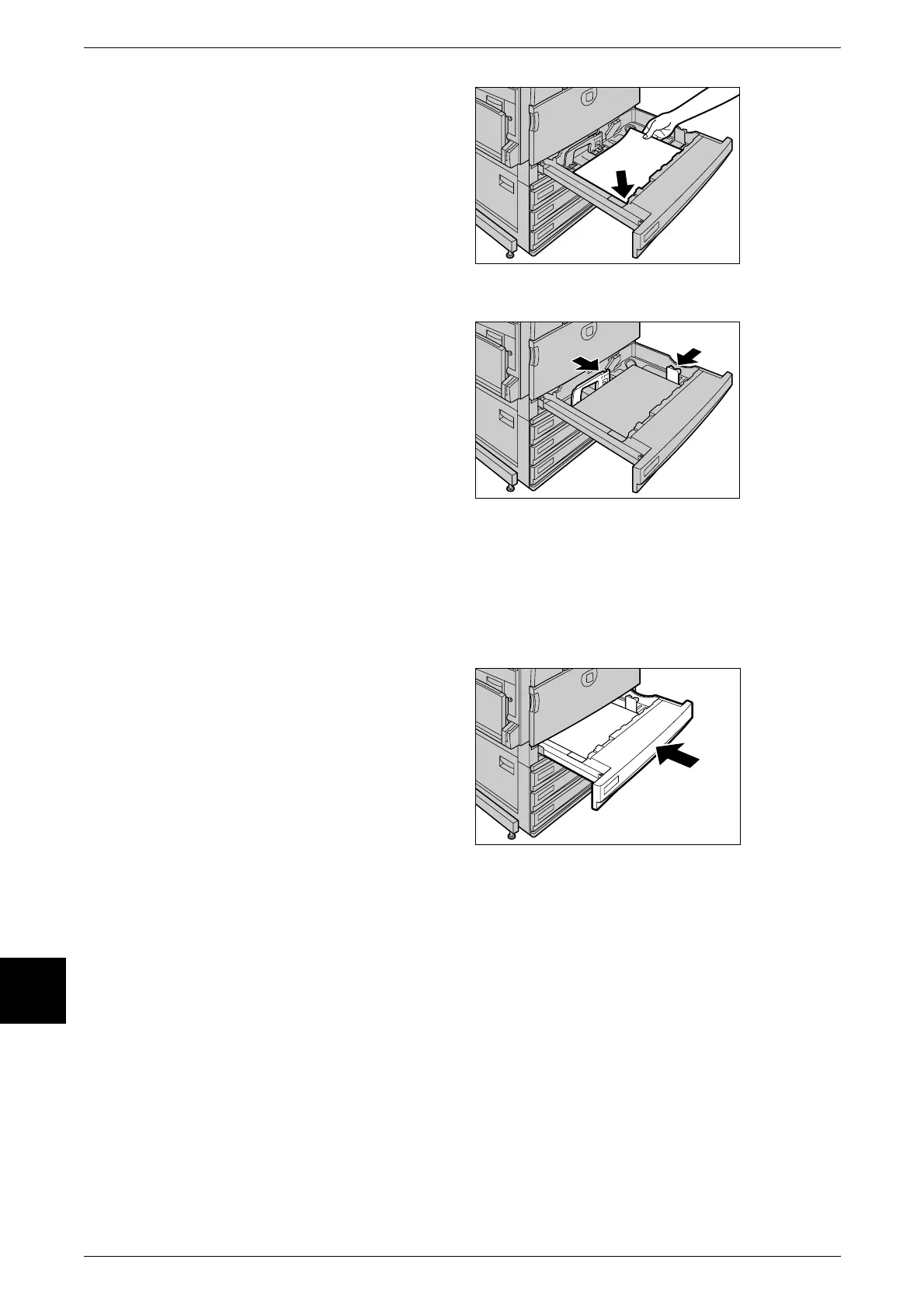
5 Load and align the edge of the
paper against the front left edge of
the tray with the side to be copied or
printed on facing up.
Important • Do not load mixed paper types
into the tray. This can be the
cause of paper jams.
• Do not load paper exceeding
the maximum fill line. Doing so
might cause paper jams or
machine trouble.
6 Move the two paper guide levers
while holding their grips so that they
lightly contact the edges of the
paper.
Important • Exerting excessive pressure
when aligning the paper levers
against the edges of the paper
might cause paper jams.
• Make sure that the paper
guides fit flush against the
paper. If the paper guides are
not flush against the paper, the
device may not be able to auto
detect the paper size, or a
paper jam or other error could
result. In this case, reset the
paper guides and realign them.
7 Push the tray in gently until it comes
to a stop.
Note • Affix the paper size label to the
front of the paper tray.
8 After changing the paper size, set the paper type for the paper tray.
For information about how to set the paper type, refer to "Changing Paper Settings" (P.237).



 To Next Page