2 Product Overview
30
Product Overview
2
Machine Components
This section describes the main components and their functions of the Document
Centre C450/C360/C250 (hereinafter called "the machine").
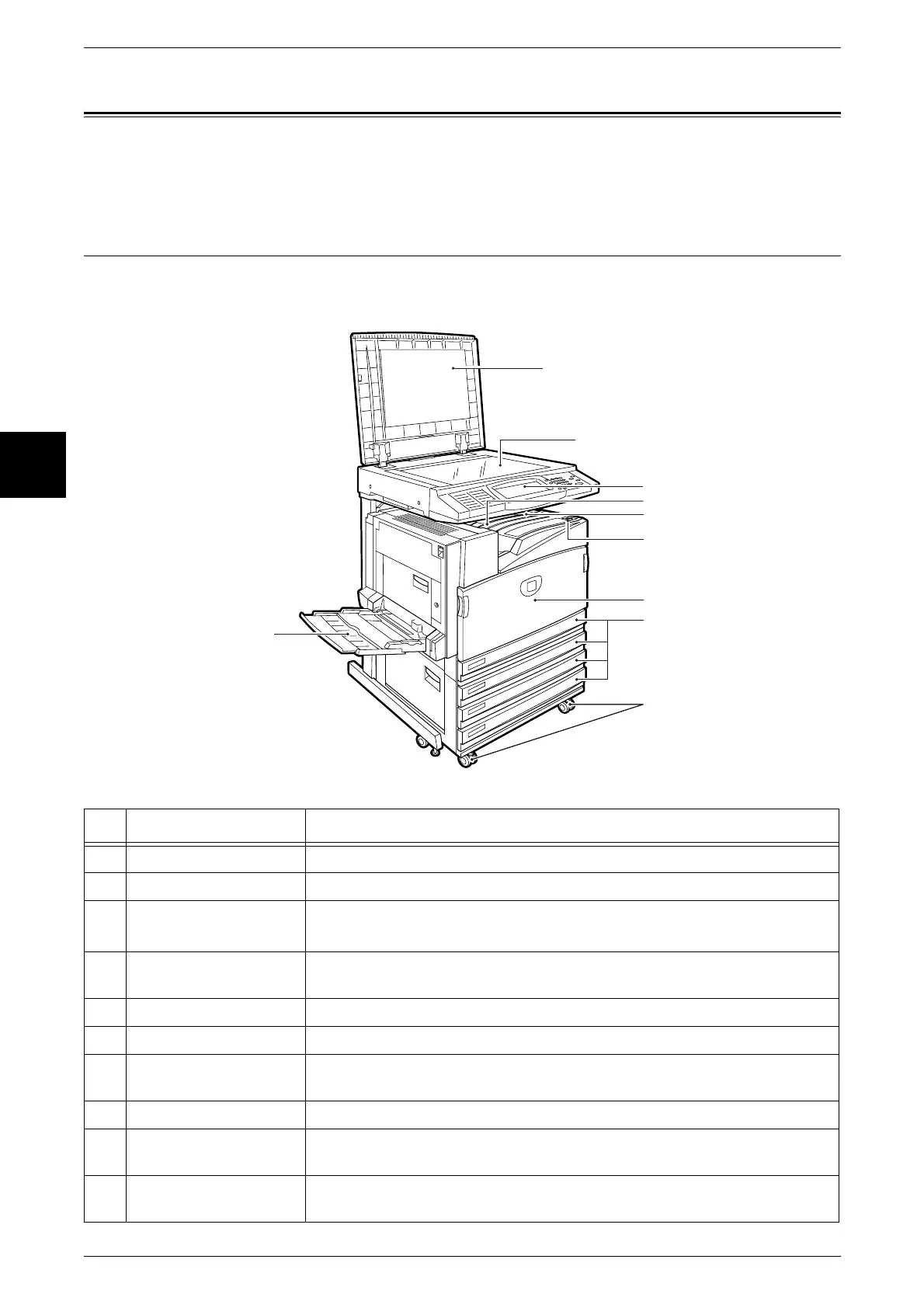
Main Body
4 Tray Model
No. Component Function
1 Document cover Holds the document down.
2 Document glass Load documents here.
3 Control panel It consists of operation buttons, LED indicators and a touch screen.
Refer to "Control Panel" (P.42).
4 Center output tray
(Output tray)
Copies and prints are delivered here facing down.
5 Paper stopper Set upright for use when making copies or prints.
6 Power switch Switches the power of the machine on/off.
7 Front cover Open this cover to access the insides of the machine to replace
consumables.
8 Tray 1, 2, 3, 4 Load papers here for copying.
9 Tray 5 (Bypass) Used for loading non-standard paper (thick-stock paper, and other special
media) that cannot be loaded in Trays 1 to 4.
10 Locking casters Used for locking the wheels of the machine. Lock these casters after moving
the machine to its installation site.
5
6
7
8
10
9
1
3
4
2












 To Next Page