Copy Mode Settings
275
Setups
11
Copy Mode Settings
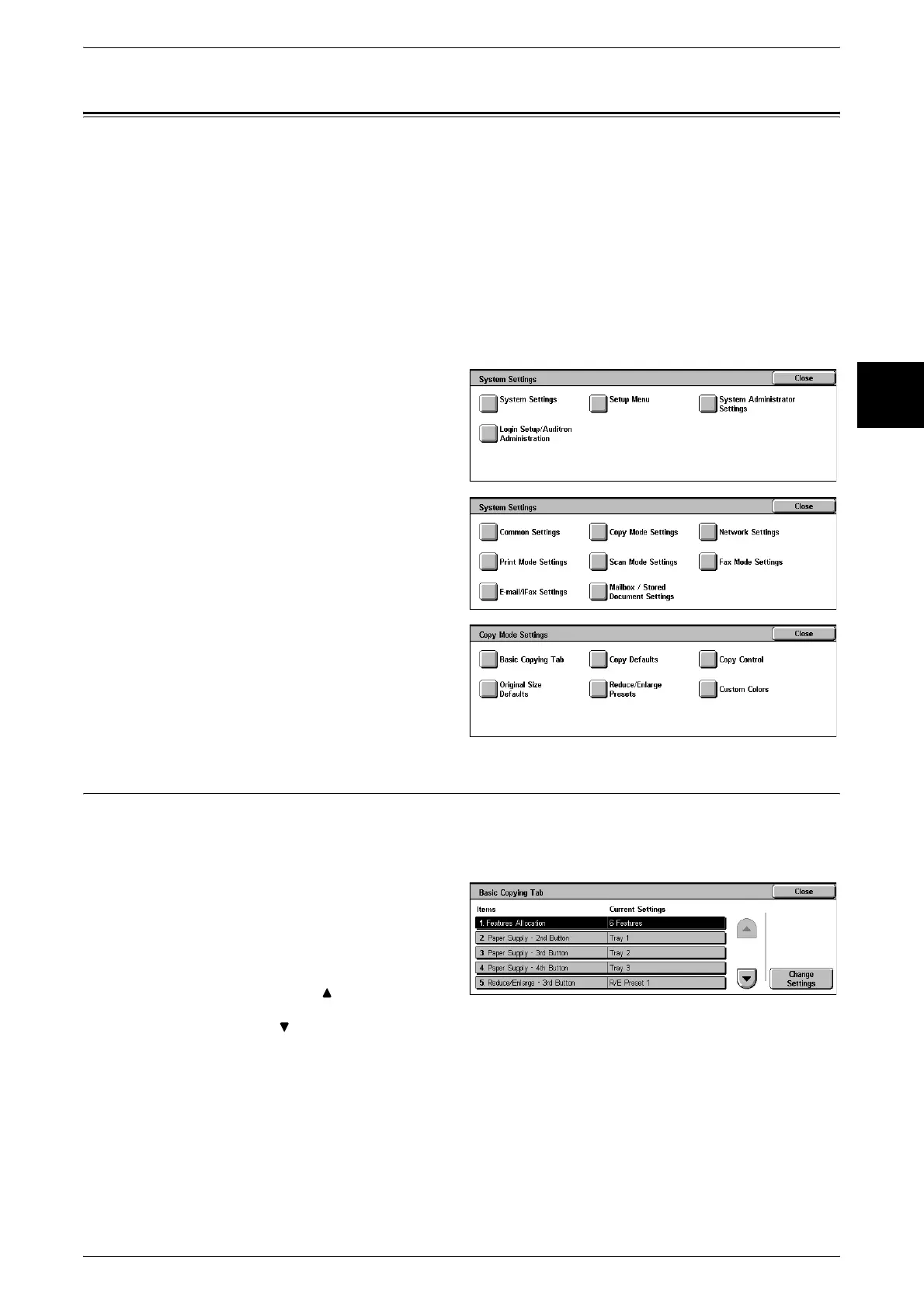
In [Copy Mode Settings], you make settings relating to the copy feature. The following
are the places to reference for information about each item.
Basic Copying Tab................................................................................................................... 275
Copy Defaults........................................................................................................................... 277
Copy Control............................................................................................................................ 281
Original Size Defaults.............................................................................................................. 284
Reduce/Enlarge Presets............................................................................................................ 284
Custom Colors.......................................................................................................................... 285
1 In the [System Settings] screen,
select [System Settings].
For the method of displaying the [System
Settings] screen, refer to "System Settings
Procedure" (P.240).
2 Select [Copy Mode Settings].
3 Select the item to be set.
Basic Copying Tab
You can change the tray and magnification settings appearing in the [Basic Copying
Tab] screen. By setting most commonly used tray and magnification settings, you can
reduce the number of selection operations for making a copy.
1 Select [Basic Copying Tab].
2 Select the item to be set or
changed, and select [Change
Settings].
Note • Select [ ] to display the
previous screen and select
[ ] to display the next screen.
3 Select the setting value.
4 Select [Save].












 To Next Page