11 Setups
320
Setups
11
Mailbox/Stored Document Settings
In [Mailbox/Stored Document Settings], make the settings for handling of documents
stored in mailboxes. The following are the places to reference for details of each
setting.
Note • This feature does not appear for some models. An optional package is necessary. For more
information, contact our Customer Support Center.
Mailbox Settings .......................................................................................................................320
iFax to iFax ...............................................................................................................................321
iFax to E-mail............................................................................................................................321
Stored Document Settings.........................................................................................................321
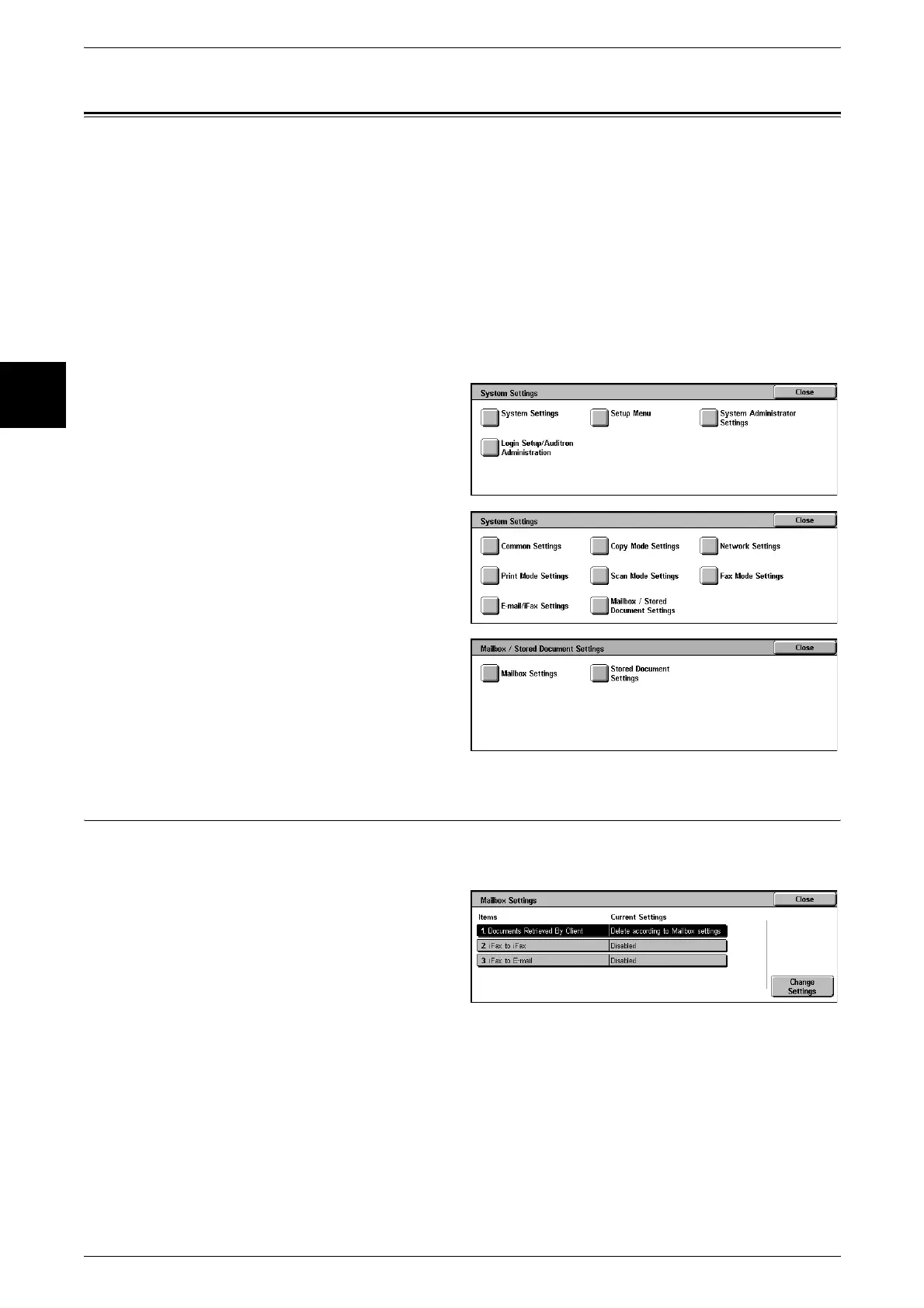
1 In the [System Settings] screen,
select [System Settings].
For the method of displaying the [System
Settings] screen, refer to "System Settings
Procedure" (P.240).
2 Select [Mailbox/Stored Document
Settings].
3 Select the item to be set or
changed.
Mailbox Settings
Set what happens after documents from a client are received and when forwarding
received iFax documents.
1 Select [Mailbox Settings].
2 Select the item to be set or
changed, and select [Change
Settings].
3 Set the setting value.
4 Select [Save].












 To Next Page