Paper Types
229
Paper and Other Media
10
Usable Paper
The following describes the types of paper that can be used on the machine other than
recommended paper.
Note • The above limits describe the results of measurements made in the following environment,
and guarantees can not be made for other environments.
A-zone (high temperature and humidity) 28ºC, 85%
B-zone (normal office) 22ºC, 55%
C-zone (low temperature and humidity) 10ºC, 15%
Usable Special Media
Copies and prints can also be made on the following paper type when Tray 5 (bypass)
is used. This media is called special media. The following table shows the main special
media that can be used on this machine:
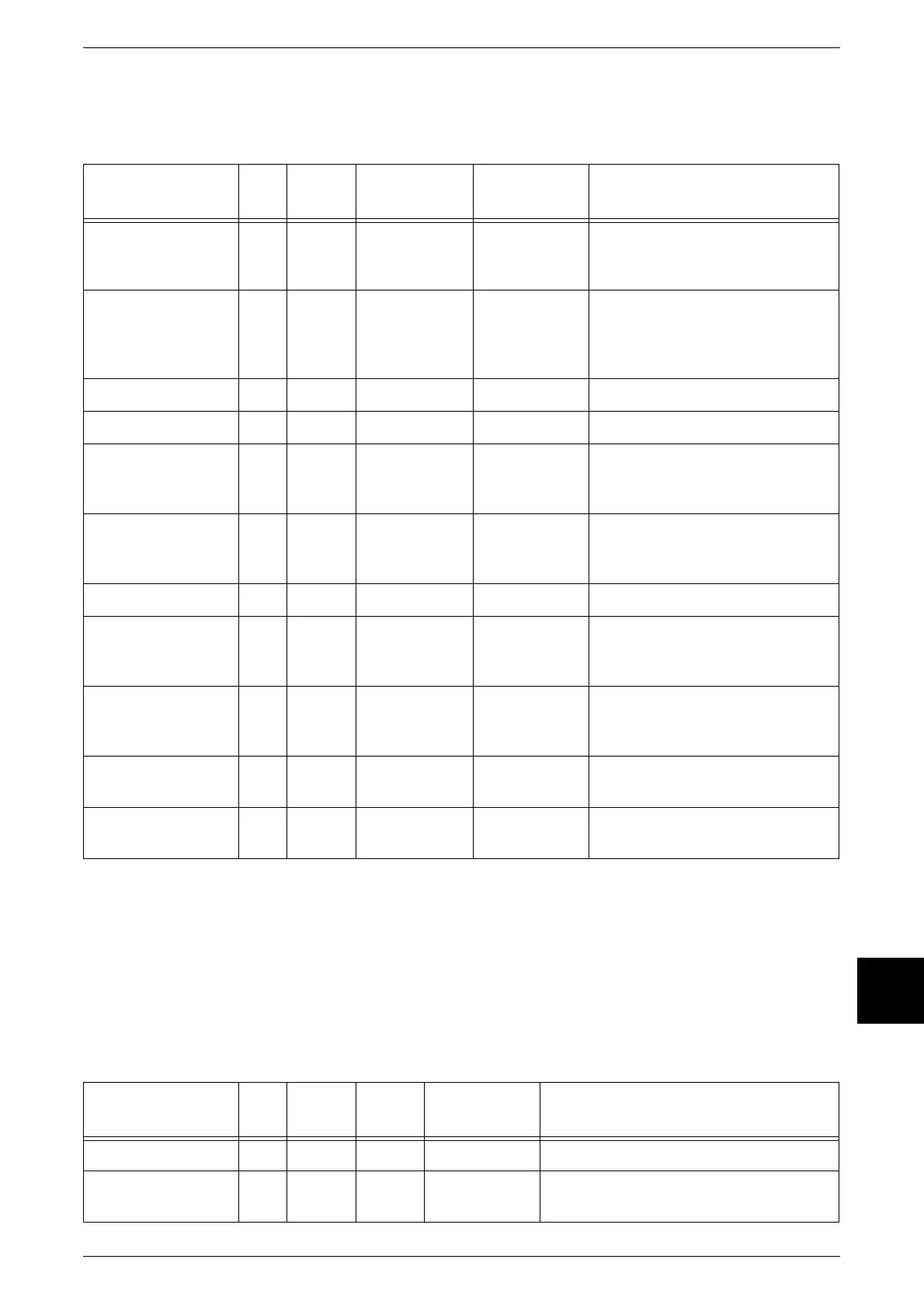
Paper Name Size
Paper
Weight
Paper Type
Image
Quality
Usage Notes
Colotech Plus A3 100 Heavyweight 1 Heavyweight 1 Small white areas appear. To
prevent this, use ColotechPlus 90
g/m2 paper.
Green Wrap A4 80 Plain Plain Paper D To prevent small dots and minor
white stripes, contact our
Customer Support Center for
adjustment.
Colotech Plus Gloss A4 140 Heavyweight 1 Coat 1
Pro-Explore A4 100 Heavyweight 1 Heavyweight 1
XEROX ONE A4 80 Plain Plain Paper D Small dots appear in solid areas.
To prevent this, use Diplomat
paper.
XEROX ONE A3 80 Plain Plain Paper D Image wrinkle may occur
sporadically. To prevent this, use
Diplomat paper.
Warrior A3 80 Plain Plain Paper D Small dots appear in solid areas.
KX A4 Paper A4 75 Plain Plain Paper D Small dots appear in solid areas
when used in the C-zone. To
prevent this, use KX-H paper.
P70 V703 A3 70 Plain Plain Paper D Small dots appear in solid areas.
To prevent this, use Premium
paper.
Xcite(Red) A3 80 Plain Plain Paper D Small dots appear in solid areas
when used in the A- and C-zones.
Transmate A3 80 Plain Plain Paper D Dots appear in solid areas when
used in the A- and C-zones.
Paper Name Size
Paper
Weight
Paper
Type
Image
Quality
Usage Notes
3R96019 A4 OHP OHP OHP Solid areas may come out light.
Laser Card
040P00142
A4 A4 Label Plain Paper D Small dots may appear.


 To Next Page