15 Maintenance
410
Maintenance
15
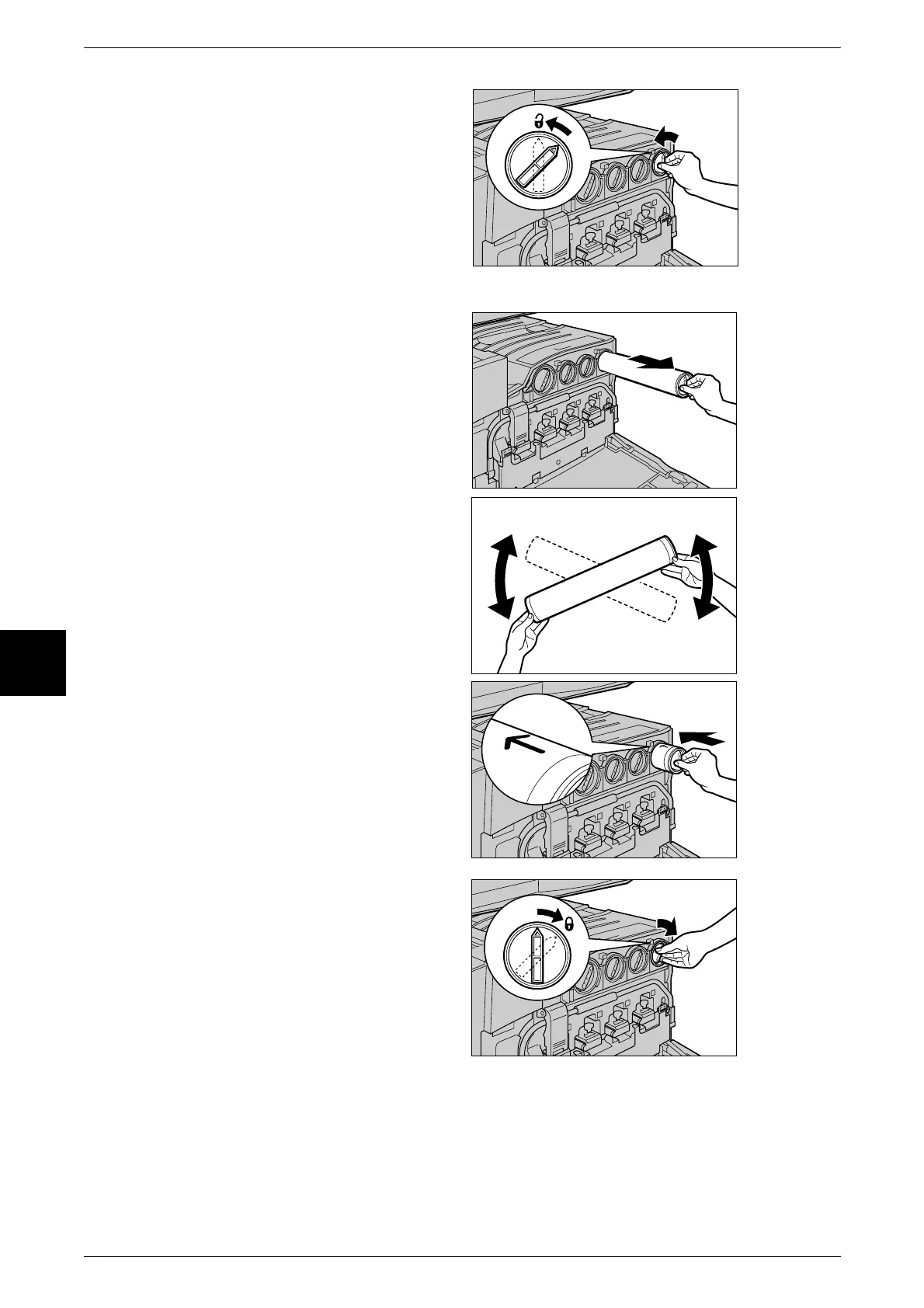
2 Turn the toner cartridge of the color
indicated in the message
anticlockwise to the unlocked
position.
Note • "Y" is for yellow, "M" is for
magenta, "C" is for cyan, and
"K" is for black.
3 Remove the toner cartridge by
gently pulling it towards you.
Important • Pull out the toner cartridge
gently. Otherwise, toner may
fly out of the cartridge.
• Return used toner cartridges
to our Customer Support
Center for disposal.
4 Prepare a new toner cartridge of
the same color as the cartridge that
you removed and gently tilt the
cartridge three or four times up,
down, left, and right as shown in
the figure on the right.
5 Insert the toner cartridge as far as
possible with the arrow (K) on the
cartridge facing upwards.
6 Turn the toner cartridge clockwise
to the locked position.
7 Close the front cover.
Note • A message will be displayed and the machine will not operate if the front cover is even
slightly open.












 To Next Page