2 Product Overview
40
Product Overview
2
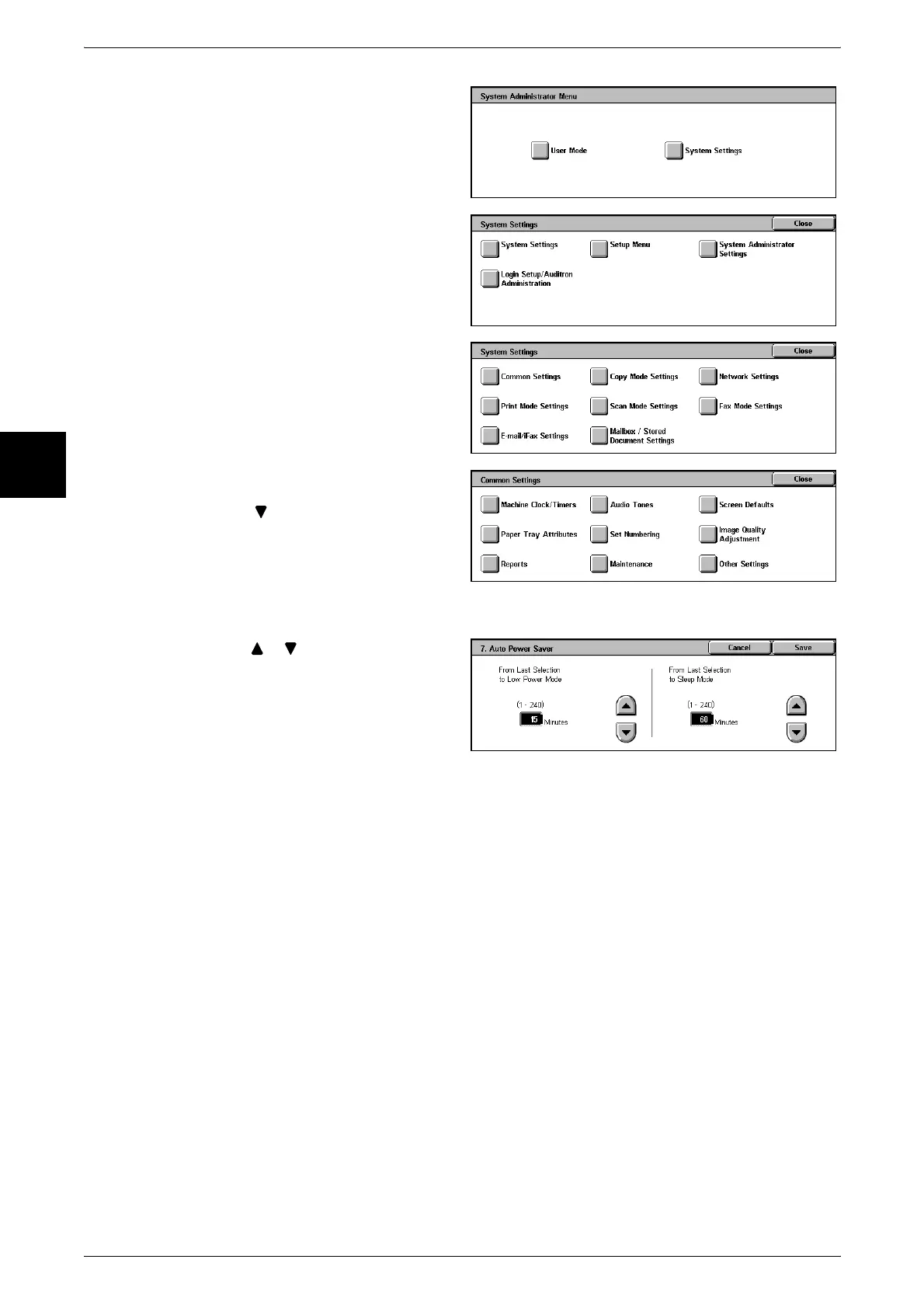
3 Select [System Settings].
4 Select [System Settings].
5 Select [Common Settings].
6 Select [Machine Clock/Timers].
7 Select [ ].
8 Select [7. Auto Power Saver], and select [Confirm/Change].
9 Using [ ] [ ], configure a power
saver mode migration time from 1
to 240 minutes, in 1 minute
increments.
From Last Selection to Low Power Mode
Set the time to move to the [Low Power Mode] after the last operation.
Note • The default for [From Last Selection to Low Power Mode] is [15] minutes. The Low Power
Mode cannot be set to [Disabled].
From Last Selection to Sleep Mode
Set the time to move to the [Sleep Mode] after the last operation.
Note • The default for [From Last Selection to Sleep Mode] is [60] minutes. Configure the [From
Last Selection to Sleep Mode] time to be longer than the [From Last Selection to Low Power
Mode] time.
10 Press [Save].
11 Select [Close] repeatedly until the [System Settings/Registration] screen is displayed.
12 Select [Exit] to exit the System Administration mode.












 To Next Page