➢➢ To upgrade YVIB hardware forms (S1A to S1B)
Attention
Redundant Safety I/O packs mounted on the same terminal board must all be of the
same hardware form, and running the same firmware version.
Do NOT attempt this replacement unless having enough I/O packs with the newer
hardware form available, including spares.
It is also recommended to backup the ToolboxST .tcw file prior to upgrading the
system.
1. The site’s ControlST software must be minimum V06.01. Verify the version and upgrade the system if needed.
2. Install the YVIBH1B I/O pack firmware from the ControlST V06.02 or later DVD.
3. Run an I/O report to capture the current configuration of the YVIB I/O module.
4. From the Component Editor, modify the hardware form of the YVIB I/O pack.
5. From the ToolboxST Component Editor, perform a YVIB firmware Upgrade.
6. From the Component Editor, make the changes to the YVIB configuration.
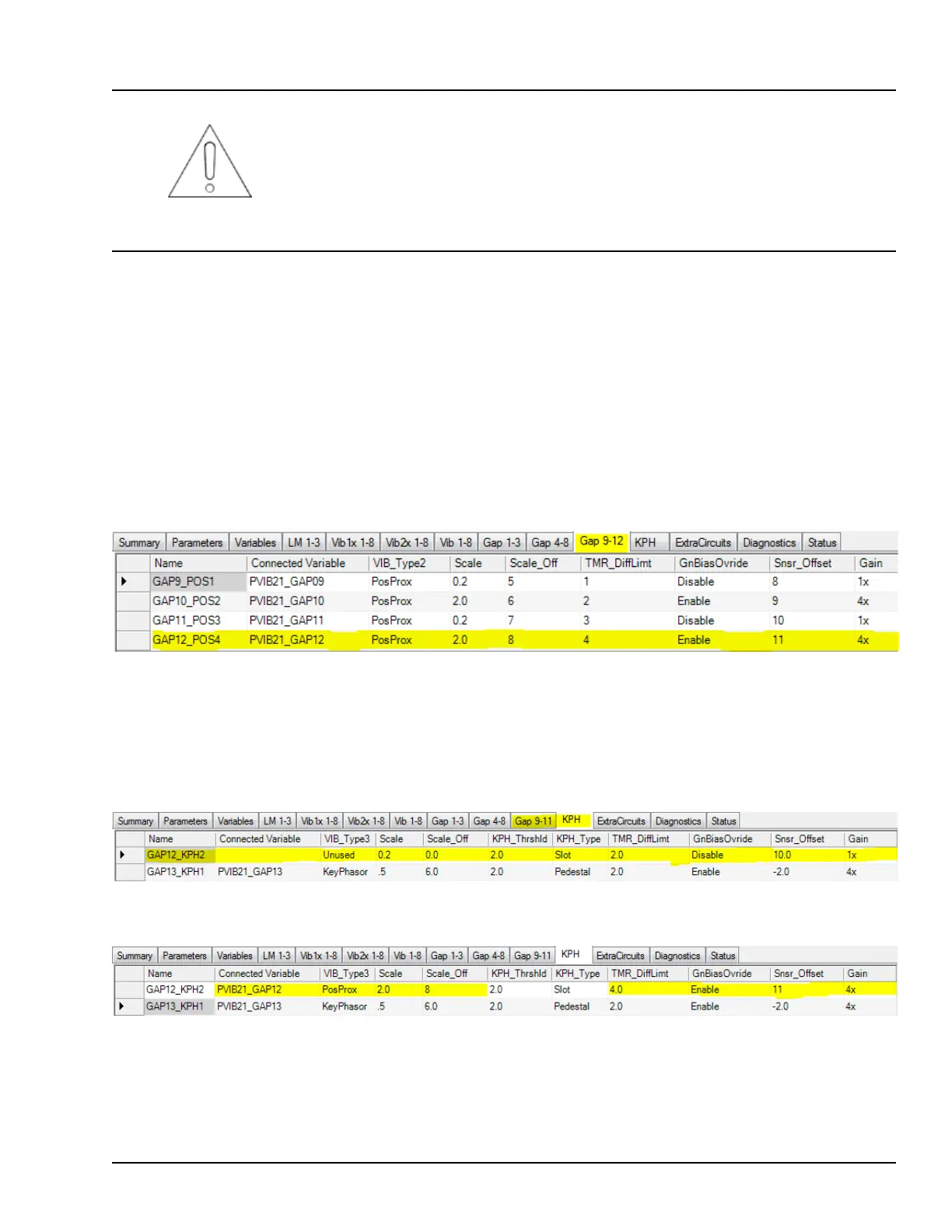
7. Refer to the I/O report generated prior to Upgrade and the Gap 9–12 configuration.
Gap 9–12 Before Upgrade (example)
8. GAP12_POS4 configuration is reset to defaults after the upgrade and renamed GAP12_KPH2. It will need to be
manually reconfigured, and have the variable reattached after the upgrade. The variable has been moved from Gap 9-12
tab to KPH tab. Use the following screens as examples for making this correction.
Gap 9–11 and KPH tabs After Upgrade Before Correction (example)
KPH tab After Upgrade After Correction (example)
9. Perform and build and download from the ToolboxST Component Editor. Build errors will display if invalid
configurations are chosen.
YVIB Vibration Monitor Modules GEH-6855_Vol_II System Guide 233
Public Information



 To Next Page