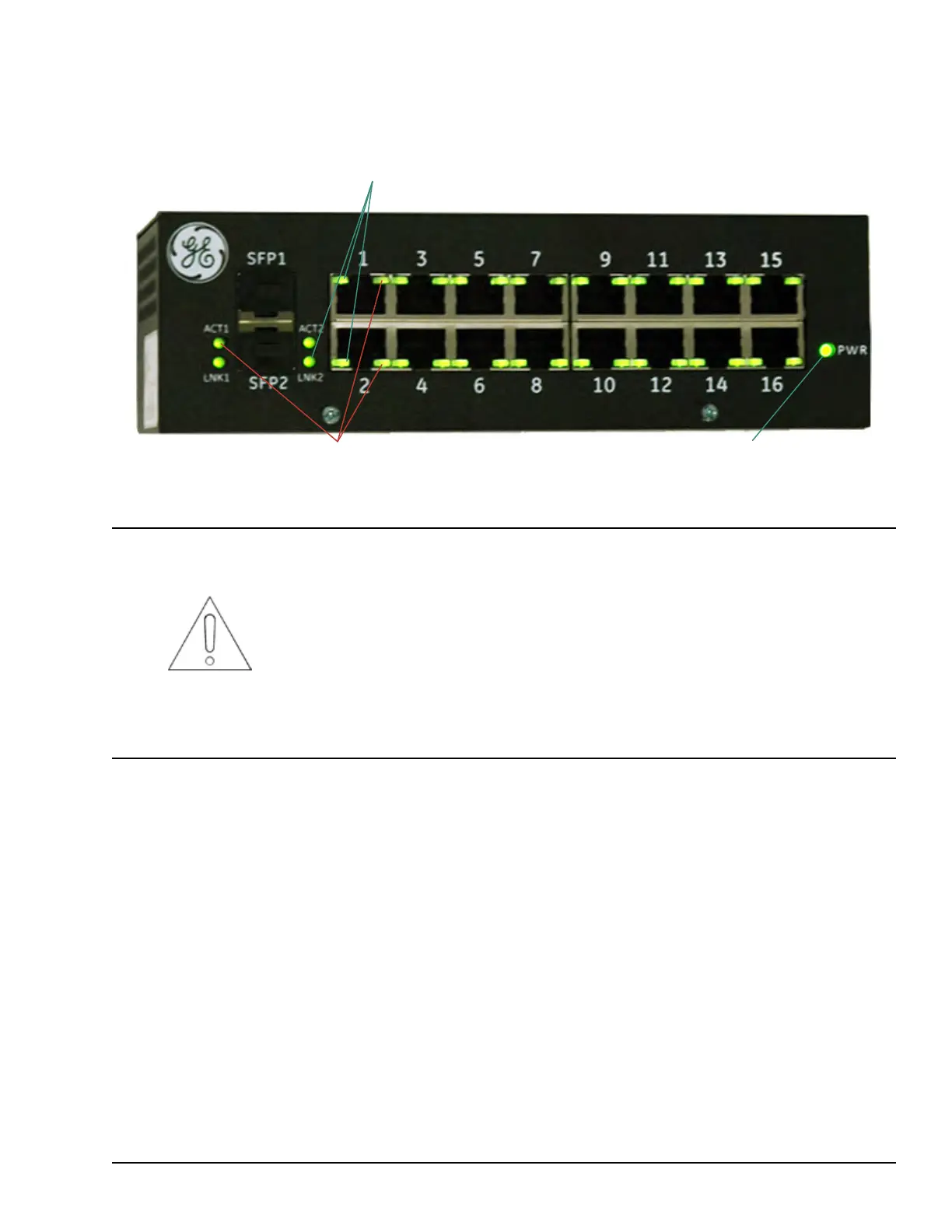
3.5.4 Diagnostic LEDs
The following figure defines the LED functions on the ESWx switch.
Power is solid green when internal
power supply is up and regulating
For each of the 16 ports (and SPF ports),
the Activity LED functions as follows:
•
flashes green for activity at full duplex
•
flashes yellow for activity at half duplex
For each of the 16 ports (and SPF ports),
the Link LED functions as follows:
•
Solid green with 100 MB link
•
Solid yellow with 10 MB link
•
Not lit if no link
Attention
In certain conditions, an input voltage sag, known as a brownout, may cause the GE
IS420ESWBH#_ (ESWB) I/O Network (IONet) switch to incorrectly reboot and fail to
re-establish communication with the system. If the ESWB switch experiences a
brownout condition that reduces the input 28 V line below the minimum operating
voltage but not completely to 0 V, when the input voltage returns to above the
minimum operating voltage, the switch may not correctly reboot. If this occurs, the
ESWB LEDs will either remain on solid, flash in sync, or scroll from one side to the
other, and the switch will not re-establish communication. If the site experiences a
brownout, after the voltage returns and the IONet loses communication, observe the
LEDs on the front of the switch. If they are solid, flashing in sync, or scrolling, cycle
power to manually reboot the switch.
Unmanaged Ethernet Switches GEH-6855_Vol_II System Guide 89
Public Information



 To Next Page