8.1 Adding Comments
120
To select from preset terms
Pressing the WAVE key after activating text input brings up a list of preset
terms.
It is also possible to select words from previously entered titles (History func-
tion).
See: "Entering Text From a Term List Or History List" ( p.122)
3
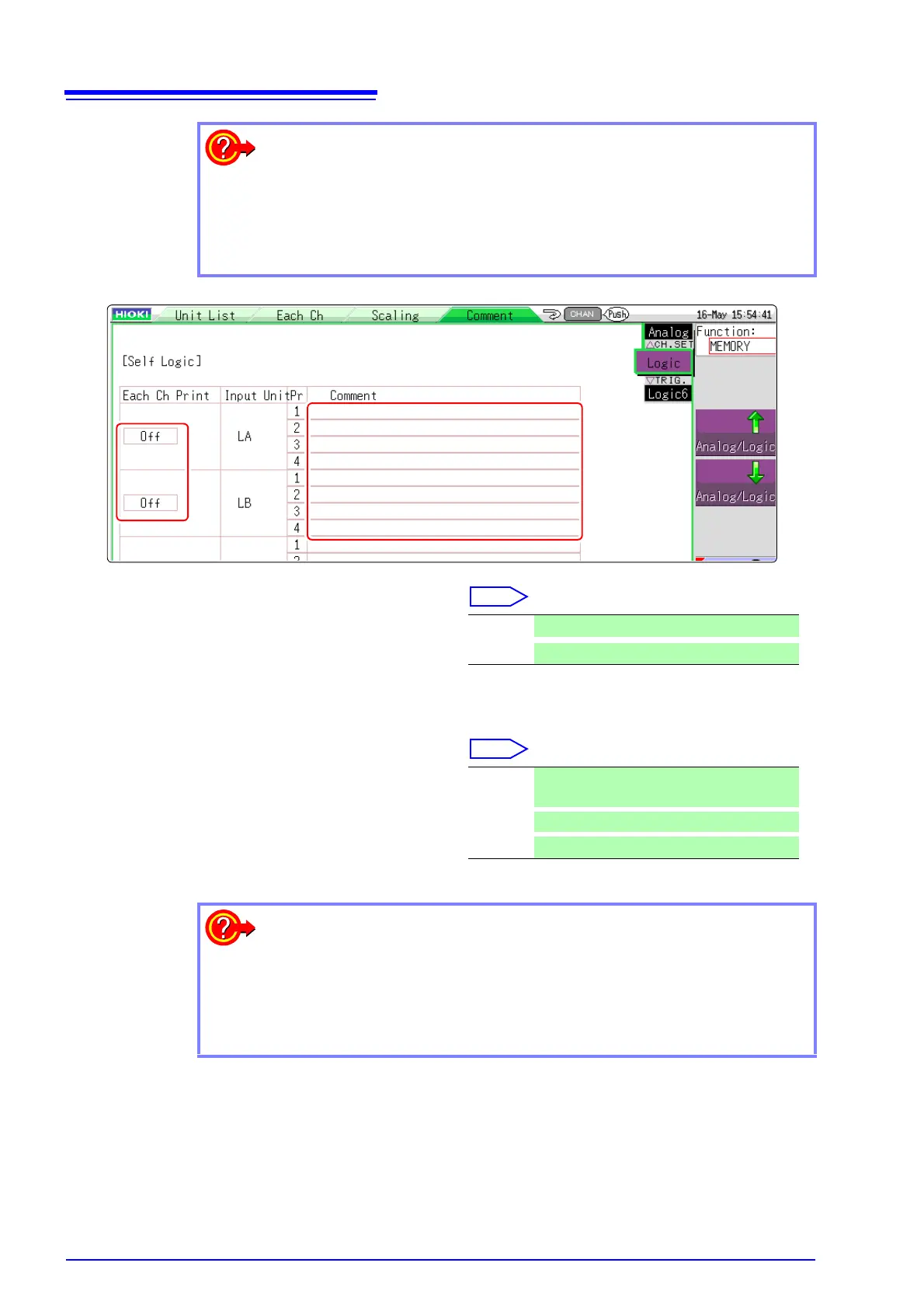
Select the print content for each logic
channel.
Select [Analog/Logic] to display logic chan-
nel page.
Move the cursor to the [Each Ch Print] item.
4
Enter the comment for each logic channel.
Move the cursor to the [Comment] item.
Off Comments are not printed.
Comment
Comments are printed.
Input Enter comment text.
See: "Entering Text" ( p.121)
Clear
Clear entered information
Undo
Return to condition of preceding step
To select from preset terms
Pressing the WAVE key after activating text input brings up a list of preset
terms.
It is also possible to select words from previously entered titles (History func-
tion).
See: "Entering Text From a Term List Or History List" ( p.122)


 To Next Page