9/29/09 System 824 Views 5-41
• Run / Stop indicator
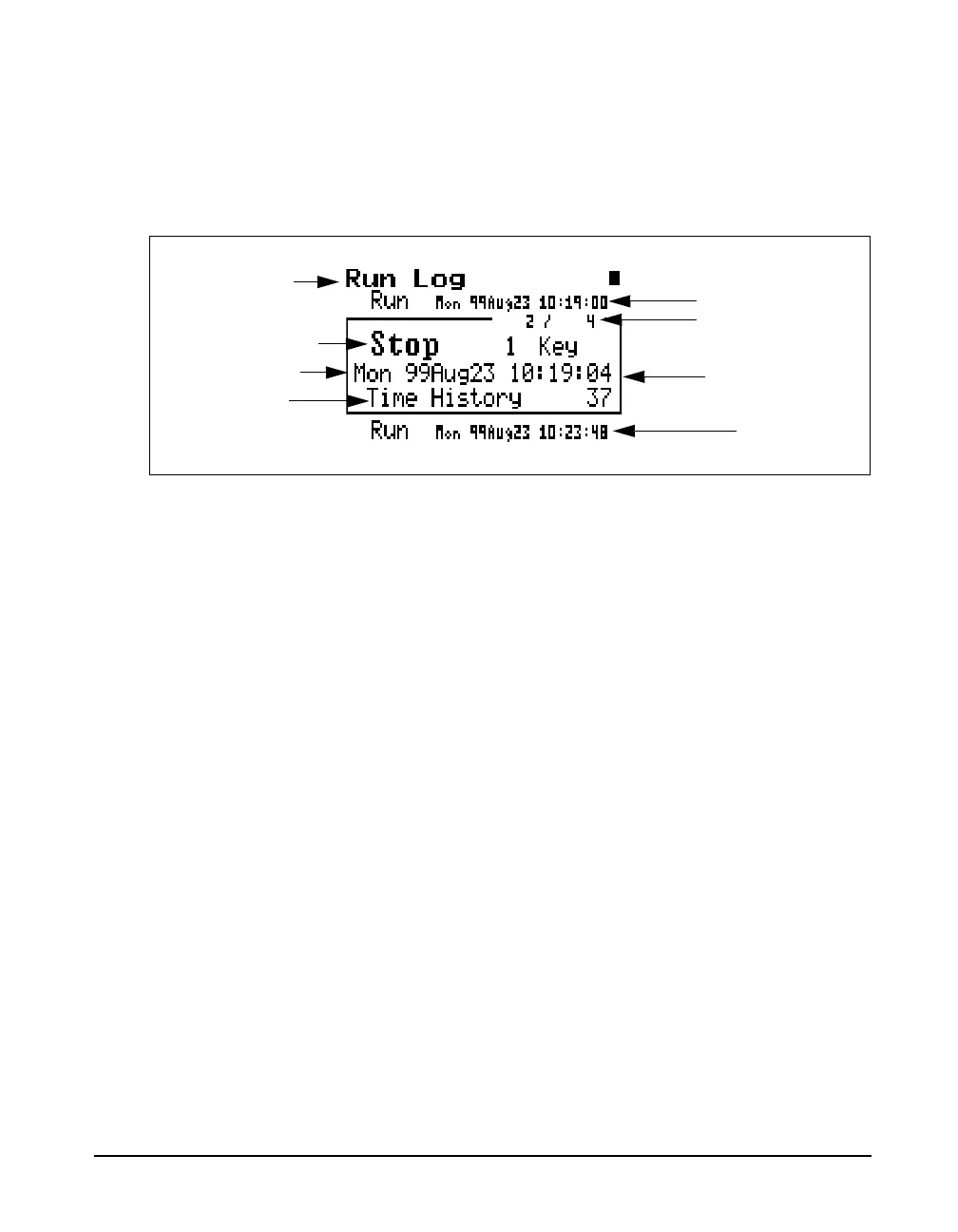
The Run Log display is shown below for the LOG and SSA
instruments:
The following explains this display’s components:
Display label - Shows the display currently being used (for
example, “Run Log”).
Log Number- The “Run Log” display shows the start and
stop times/dates of measurements in active memory. Each
measurement is logged in memory in the order that it
occurred. The Log Number indicates the order of the
displayed log entry in relation to the other log entries
currently in active memory.
Event Date/Time - The Event Date/Time shows the time
and date that this Log entry either started to run or was
stopped.
Run/Stop Indicator- Each measurement reading log has
two entries; one corresponding to when the measurement
started to run and the other entry corresponding to when the
measurement was stopped. The Run/Stop indicator shows
whether the log entry indicates the time and date of a Run
log entry or a Stop log entry.
Display label
Event Date/Time
Log Number
Run/Stop Indicator
Previous action
Previous record
Next record
Current record
Number of time
history samples for
this run/stop period



 To Next Page