9/29/09 System 824 Views 5-57
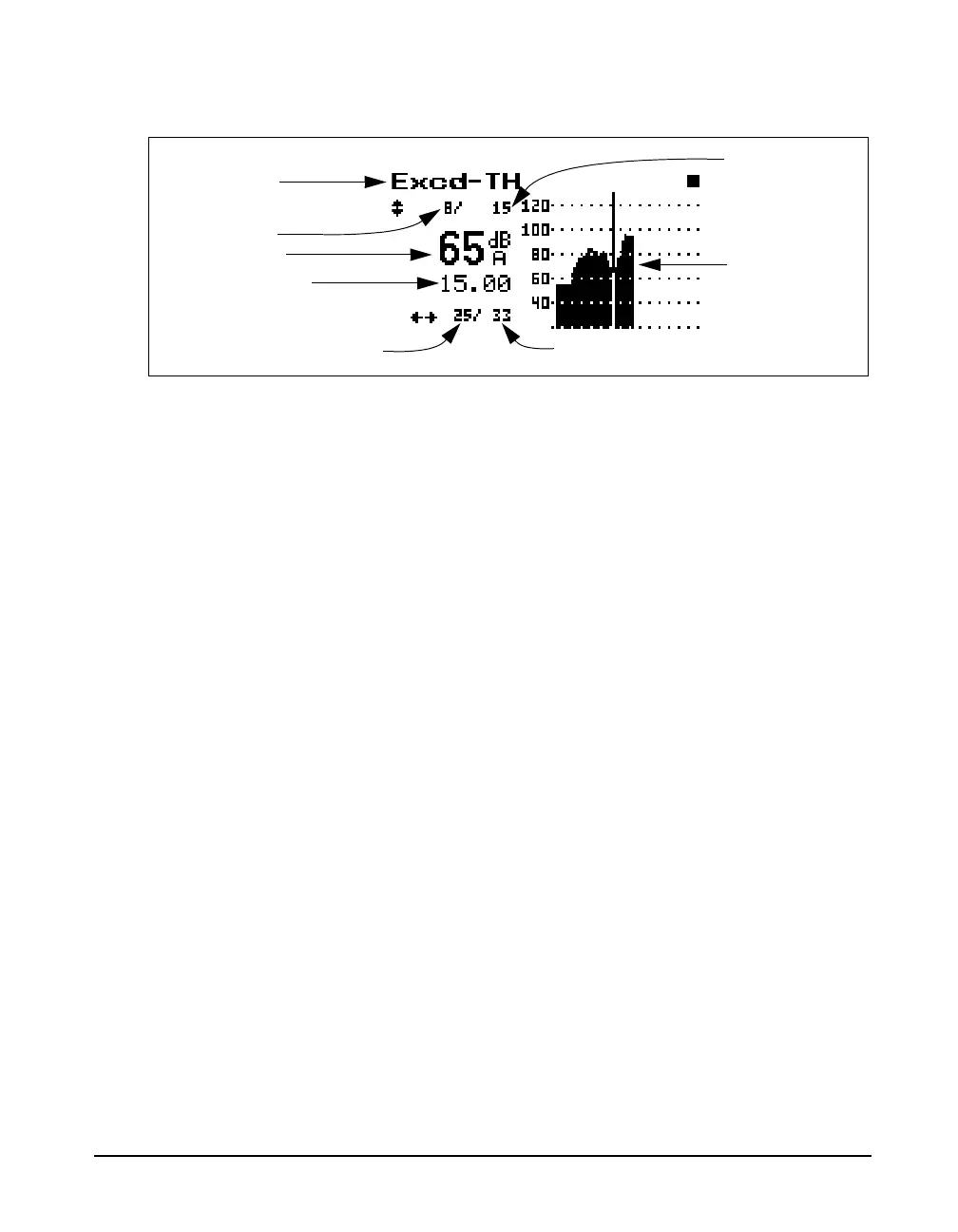
The following explains each of the display’s components:
Display Label - This shows the current display (for
example, “Excd-TH”)
Current Record - The “Excd-TH” display shows each
exceedance record in the order that it occurred. This number
shows that you are viewing the time history corresponding
to this particular exceedance record. Use the
dandukeys to move forward or backwards,
respectively, through the sequence of Exceedance History
records. Alternately, you can press the ckey, highlight
Locate, and press the ckey again. This will open a window
permitting you to jump to the first or last Exceedance or to a
selected exceedance record.
Level at Cursor - Shows the level in dB at the point in time
indicated by the cursor. Use the randlkeys to position
the cursor along the time axis.
Time at Cursor - Shows the time in seconds of the sample
indicated by the cursor.
Current Sample - This is the current sample number as
indicated by the cursor.
Total Number of Samples -Shows the total number of
samples taken for this exceedance.
Total Number of Excd Records - Shows the total number
of exceedances recorded.
Display label
Current record
Total number of samples
Current sample
Total number of
Excd records
Level at cursor
Time at cursor
Graph of Excd
time history



 To Next Page