11-34 824 Reference Manual 9/29/09
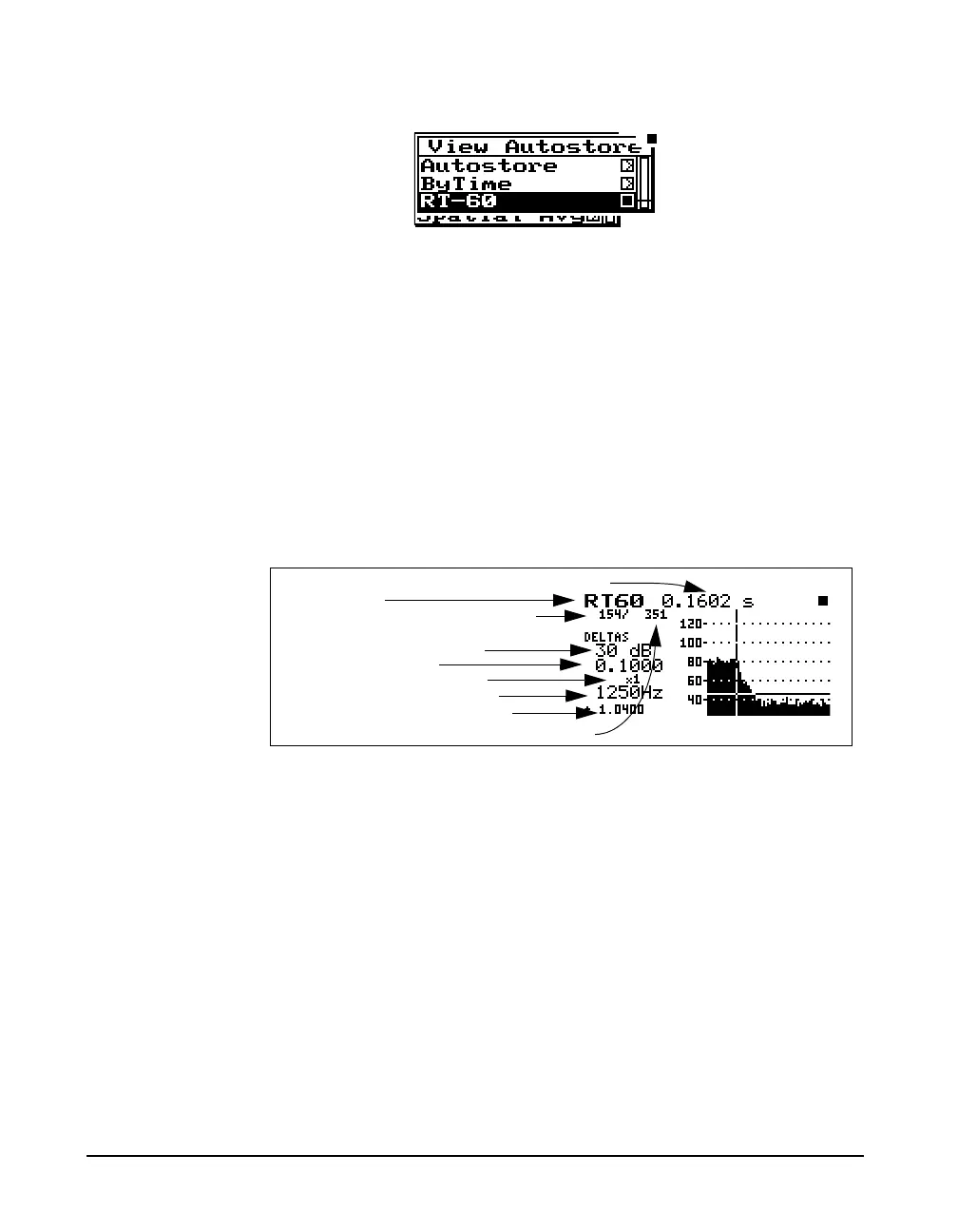
Highlight “RT-60” and press the c check key.
RT60
The RT-60 analysis display uses the ByTime history to
calculate a room decay time. This time is calculated from the
cursor position to a point a number of dB down as set by the
“RT60 dB Down” setting and then extrapolated to a drop of
60 dB using a “Least Squares” slope calculation method.
The
uup and ddown arrow
keys move you to the next higher and
lower filter frequency. The
lleft
and
rright arrow keys move you
to the previous and next ByTime
sample.
An auto-select routine will automatically locate the cursor to
be 5 dB below the maximum level. The auto-select is
executed on demand from the check menu and the first time
the RT-60 display is selected. There is a vertical line for the
cursor specifying the beginning of the measurement and a
horizontal line drawn at the dB down level.
If auto RT60 is set to “Yes”, the
auto-select routine will be performed
whenever a new filter is selected.
Auto-select also sets the horizontal zoom so that the whole
decay fits on screen.
RT-60 time in seconds at frequency shown
Display label
RT-60 dB down setting
RT-60 delta time
Horizontal graph scaling
Selected filter frequency
ByTime sample time
Total number of ByTime samples
Current ByTime sample number



 To Next Page