215676 303 Revision A
Adjusting Reel Speed
The A40D Auger Header’s reel is hydraulically driven. Adjusting the reel speed also changes the auger speed, unless the
auger speed is initially set to a predetermined value. Follow this procedure to set the auger speed so that subsequent reel
speed adjustments will only affect the reel.
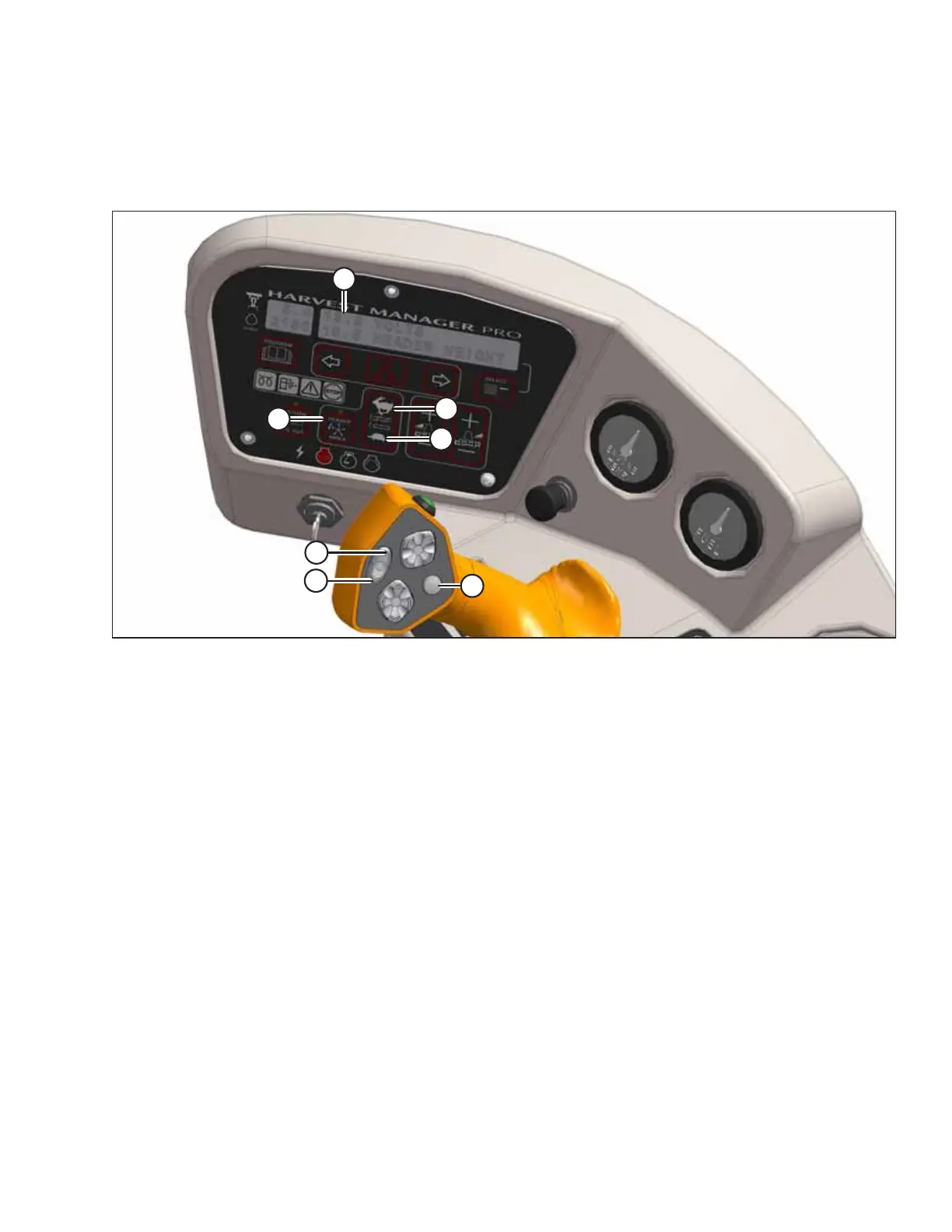
Figure 4.306: Operator Console
A - Display B - Header Index C - Auger Fast
D - Auger Slow E - Fast F - Slow
G - Display Selector
NOTE:
Once the reel speed has been configured, subsequent adjustments to the reel speed will NOT affect the auger speed.
1. Start the engine.
2. Engage the header.
3. Set HEADER INDEX SWITCH (B) to OFF.
4. On the ground speed lever (GSL), press REEL SLOW switch (F) until a beep is heard. The message ##.## REEL RPM will
appear at location (A).
5. Press AUGER SLOW button (D) or FAST button (C) to set the desired auger speed. The message ##.# AUGER SPEED will
appear at location (A).
6. On the GSL, press REEL SLOW button (F) or FAST button (E) to set the desired reel speed. The message ##.## REEL
RPM. will appear at location (A).
OPERATION



 To Next Page