2.2 Troubleshooting with Error Messages VJ628XE-M-00
2.2.2 Errors with Message 20
• The square bracket pair in an error message indicates the applicable ink color.
• If no ink and no cartridge occur at the same time, no cartridge message has priority to be displayed.
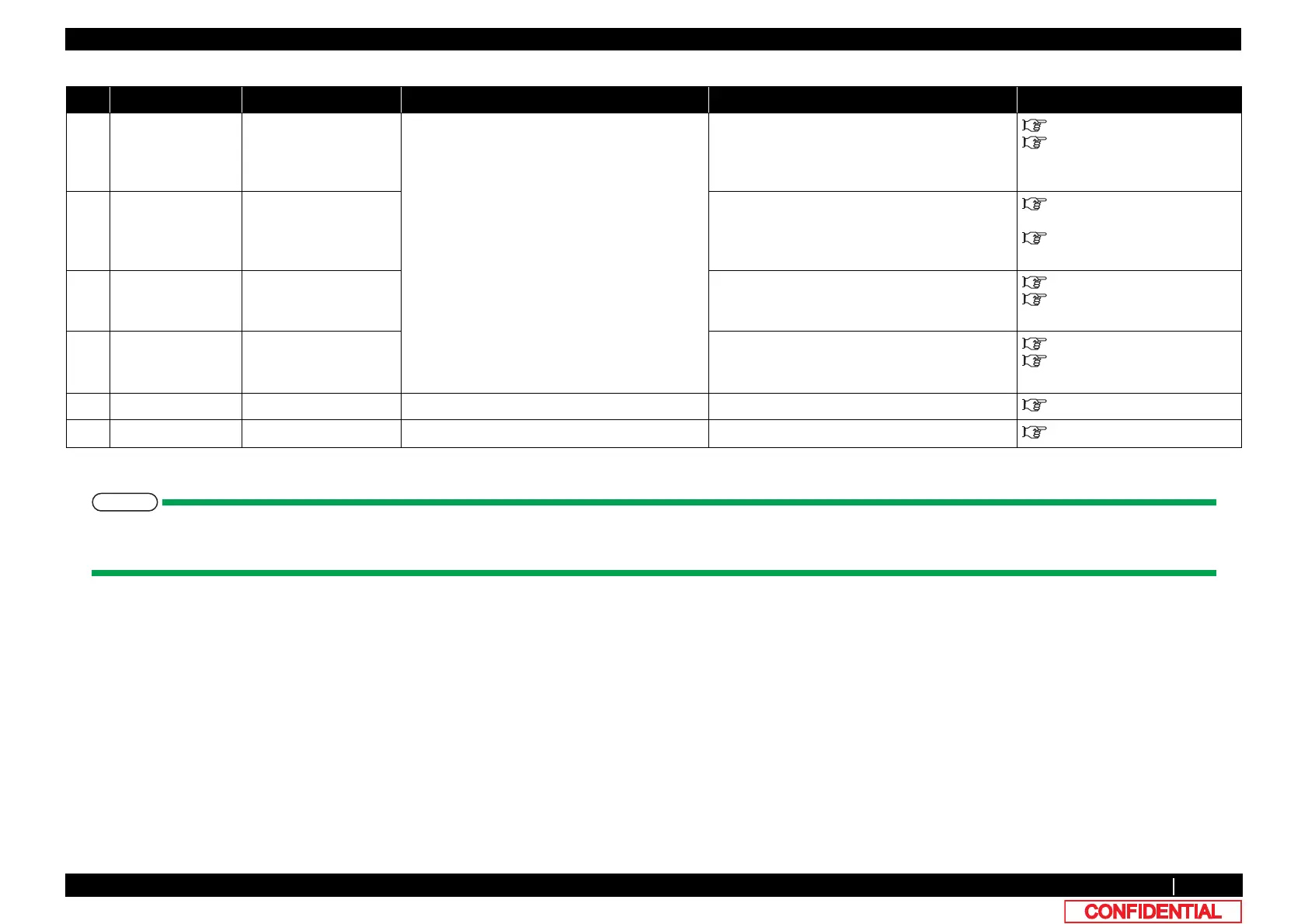
7 Life Times [Head] The operational life of
Head has almost
expired.
Check the life counter in Maintenance mode 2. Replace Head as necessary. Clear the counter
after replacing it.
3.8.15 Replacing Head
6.3.4 Counter Initialization
Menu
8 Life Times [Pump] The operational life of
Pump has almost
expired.
Replace Pump as necessary. Clear the counter
after replacing it.
"3.10.7Replacing Maintenance
Assy
6.3.4 Counter Initialization
Menu
9 Life Times [CR
Motor]
The operational life of
CR motor has almost
expired.
Replace CR motor as necessary. Clear the
counter after replacing it.
"3.6.1Replacing CR Motor
6.3.4 Counter Initialization
Menu
10 Life Times [PF
Motor]
The operational life of
PF motor has almost
expired.
Replace PF motor as necessary.
Clear the
counter after replacing it.
"3.7.1Replacing PF Motor
6.3.4 Counter Initialization
Menu
11 Smart/C End Smart/C is End. Explain to User that it needs to be Smart Charge. - Operation Manual
12 Smart/C Low Smart/C is Low. Explain to User that it needs to be Smart Charge. - Operation Manual
Table 2-2 Symptoms and Check Items for Errors with Message(Continued)
No. Message Event/symptom Check item Action Reference















 To Next Page