Chapter 6—Configuring and Managing Partitions Creating a Storage Partition
August 2017 User Guide—Spectra T50e Library
184
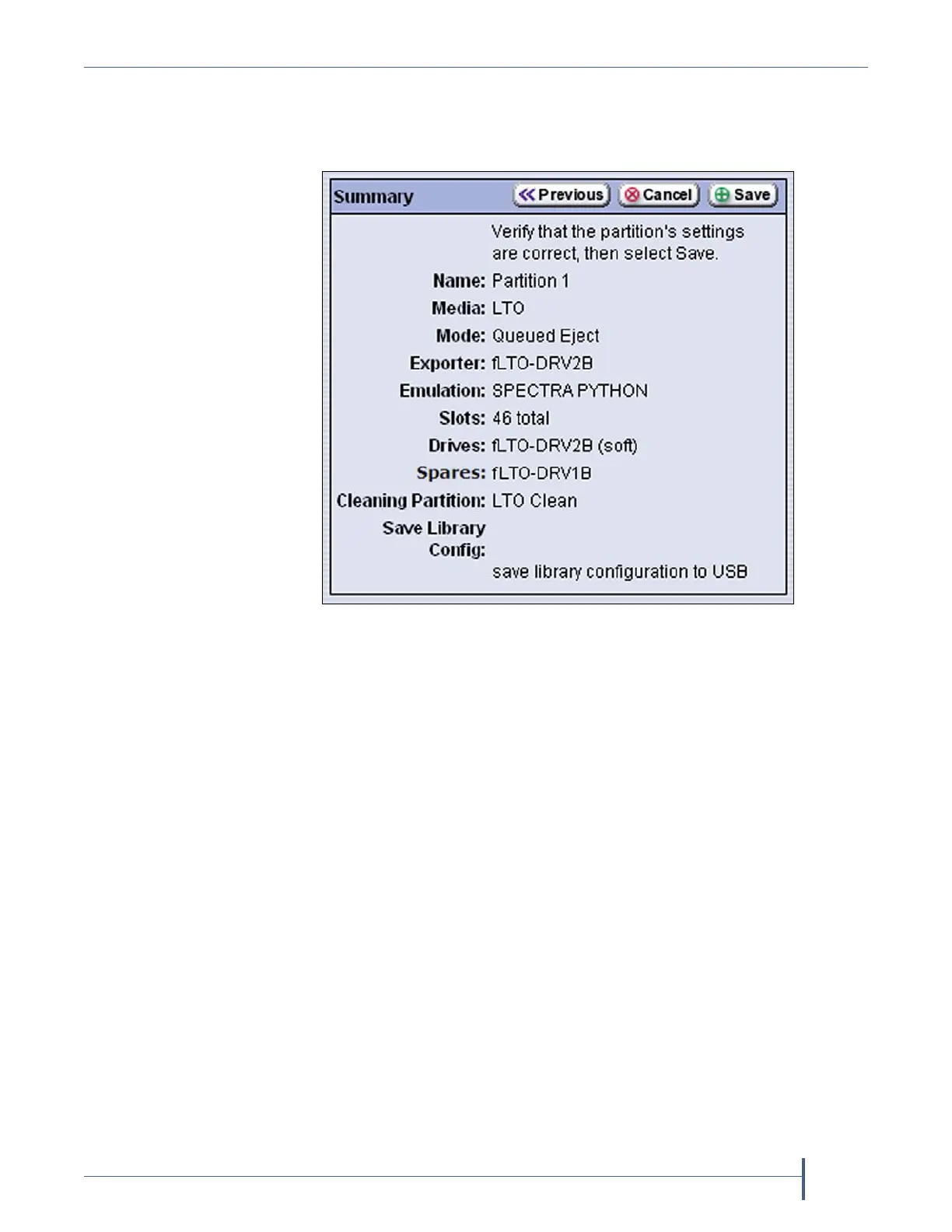
3. ClickNext.TheSummaryscreendisplays.
Note: Dependingontheoptionsyouchose,theSummaryscreenon
yourlibrarymaybedifferentfromtheoneshowninFigure119.
4. ReviewtheinformationontheSummaryscreentoconfirmthatall
settingsarecorrectforthispartition’sconfiguration.
Iftheconfigurationinformationiscorrect,proceedtoStep5.
Iftheconfigurationinformationisnotcorrect,dooneofthe
following:
ClickCanceltoconfigurethepartitionagainfromthebeginning.
ClickPrevioustomovebackwardthroughtheconfiguration
screensuntilyoureachthesettingsthatneedcorrecting.
Asyoumovebackwardthroughtheconfigurationscreens,the
valuesareresettotheirdefaultvalues.Afteryoureachthe
desiredscreenandmakethenecessarychanges,advance
throughthescreensandre‐enterthenecessaryinformationuntil
youagainreachtheSummaryscreen.
Note: Ifthescreenrequiringthecorrectionistowardthebeginningof
theconfigurationprocess,itmaybeeasiesttoclickCanceland
repeattheentireconfigurationprocess.
Figure 120 Confirm the settings for the partition.



 To Next Page