General Programming
BD Alaris
TM
System with Guardrails
TM
Suite MX User Manual 159
3. Press the CONFIRM soft key.
•
PAUSE scrolls in Message Display.
•
PAUSED appears on Main Display.
• Yellow Standby Status Indicator illuminates.
• After 2 minutes:
PAUSE - RESTART CHANNEL visual and audio prompts begin, and yellow Standby
Status Indicator flashes.
4. To reinitiate infusion:
• Press the
RESTART key.
or
• Press the
CHANNEL SELECT key and then the START soft key.
NOTE:
The time displayed in the upper right corner of the screen is the time of day in a 24-hour clock format
(military time).
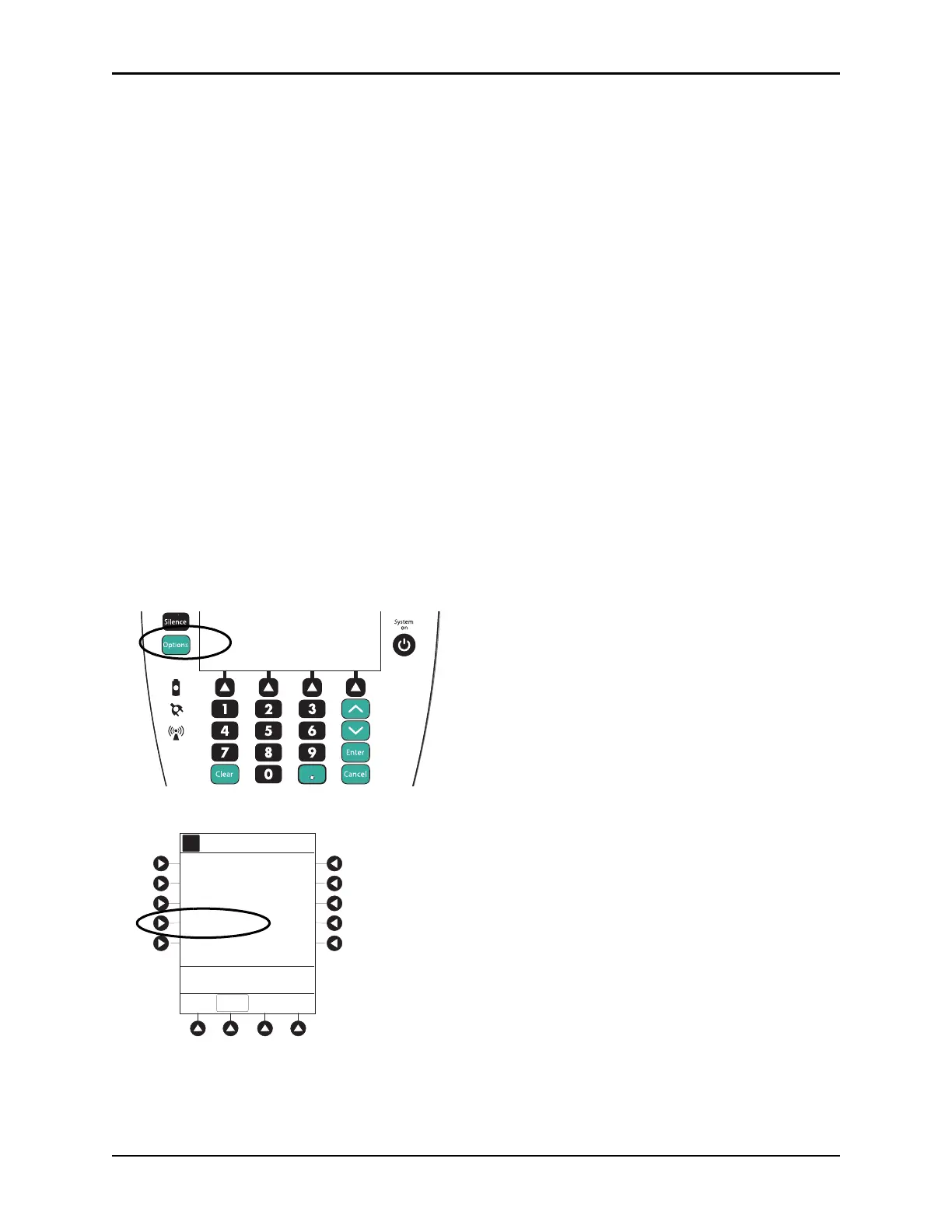
Select Pressure Limit
Pump Module
1. Press the CHANNEL SELECT key.
2. Press the
OPTIONS key.
3. Press the
PRESSURE LIMIT soft key.
Options
Silence
Clear Cancel
Enter
System
on
Channel Options
Guardrails Drugs
Pressure Limit - P
A
>Select an Option or EXIT
EXIT
Channel Labels
Guardrails IV Fluids



 To Next Page