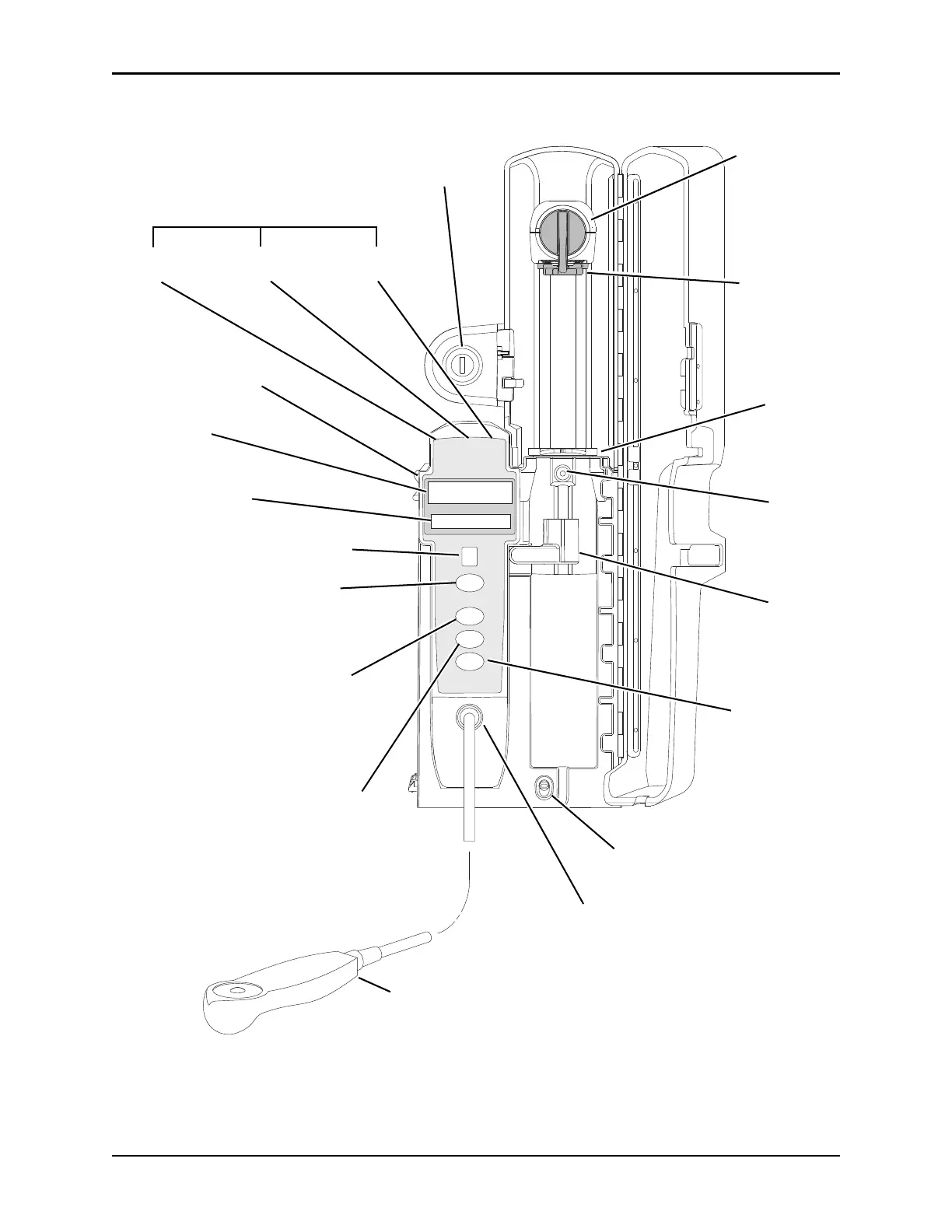
Status Indicators
Alarm
(red)
Infusing
(green)
Standby
(yellow)
IUI Connector, Left
Rate Display
Message Display
Channel (module) Identification
Channel (module) Select Key:
When pressed, selects corresponding
module for infusion parameter entry
and infusion setup.
Pause Key: When pressed during
an infusion, temporarily stops infusion
on that module. After approximately
2 minutes, a visual and audio prompt
begins.
Channel (module) Off Key: When
pressed and held until a beep is heard,
stops infusion on that module, deselects
that module, and if only that module had
been operating, system powers down.
Repeat for other operating modules to
power off each module.
Module Release Latch: When pressed,
allows module to be removed.
Gripper Control/
Drive Head Release
(shown in closed
position)
Plunger Grippers
(shown in closed
position)
Barrel Flange
Gripper
Syringe Barrel
Sensor
Syringe Barrel
Clamp/Sizer
Dose Request Cord Attachment
Dose Request Cord
Security Lock
Restart Key:
When
pressed, resumes
operation of a
previously paused or
alarmed infusion on that
module.



 To Next Page