General Setup and Operation
BD Alaris
TM
System with Guardrails
TM
Suite MX User Manual 31
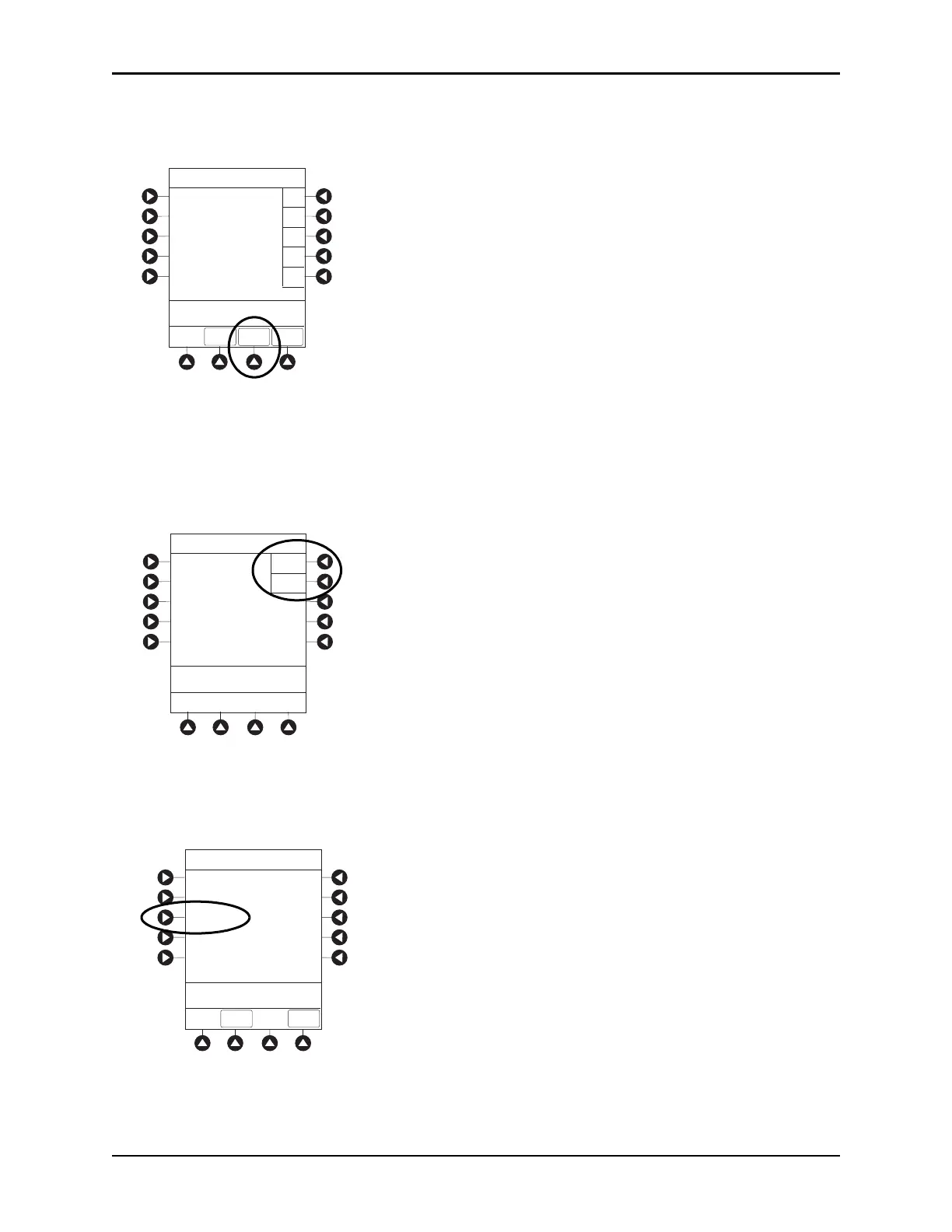
5. To verify correct entry, press the CONFIRM soft key.
New Patient ID Entry verification screen appears.
6. To accept modified patient ID, press the Yes soft key.
Main screen appears with new patient ID.
or
To retain original (old) patient ID, press the
No soft key.
Main screen appears with old Patient ID.
Entering Clinician ID
1. Press the OPTIONS key.
2. Press the
Clinician ID soft key.
EXIT
A
B
C
D
PAGE
DOWN
>Enter Patient ID and Press
CONFIRM
E
K-O
F-J
P-T
U-Y
A-E
Patient ID Entry
234567891EF_ _ _ _ _
CONFIRM
>Press Yes or No
Patient ID Entry
Yes
No
Patient ID
123456789CD
will be changed to
234567891EF
Is this correct?
>Select an Option or
EXIT
PAGE
DOWN
EXIT
Display Contrast
Clinician ID
Power Down All Channels
Anesthesia Mode
Patient ID
System Options 1 of 3



 To Next Page