Chapter 2—BD Alaris™ PCU Model 8015 and Alaris™ PCU Model 8015
30 BD Alaris
TM
System with Guardrails
TM
Suite MX User Manual
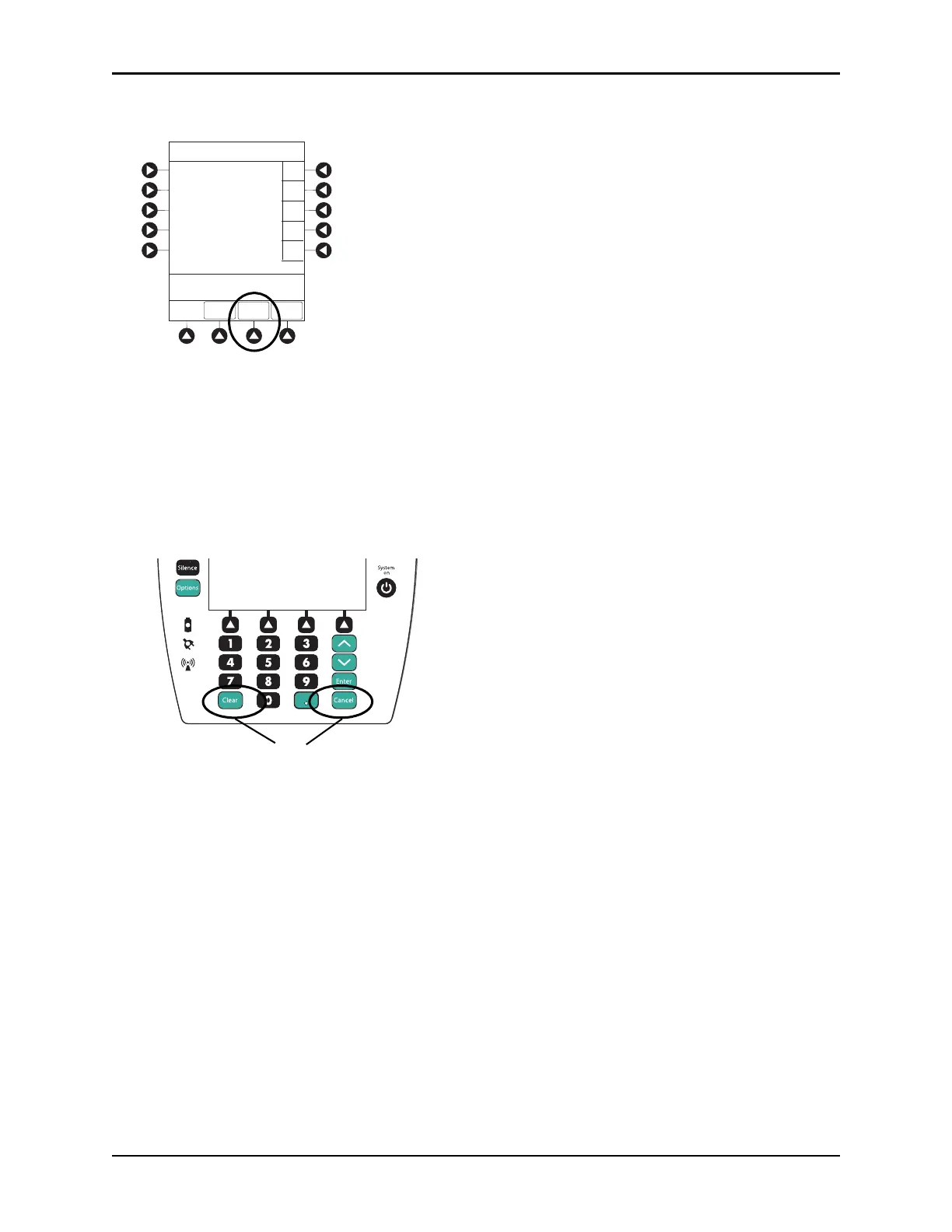
4. To verify correct entry, press the CONFIRM soft key.
Modifying Patient ID
1. Press the OPTIONS key.
2. Press the
Patient ID soft key.
3. To clear the entire entry, press the
CLEAR key.
or
To back up a single character at a time, pre
ss the CANCEL key.
4. To enter modified patient identifier, use numeric data entry keys and/or alpha speed keys.
• An alphanumeric identifier, of up to
16 characters, can be entered.
• Press soft key next to a letter group to list letters in that group. Press soft key next to an individual
letter to enter that letter.
•
To access letter “Z” and special characters (hyphen, underscore, s
pace), press the PAGE DOWN soft
key.
EXIT
A
B
C
D
PAGE
DOWN
>Enter Patient ID and Press
CONFIRM
E
K-O
F-J
P-T
U-Y
A-E
Patient ID Entry
123456789CD_ _ _ _ _
CONFIRM
Options
Silence
Clear Cancel
Enter
System
on
OR



 To Next Page