Chapter 7—Alaris™ Auto-ID Module Model 8600
318 BD Alaris
TM
System with Guardrails
TM
Suite MX User Manual
Operating Features, Controls and Indicators
Configurable Settings
See BD Alaris™ PCU Model 8015 and Alaris™ PCU Model 8015 on page 15 for system configurable
settings.
If the configuration settings need to be changed from the Factory
default settings, refer to the applicable
technica
l service manual or contact CareFusion technical support, for technical, troubleshooting, and
preventive maintenance information.
With the profiles feature enabled, the settings are configured independently for each profile. A
hospital-defined, best-practice data set must be uploaded to enable the profiles feature. Date and time is a
system setting and is the same in all profiles.
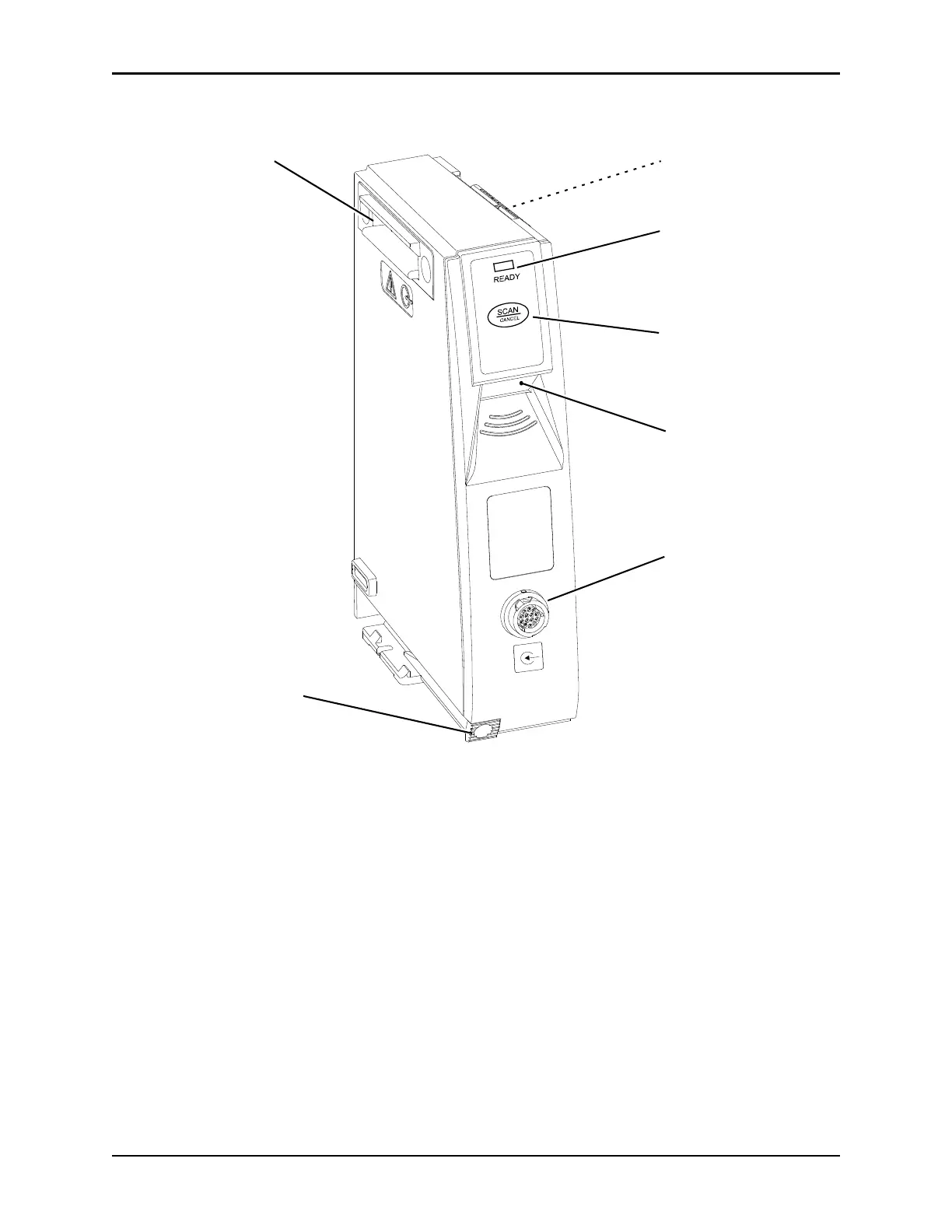
READY Indicator: Green LED
illuminates to provide visual
confirmation that auto-ID module or
auto-ID handheld scanner is ready
to scan
SCAN/CANCEL Key: When
initially pressed, scanning is
initiated by embedded scanner.
Subsequent press cancels scan.
Auto-ID Handheld
Scanner Connection Port
Module Release Latch:
When pressed, allows auto-id
module to be removed.
Image Scanning Window
IUI Connector, Left IUI Connector, Right
(not visible)



 To Next Page