Chapter 5—Alaris™ SpO
2
Module Models 8210 and 8220
262 BD Alaris
TM
System with Guardrails
TM
Suite MX User Manual
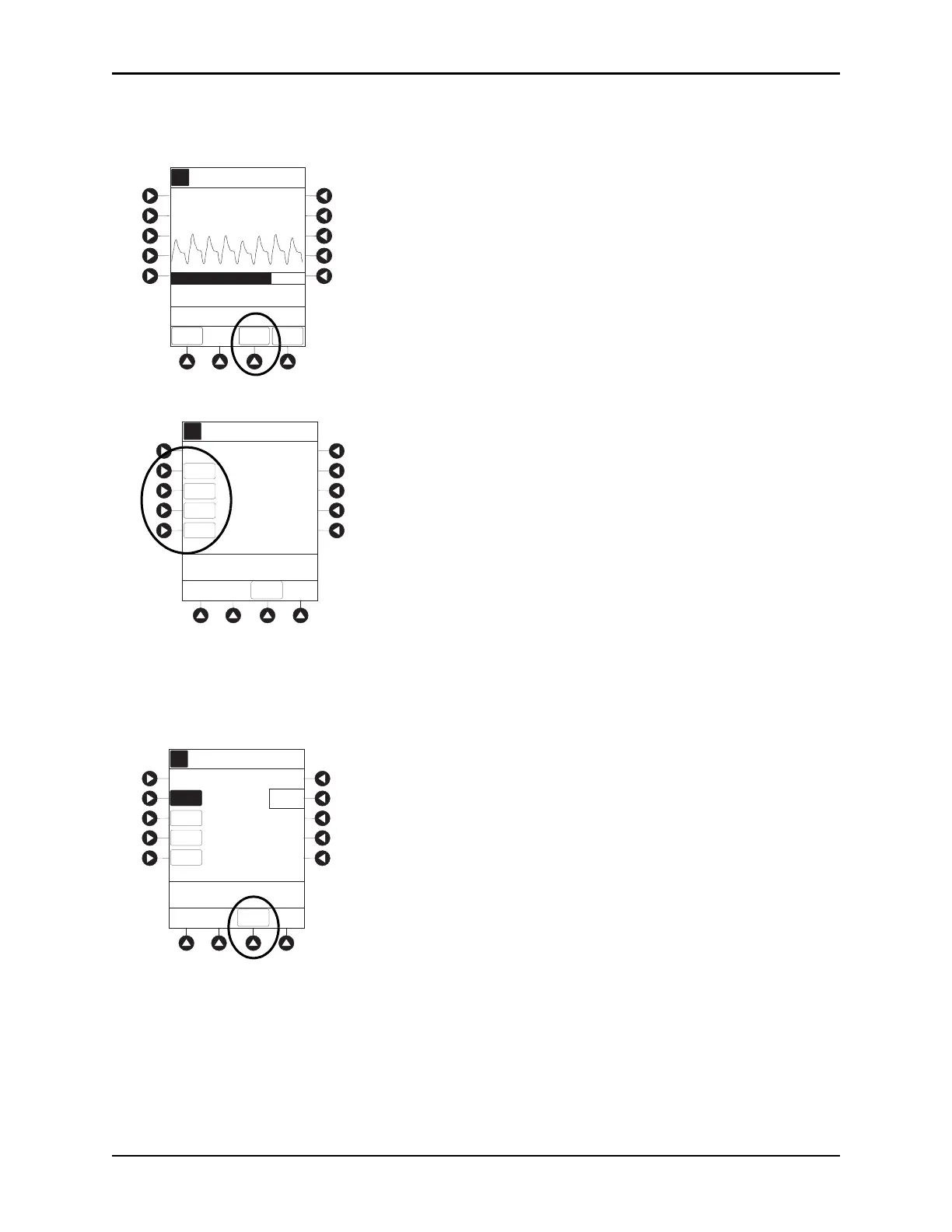
Setting Alarm Limits
1. Press LIMITS soft key.
2. To change a limit setting, press soft key next to applicable parameter.
3. Enter a numeric value for selected alarm limit.
%SPO2 HIGH limit can be Off or a numeric value.
4. To move to next limit, press
ENTER key.
5. To confirm alarm settings and return to
SPO2 Main display, press CONFIRM soft key.
6. To return to Main Display, press MAIN SCREEN soft key.
A
Adult
Mode
82
% SPO2
97
Off
150
90
50
LIMITS
TREND
MAIN
SCREEN
PULSE
RATE
SPO2 Main
SatSeconds (% to Alarm)
0
100
>Press ENTER to Retain
Current View
A
%SPO2
HIGH
%SPO2
LOW
Off
90
150
50
>Select Parameter Limit
PULSE
HIGH
PULSE
LOW
CONFIRM
Adult Alarm Limits
A
A
%SPO2
HIGH
%SPO2
LOW
>Press CONFIRM to
Apply Changes
_98
90
150
50
Off
PULSE
HIGH
PULSE
LOW
Adult Alarm Limits
CONFIRM



 To Next Page