Appendix A—Troubleshooting and Maintenance
330 BD Alaris
TM
System with Guardrails
TM
Suite MX User Manual
Sound Pressure Level Ranges for Alarm Signals
Infusion Alarms:
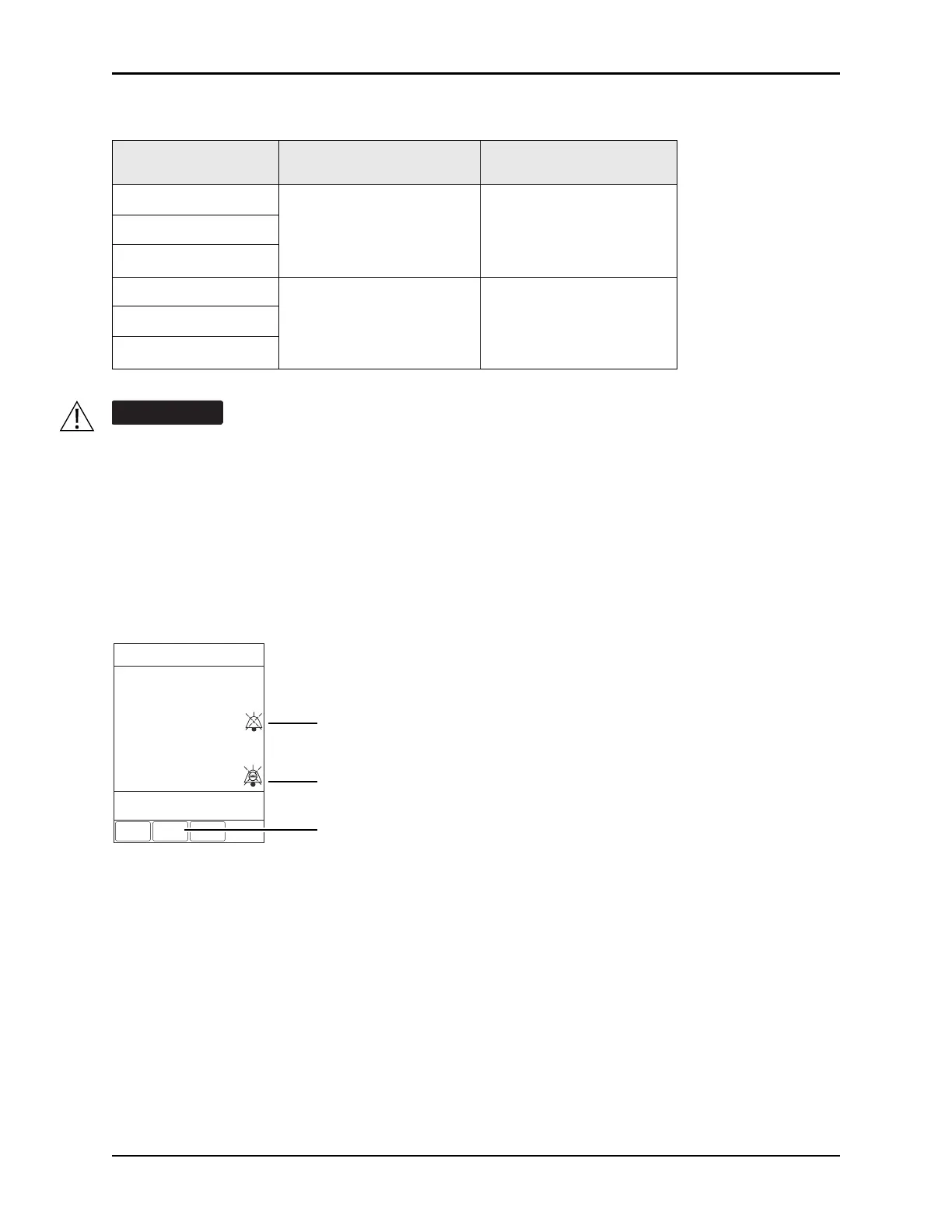
Infusion alarms can be silenced for 120 seconds by pressing the SILENCE key. Subsequent infusion alarms
are not silenced during this period. Visual alarm indicators remain on and an infusion alarm silence icon is
displayed on the PCU screen in the lower right corner. Silence period can be ended by pressing
CANCEL
SILENCE
soft key. If the alarm condition still exists, the audible alarm tone will return.
Monitoring Alarms:
Monitoring alarms may be presilenced, or silenced in response to a monitoring alarm condition. All
monitoring alarms are silenced for 120 seconds (subsequent infusion alarms are not silenced during this
period). Alarm indicators remain on and a monitoring alarm silence icon is displayed. Silence period can
be ended by pressing
CANCEL SILENCE soft key.
Alarm
Volume 5 (Max)
Average SPL (dBA)
Volume 1 (Min)
Average SPL (dBA)
HIGH - Malfunction
68
60
HIGH - Monitoring
HIGH - Infusion
MED - Monitoring
68
55
MED - Infusion
LOW - Infusion/PCU
Profile 4 audio setting supports standards compliance. Setting the alarm audio profile to Profile 4
could potentially result in the system alarms sounding similar to other medical devices, such as
respirators and monitoring services that are compliant with the same safety standards.
A
VOLUME
INFUSED
AUDIO
ADJUST
Midtown Hospital
Med Surg
ALARM
B
C
SP02
KVO
Patinet ID:
234567891EF
CANCEL
SILENCE
Infusion Alarm Silence symbol
Monitoring Alarm Silence or
Presilence symbol
CANCEL SILENCE soft key


 To Next Page