Getting Started
ClareVision Plus Network Video Recorder User Manual 31
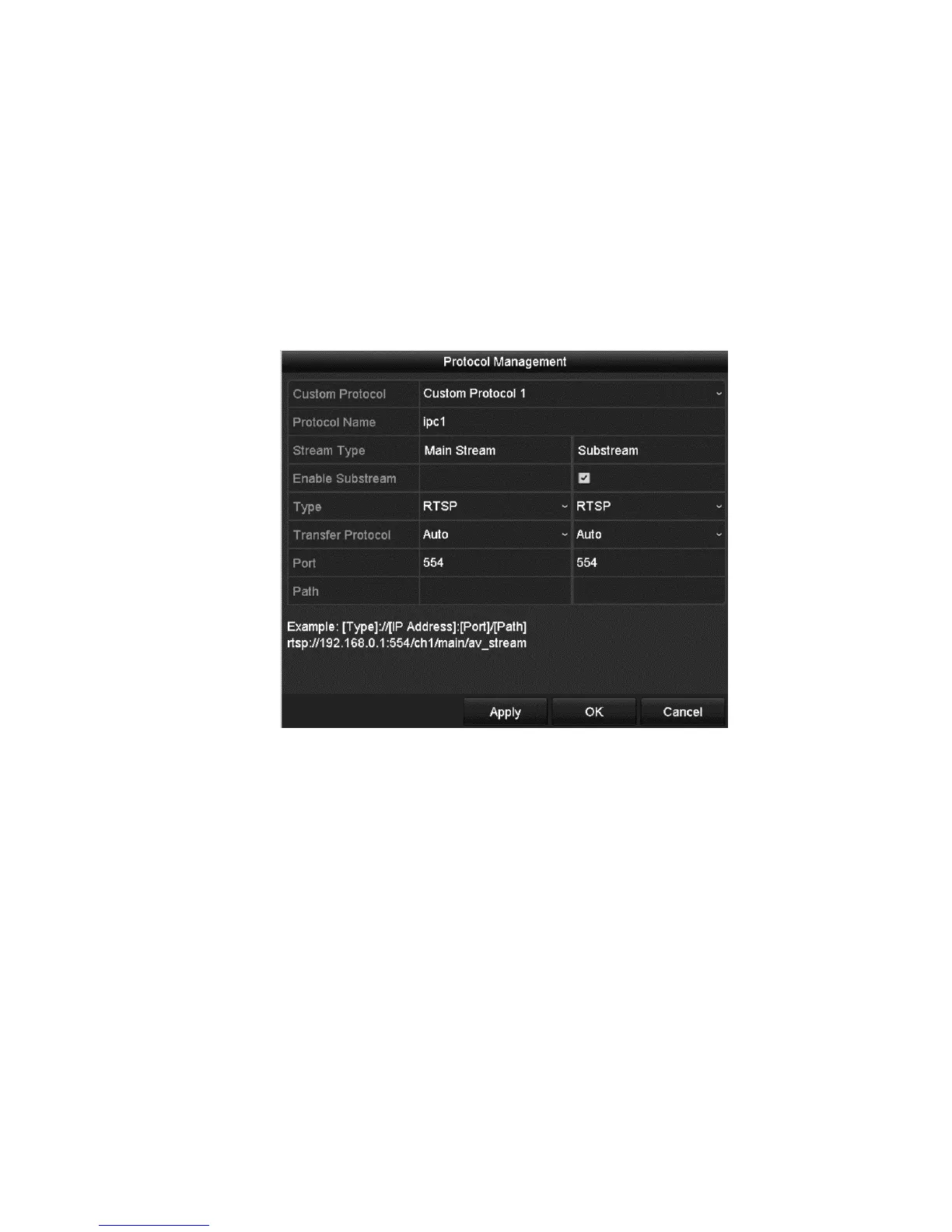
Configuring the customized protocols
When connecting network cameras that are not configured with the standard
protocols, configure customized protocols.
To configure customized protocols:
1. Click Protocol in the Add IP Camera (Custom) interface to enter the Protocol
Management interface.
There are sixteen customized protocols provided in the system. You can edit
the protocol name and choose whether to enable the sub-stream.
2. Choose the protocol type, and then select the transfer protocols.
Before customizing the camera’s protocol, you must contact the camera’s
manufacturer to consult the URL (uniform resource locator) for the main and
sub streams.
URL format: [Type]://[IP Address of the network camera]:[Port]/[Path].
Example: rtsp://192.168.1.55:554/ch1/main/av_stream.
Protocol Name: Edit the name for the custom protocol.
Enable Substream: If the network camera does not support sub-stream or
the sub-stream is not needed leave the checkbox empty.
Type: The network camera receiving the custom protocol must support
stream acceptance through standard RTSP.
Transfer Protocol: Select the transfer protocol for the custom protocol.
Port: Set the port No. for the custom protocol.



 To Next Page